



Arc Browser – a different web browser focused on workflow
Arc Browser is a modern and visually distinctive browser that challenges the classic way we use Chrome, Edge, and Firefox. Instead of tabs at the top, Arc uses a left sidebar, workspaces (Spaces), and smart shortcuts designed for power users, creatives, and anyone who spends most of their workday in the browser.
We tested Arc Browser on a standard Windows 11 PC, and within the first few days it was clear that Arc isn’t trying to be “just another browser” — it wants to change how you work online.
Interface and workflow
One of the first things you notice about Arc Browser is its dramatically different interface. Tabs aren’t arranged horizontally at the top but vertically on the left. It sounds like a small change, but in practice it makes a big difference when you’re working with lots of open pages.
During our test we found that:
- It’s easier to keep track of many open projects
- Temporary tabs automatically disappear again
- The browser feels more like a work tool than a “consumption window”
Arc also introduces “Spaces,” which act as separate work areas. One Space can be for work, another for personal use, and a third for research — without mixing tabs, cookies, or your overview.
Features that set Arc apart from Chrome and Edge

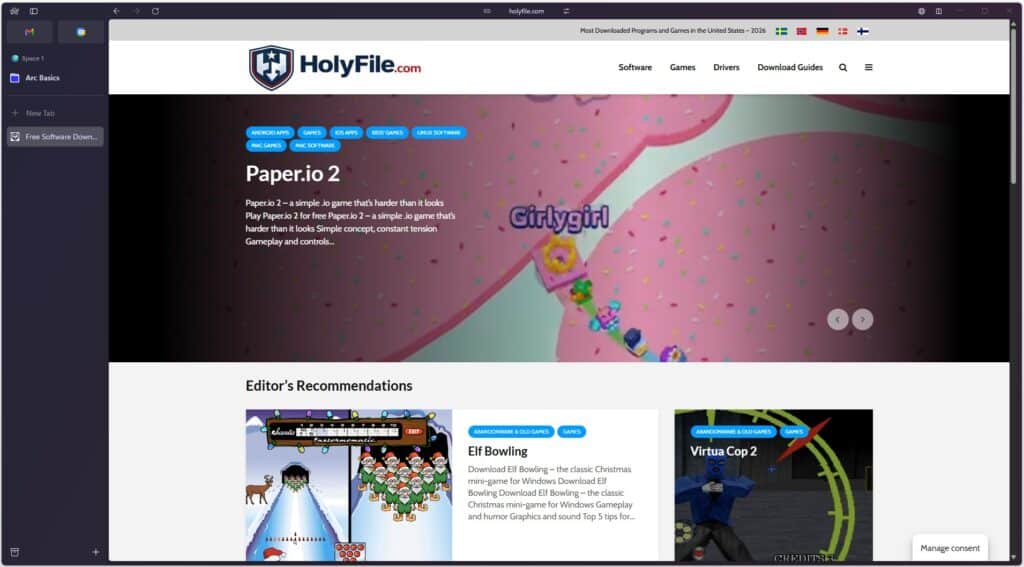
Arc Browser is built on Chromium, which means top-notch compatibility with websites and Chrome extensions. Even so, Arc feels very different from Google Chrome in daily use.
Some of the features that impressed us most during testing:
- Automatic archiving of tabs you don’t use
- Built-in split view so you can see two pages side by side
- Smart shortcuts and keyboard-driven navigation
- The ability to pin important pages permanently
Arc generally feels fast and responsive, and we encountered no stability issues during normal use.
Arc Browser in practice – who is it for?
Arc Browser isn’t necessarily the best browser for everyone. If you mainly use your browser to quickly check news, email, and social media, Arc can feel unnecessarily advanced.
On the other hand, Arc is especially well suited for:
- Students juggling lots of sources
- Web developers and designers
- Content creators and SEO work
- People who manage project-based work in the browser
In a U.S. context, Arc makes the most sense for users already comfortable with tools like Notion, Figma, or VS Code.
Performance, privacy, and security
Arc Browser is built on Chromium and therefore inherits both its strengths and weaknesses. Performance is strong and pages load quickly. Resource usage felt slightly lower than Chrome in our testing, but still higher than, for example, Firefox.
On privacy, Arc sits somewhere in the middle. It doesn’t emphasize privacy as much as Brave or Firefox, but it’s also not as data-hungry as Chrome.
Top 5 tips for Arc Browser
Use Spaces from day one
Create separate Spaces for work, personal, and projects — they really start to make sense when you use them consistently.
Learn the keyboard shortcuts
Arc is built for keyboard use. Once the shortcuts are muscle memory, you’ll work significantly faster.
Use split view for research
Split view is brilliant for comparison, research, and writing.
Only pin what matters
Too many pinned tabs ruin your overview. Be selective.
Give yourself an adjustment period
Arc takes a little getting used to — but the payoff comes after a few days of use.