


Decode Morse code directly from audio with CwGet
CwGet is a specialized application used to decode Morse code (CW – Continuous Wave) through your computer’s sound card. It’s especially popular among amateur radio operators and enthusiasts who work with shortwave, HAM radio, and classic Morse communications.
Instead of decoding dots and dashes manually, CwGet listens directly to the audio signal and converts Morse code into readable text in real time.
How CwGet works in practice
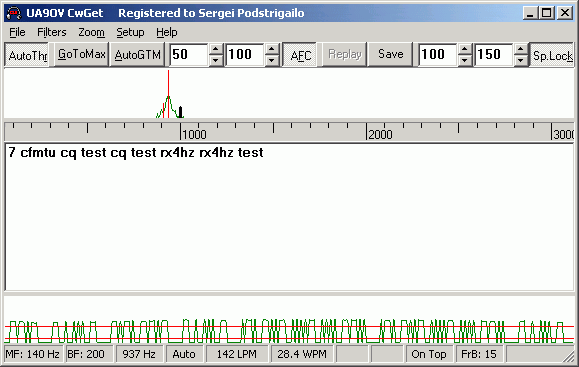
CwGet uses your computer’s sound card as input and analyzes the signal from, for example, a radio, a recording, or an SDR device. In our test, setup worked smoothly on a standard Windows PC, where the program quickly locked onto the signal and began decoding CW with surprisingly high accuracy.
The program is particularly well-suited to weak signals where manual decoding can be difficult.
Built-in narrow-band DSP filter
Beyond Morse decoding itself, CwGet also functions as a narrow-band DSP filter. That means the program can suppress noise and focus on very narrow frequency ranges—a big advantage when you’re working with weak or noisy CW signals.
In practice, that makes CwGet useful both as a decoder and as a technical utility in more advanced radio setups.
Who is CwGet best suited for?
CwGet isn’t aimed at the average PC user; it serves a precise niche:
- Amateur radio operators (HAM)
- CW and Morse enthusiasts
- Shortwave and SDR radio users
- Technically inclined users focused on signal processing
If you actively work with Morse code, CwGet is one of the classic tools still widely used today.