


Easy Cut Studio makes cutting much easier
Easy Cut Studio is a design and cutting application for anyone working with vinyl, paper, signs, decorations, text, logos, or creative craft projects.
The software is especially relevant if you have a vinyl cutter or cutting plotter and want to draw, edit, and prepare artwork directly on your computer before sending it to the machine. We tested Easy Cut Studio on a Windows 11 PC, and it quickly felt built for practical work rather than flashy software with too many unnecessary menus.
It’s not the most modern-looking design app, but it has one big advantage: it’s reasonably easy to understand what to do. You import or draw your design, adjust shapes, text, and placement, then send the project to your cutting machine.
Design shapes, text, and signs right in the app
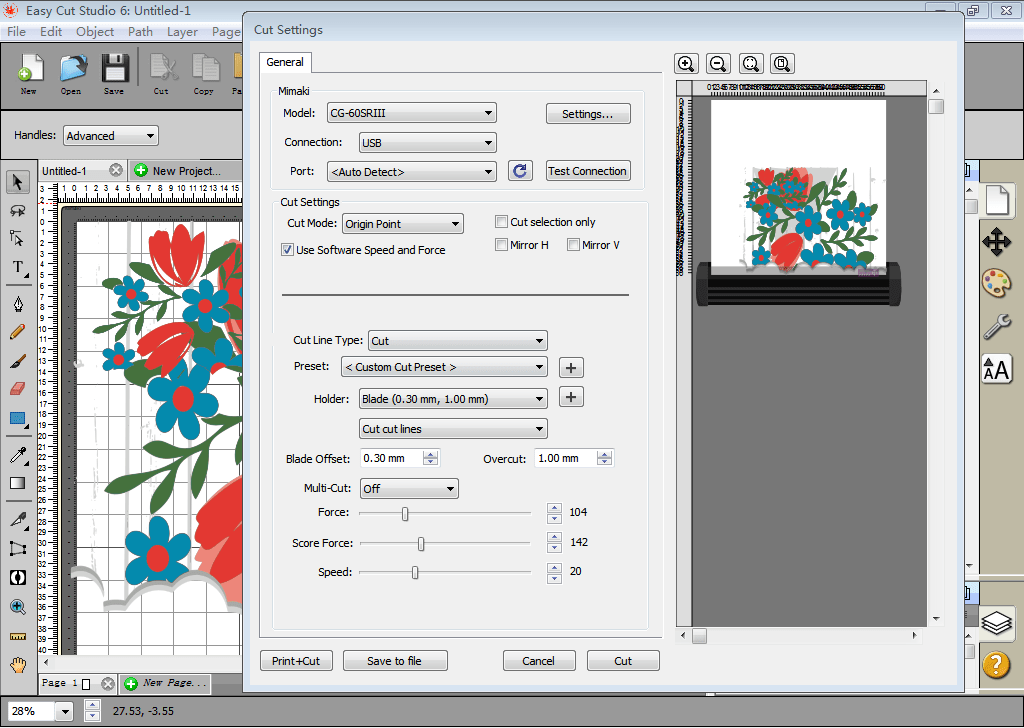
Easy Cut Studio includes a range of tools to draw, edit, and adapt shapes. That means you don’t necessarily need to start in another design program if you just need a simple sign, text, logo, decoration, or a pattern for hobby use.
In our testing, the software worked best for projects where the artwork was already fairly clear: text cuts, simple shapes, labels, stickers, and decorative elements. The workflow is straightforward. You can quickly resize, move elements around, and get the project ready for cutting.
For more advanced graphic design, many will still prefer tools like Adobe Illustrator, CorelDRAW, or Inkscape first. Easy Cut Studio is more interesting as the bridge between your design and the actual cutting process.
Supports many popular cutting machines
One of Easy Cut Studio’s biggest strengths is its broad machine support. It works with many different vinyl cutters and plotters, including brands like Roland, GCC, USCutter, Vinyl Express, Silhouette, Graphtec, Mimaki, and more.
That makes it practical for hobbyists, small businesses, sign shops, and creative studios where you may not always use the newest hardware. It’s also helpful if you’ve bought a used cutter and need software that can still drive the machine.
Be aware that you should always double-check compatibility on the vendor’s official list before spending time on setup—especially if you have an older or lesser-known model.
Free trial — but not completely free software
Easy Cut Studio can be downloaded as a free trial, but it’s important to understand that the full version is paid software. The official demo is time-limited, and the developer notes that the trial may place demo markings in your cuts.
That’s fair for paid software, but it should be stated clearly so users don’t expect a fully free alternative. If you only need it once, the trial may be enough to test the features. If you plan to use it regularly for crafts, retail, sign production, or creative projects, expect to purchase a license.
Great for hobby, vinyl, and small runs
Easy Cut Studio is best for users who want a direct, straightforward cutting solution. That covers everything from homemade wall decals and paper decorations to shop signs, text vinyl, labels, scrapbooking, and small metal or foil projects.
We especially like that the app doesn’t try to be everything at once. It’s about getting your artwork ready and cut. On the other hand, the interface could feel more modern and polished when working on details. It’s functional rather than elegant.
Safe download of Easy Cut Studio
The best and safest way to get Easy Cut Studio is from the developer’s official download page. That helps you avoid outdated installers, unwanted extra programs, or third-party downloads that may be repackaged.
Top 5 tips for Easy Cut Studio
Start with a simple shape
Make a small test cut with a circle, star, or short text before sending a big project to the machine. It saves both material and frustration.
Keep text and graphics separate
If you’re working on signs or stickers, it’s smart to keep text, shapes, and background elements separate until you’re fully happy with the layout.
Verify compatibility before you buy
Easy Cut Studio supports many cutters, but always double-check your exact model on the developer’s list before purchasing a license.
Save your project before resizing
It sounds basic, but it’s easy to break proportions. Save a copy before experimenting with scaling, mirroring, and cropping.
Use the demo to test your workflow
The trial is best for seeing if the app fits how you work. Test import, editing, and machine setup before you decide on a full license.
A solid tool for creative cutting
Easy Cut Studio is a great choice if you want a fokuseret program til design og udskæring without having to go through an overly heavy graphics suite. It’s especially strong for vinyl, signs, paper projects, stickers, text cuts, and hobby production.
The interface could use a modernization, and the free version should be seen more as a demo than a full free program. But the core functionality is strong, and the wide machine support makes it more relevant than many small niche tools in the same category.