


My Family Tree – Create a unique digital family tree for your family.
Download My Family Tree for free here, and explore new ways to dive into your genealogy. Genealogy is a popular hobby today thanks to accessible tools like My Family Tree, which make it easy to discover and document your family history.
Why choose My Family Tree?
My Family Tree is an intuitive program that helps you build a detailed digital family tree you can save, share, and expand. It doesn’t just let you record basic information like names, birth dates, and relationships—it also gives you space to bring your relatives to life with unique details and stories.

Features of My Family Tree
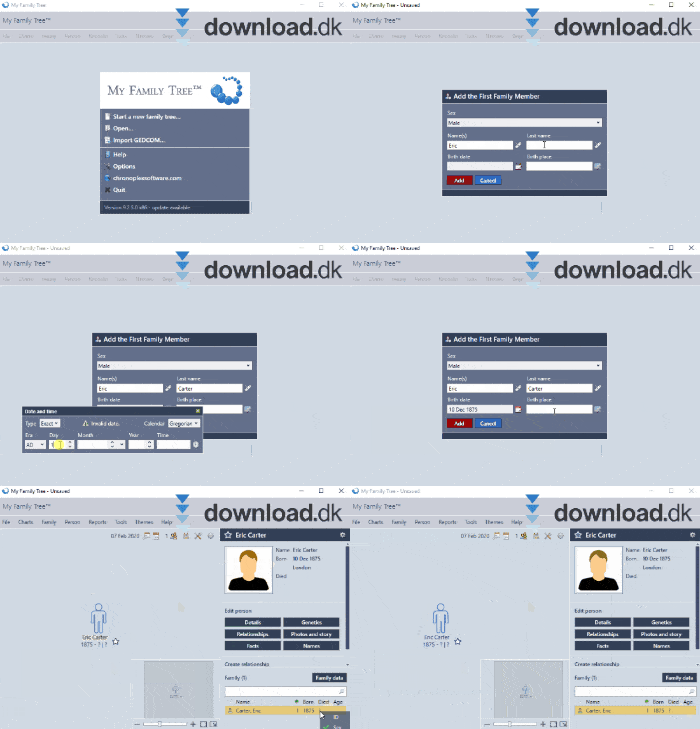
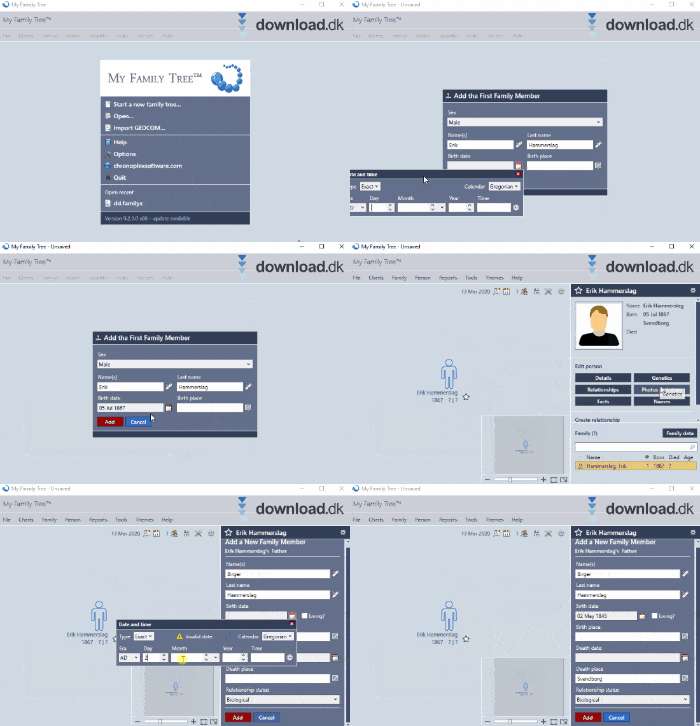
1. Build a family tree with personality
With this program, you can add much more than just names and dates. You can:
- Create detailed profiles with information about achievements, dreams, and life stories.
- Upload photos and add details like height, weight, and eye color.
- Include notes and personal memories that make the family tree unique and alive.
2. User-friendly design
Even though the design isn’t the most modern, it’s practical and easy to navigate.
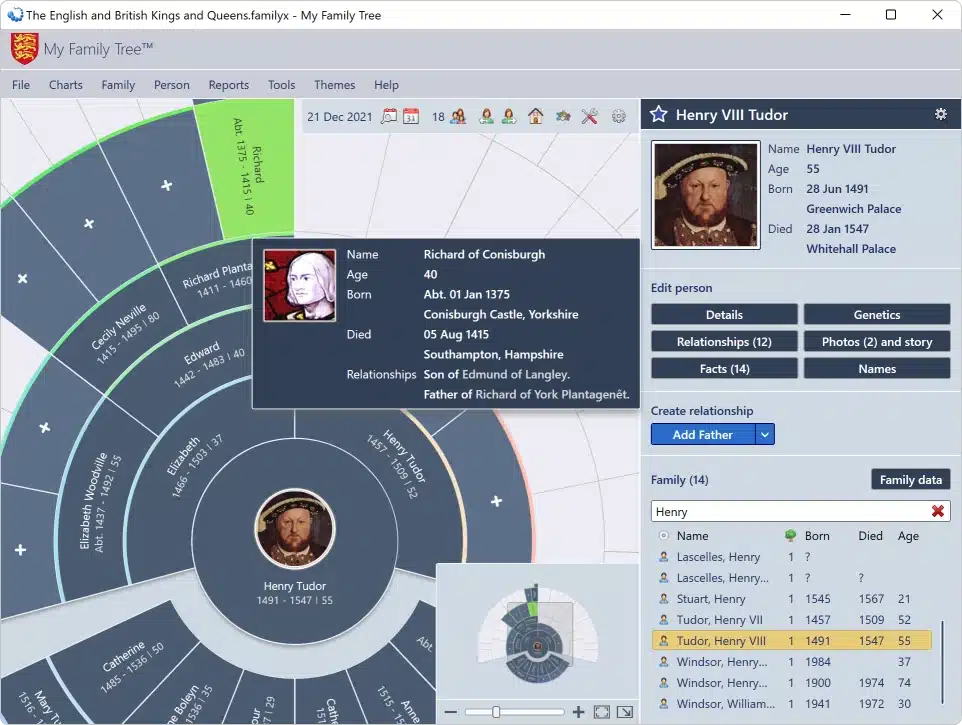
- Toolbar at the top: Quick access to tools and features.
- Illustrated family tree in the center: Get a visual overview of your family.
- Detailed menu on the right: Add and edit information for each family member.
3. Share and preserve your family history
Your family tree can be saved digitally, making it easy to share with other family members or continue your work later. This helps ensure your family’s stories are preserved for future generations.

Why is genealogy important?
Genealogy is not just a hobby—it’s also a way to honor and understand our roots. With this program, you can ensure that both past and present family members are remembered. The software makes it possible to document the stories that make your family unique and pass them on to future generations.
Family tree with memories and personality
This program is the ideal tool for both beginners and experienced genealogists. It lets you create a family tree that’s not just names and dates, but memories and personality. With its user-friendliness and unique features, it’s a program we highly recommend to anyone interested in family history.
Top 5 tips for My Family Tree
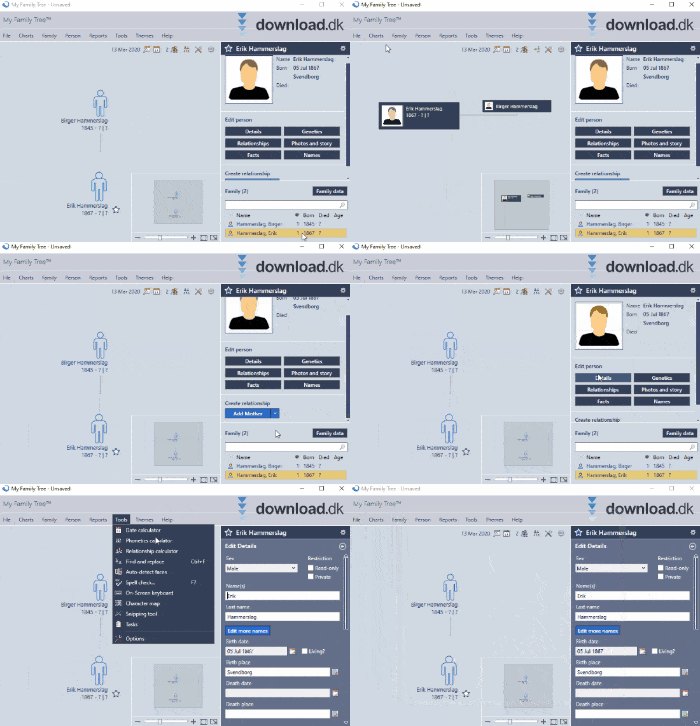
Focus first on parents, grandparents, and siblings. It makes it easier to expand your tree logically and clearly.
Bring the tree to life by adding photos and notes about life events—giving your descendants a richer story.
Save your work regularly and use My Family Tree’s backup feature to avoid data loss from crashes or errors.
Color-code branches or generations—it makes navigating large family trees much easier.
Export the tree as a file and share it with relatives. Extra eyes can help fill in missing details.
Questions and answers about My Family Tree
It’s a free program that helps you create and maintain a digital family tree. You can add detailed information, photos, and personal stories about your relatives.
Yes, it’s completely free to download and use. There are no hidden fees or payment requirements.
The program lets you:
- Create a visual family tree.
- Add details like birth dates, gender, and relationships.
- Upload photos and include personal stories about family members.
- Save and share your tree digitally.
Yes, My Family Tree lets you add unique details such as achievements, dreams, notes, eye color, and much more—so relatives become more than just names and dates.
No, My Family Tree is designed with usability in mind. Its simple, clear interface makes it easy for both beginners and experienced genealogists to navigate and work with.
Yes, you can save your tree digitally and share it with other family members so they can view or contribute to your family history.
The program requires minimal system resources and runs on most modern computers without issues. It works on Windows operating systems.
Yes, you can add new family members and update information whenever necessary. Your tree can be easily edited and saved as you go.
No, My Family Tree is free from annoying ads and pop-ups, making for a smooth experience.
You can easily download the program for free via the link on this page. Just follow the installation guide and you’re ready to begin your genealogy.