



Open WebUI download – local AI on your terms
Open WebUI is a free, open-source AI platform that makes it much easier to run local AI, connect Ollama, use cloud models, and manage everything in one unified interface.
We tested Open WebUI on a Windows 11 PC with a focus on what many people want right now: a more flexible way to use local AI than just a simple chat window. First impressions were clear. Open WebUI feels less like “yet another AI app” and more like a small control room where you can bring models, tools, documents, and workflows together in one place.
If you’ve already explored Ollama, LM Studio, or other local AI options, Open WebUI is a very compelling next step.
What is Open WebUI?

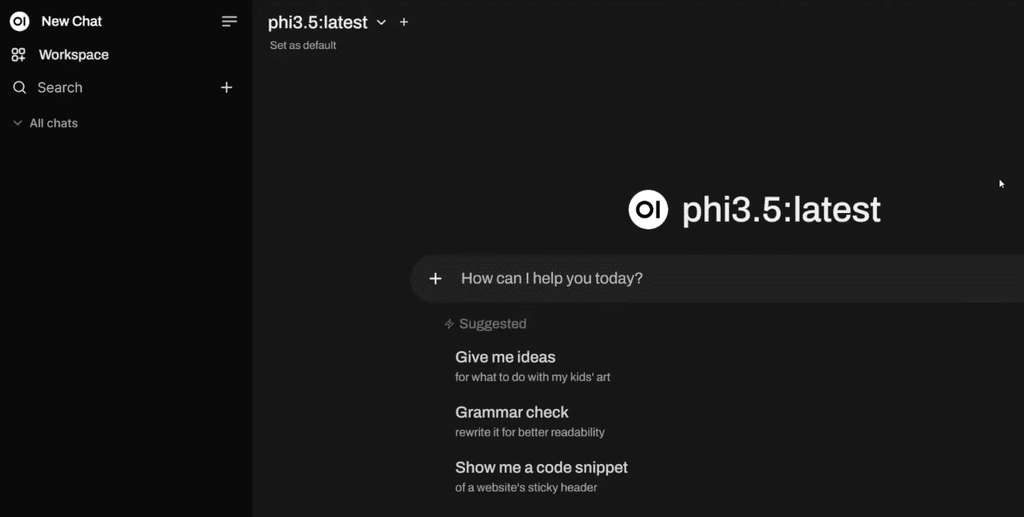
Open WebUI is a self-hosted AI platform that can connect to both local models and cloud-based models. The key is you’re not locked into a single provider. You can connect:
- Ollama
- OpenAI-compatible APIs
- other model providers and servers
- local models on your own machine
In practice, that means you can use Open WebUI as the place where you manage your entire AI setup. For some, it becomes a kind of local ChatGPT. For others, it’s a more advanced workspace for documents, RAG, plugins and tools.
It’s especially relevant in the United States right now, as more people want to use AI without sending all their data straight into a closed cloud.
Open WebUI download for Windows, Mac, and Linux
One thing we really liked in testing is that Open WebUI no longer feels like it’s only for people who love the terminal.
There’s now a desktop app for Windows, macOS, and Linux, so you can get started faster without diving into Docker on day one. That makes Open WebUI far more relevant for everyday users.
It’s worth noting that the desktop version is still in an early alpha phase. That doesn’t make it unusable—far from it—but expect occasional quirks or rapid changes from version to version.
If you want the most robust setup—especially for more serious use—Docker or a Python install is still the most “production-ready” choice.
Open WebUI with Ollama – this is where it gets really fun
Open WebUI makes even more sense if you already use—or are considering—Ollama.
While Ollama excels at fetching and running local models, Open WebUI provides a more user-friendly front end on top. That makes a big difference in practice. Instead of jumping between the terminal, random scripts, and partial solutions, you get a clean, capable interface where you can:
- choose models
- manage conversations
- work with files and knowledge bases
- use tools and extensions
- combine local AI with cloud AI
In our tests, this is exactly where Open WebUI stood out. If LM Studio often feels like a great beginner-friendly app for local chat, Open WebUI feels more like a place you can grow into.
Features that make Open WebUI stand out
Open WebUI isn’t just “an AI chat.” The platform already includes several features that make it far more interesting than many other free options.
1. Local and cloud AI in one solution
You can use local models and connect cloud services at the same time. That makes Open WebUI flexible—great when you want privacy and the option to tap into stronger models when needed.
2. Offline-first and better data control
Running local models on your own machine gives you much better control of your data. That’s a big plus for individuals, students, and small businesses.
3. Plugins, tools, and extensions
Open WebUI clearly aims to be more than just an AI chat. You can work with tools, features, and community extensions, which helps future-proof the platform.
4. RAG and working with documents
If you want to use AI with your own documents or build a knowledge base, Open WebUI is compelling. This type of feature often makes the difference between a “fun demo” and a real productivity tool.
5. Desktop app and easier onboarding
It’s a big win that new users can now start more easily. Open WebUI still isn’t the simplest AI app on the market, but it has become significantly more accessible.
Open WebUI vs LM Studio and Ollama
The short version:
- Ollama is great at fetching and running models
- LM Studio is excellent for beginners who just want to get a local chat running fast
- Open WebUI is best when you want a more complete platform around your AI workflow
If you just want to try a local model in five minutes, LM Studio is still easier for many.
If you want a more flexible setup—working across multiple models, documents, extensions, and with better data control—then Open WebUI is the stronger long-term choice.
That’s exactly why the app is so interesting right now. It fits users who are moving from “I want to try local AI” to “I actually want to use this every day.”
Performance, system requirements, and what to know
Open WebUI itself isn’t particularly heavy, but local models can be.
The important thing to understand is that Open WebUI doesn’t make hardware needs disappear. If you want to run local models, your computer still has to be up to the task. A lightweight machine can absolutely use Open WebUI as an interface and connect to an external server or cloud model. But if you want to run larger models locally, you’ll typically need more RAM.
As a rule of thumb, Open WebUI is much more exciting if you have a reasonably modern PC or Mac. On older machines, it often makes more sense to start small or connect remotely to a model server.
Is Open WebUI safe?
Open WebUI is compelling for users who value control and privacy. The whole idea is that you can run AI on your own terms.
It’s important to distinguish between the platform and how you use it. If you run local models and keep your setup on your own machine, you generally have high control. Once you connect external services, cloud models, or open tools, your security naturally depends on those choices as well.
We’d call Open WebUI a strong option for private, controlled AI use, but not a magic shortcut that replaces good judgment.
Why Open WebUI is worth downloading
Open WebUI nails something many AI apps still struggle with: it feels both ambitious and genuinely usable.
It’s not the simplest solution for everyone. Total beginners may still find LM Studio more straightforward for the first 10 minutes. But Open WebUI has a higher ceiling and gives you more to work with once you get going.
For us, it’s the kind of software worth following closely because it’s evolving fast and solves a growing need: using AI more freely, more privately, and more flexibly.
Top 5 tips for Open WebUI
1Start with Ollama if you want the simple path
If you’re new to local AI, pairing Open WebUI with Ollama is a great place to begin. Ollama handles models in the background while Open WebUI gives you a cleaner, more approachable interface.
2Begin with a smaller AI model
It’s tempting to grab a huge model right away, but we recommend starting smaller. You’ll get faster replies, use less RAM, and it’s easier to gauge what your computer can handle before moving up to heavier models.
3Keep local and cloud models organized
Open WebUI can unify both local AI and cloud services. Give your models clear names and keep some structure from the start. It quickly gets hard to remember which model runs locally and which sends requests to an external service.
4Leverage your own documents and knowledge
One of the more interesting features is working with your own documents and knowledge bases. That makes Open WebUI far more useful than a basic AI chat—especially for searching notes, manuals, reports, and other materials.
5Treat the desktop app as the easiest way in
If you’d rather avoid Docker and terminal commands, the desktop version is worth a try. It’s still early in development, so don’t be surprised by minor hiccups—but for typical Windows, Mac, and Linux users it makes getting started much easier.
Open WebUI FAQ
FAQ Is Open WebUI free?
Yes. Open WebUI is free and open source, so you can install and use it without a standard subscription. Any external AI services you connect to Open WebUI may have their own pricing.
FAQ Can I use Open WebUI on Windows?
Yes. Open WebUI works on Windows 10 and newer. There’s also a desktop app that makes installation easier if you don’t want to set up Docker or Python manually.
FAQ Does Open WebUI work with Ollama?
Yes—and in our view, it’s one of the best ways to use it. Ollama can run AI models locally while Open WebUI serves as a more complete, user-friendly front end.
FAQ Is Open WebUI better than LM Studio?
It depends on your needs. LM Studio is very easy if you mainly want to download a model and chat locally. Open WebUI, on the other hand, offers more options for models, documents, tools, servers, and advanced workflows.
FAQ Can Open WebUI run fully offline?
Yes. If you use a local model and have the required files installed, Open WebUI can run without sending your conversations to an external AI service. The desktop app needs internet for the initial setup.
FAQ How much RAM does Open WebUI require?
The interface itself isn’t the issue—it’s the local AI models that need memory. For local model inference, 16 GB RAM is a sensible baseline, while 32 GB or more gives you much more freedom for larger models.
FAQ Is Open WebUI safe to use?
Open WebUI enables private AI use because models and chats can run on your own computer or server. Security also depends on the models, plugins, APIs, and external services you choose to connect.
FAQ Do I need Docker for Open WebUI?
No. Docker is still a popular way to install Open WebUI, but you can also use a Python install or the newer desktop app for Windows, macOS, and Linux.