


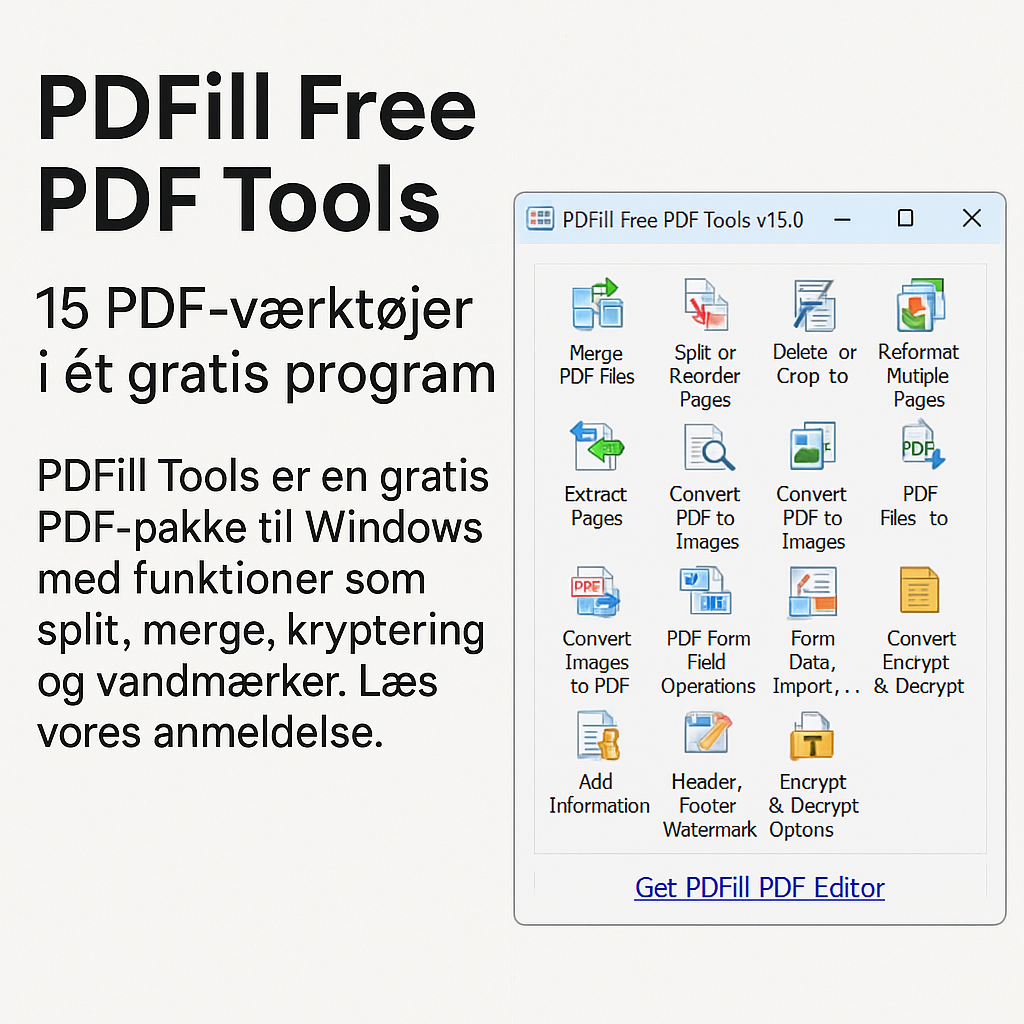
PDFill Free PDF Tools – 15 PDF tools in one free package.
PDFill Free PDF Tools isn’t a design showpiece, but it’s one of the most complete free PDF toolkits on the market. The program brings together no fewer than 15 different PDF utilities in a simple interface—perfect if you don’t need content editing but want full control over the structure and metadata of PDF documents.
Features and user experience
The program opens with a menu where you choose one of the 15 tools. There’s no advanced interface or live preview—but the features work. You get:
- Merge and split PDF files
- Reorder, rotate, and crop pages
- Add watermarks (text or image)
- Protect PDFs with passwords and encryption
- Remove security restrictions from locked PDFs
- Convert images (e.g., JPG) to PDF and back
- Add or remove metadata
- Create blank PDF pages and insert headers/footers
You’ll need a separate PDF viewer to see the results—for example, Adobe Reader or PDF-XChange Viewer.
Free vs. paid version
PDFill Free PDF Tools is completely free, with no ads or hidden features. PDFill also offers a PDF Editor and a PDF Writer that require payment—but this toolkit is fully functional without limitations.
Platforms and operating systems
PDFill Free PDF Tools is available for:
- Windows (XP, Vista, 7, 8, 10, 11)
- Desktop only—no Mac, Linux, or mobile versions
It requires Ghostscript (a free component), and PDFill will guide you through the installation.
Security and offline use
All features run locally on your PC. That makes the program ideal for working with confidential files, and you don’t need to be online to use it. Security is further enhanced by features like encryption and metadata removal.
Tips for using PDFill Free Tools
- Use “Rotate PDF Pages” to fix scans that are oriented incorrectly
- “Add Watermark” is perfect for adding a company name or “Confidential” to sensitive documents
- Use “Encrypt & Decrypt” to control who can open, print, or edit the file
- Use “Merge PDF Files” to combine multiple attachments into a single file
- Convert entire image folders into one PDF with “Convert Images to PDF”
Is PDFill worth it?
Absolutely—if you work with many documents and want batch-based processing and control, PDFill is an underrated alternative to pricier solutions. However, it requires a bit of technical understanding and patience with the user experience.
Download the latest version of PDFill Free Tools from the developer here