



Rank Math – WordPress SEO plugin focused on ease of use
Rank Math is a WordPress SEO plugin that has quickly become a serious competitor to Yoast SEO. While Yoast has long been the go-to choice among US webmasters, Rank Math is especially popular because it combines advanced features with an incredibly user-friendly setup — and most of it is completely free.
We tested Rank Math on several US-based WordPress sites — blogs, affiliate sites, and business websites — to see whether the plugin actually lives up to the hype.
Features in Rank Math


Easy setup with the wizard
We tested installing Rank Math on multiple US WordPress sites, and it literally took under five minutes. The setup wizard guided us step by step through everything important — from metadata and title structure to the sitemap. Even on an older site where we had previously used Yoast, Rank Math imported the settings without issues. It’s clear the plugin is designed so even beginners can get a professional setup quickly. For us, it provided peace of mind that we weren’t missing critical settings that could hurt SEO.
On-page SEO analysis
One feature we quickly grew to like was Rank Math’s built-in SEO analysis. Each post gets a score from 0–100 based on keywords, headings, internal links, alt text, and more. In practice, we found that small tweaks — like adding an internal link or shortening an alt text — could move the score significantly. On a travel article, for example, we went from 62 to 86, and within a couple of weeks we saw better visibility on long-tail searches like cheap flights to Spain and low-cost trip to Barcelona. The score isn’t a final verdict, but it’s a powerful checklist when you’re doing content optimization in WordPress.
Schema markup
Rank Math makes it unusually easy to implement schema markup. We especially tested FAQ and Product schema on US pages and saw how the content started appearing faster in Google’s “People also ask” and in rich results. Normally this requires code or extra plugins, but here it’s built directly into the editor. For us, the schema feature is one of Rank Math’s biggest gems because it unlocks rich snippets without extra hassle.
Integration with Google Search Console and Analytics

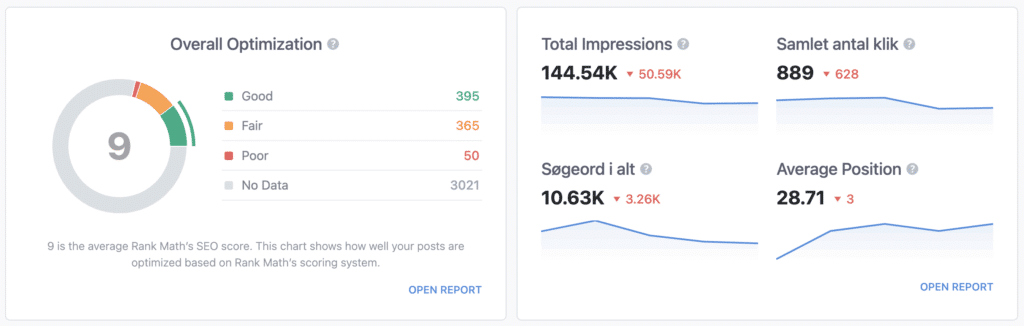
One of the features we appreciated most in our tests was the integration with Google Search Console and Google Analytics. When data is pulled directly into WordPress, you don’t have to jump back and forth between different dashboards. We could quickly spot keywords with low CTR and posts with lots of impressions but too few clicks. That made it much easier to prioritize which pages to optimize first.
Redirect manager
We stress-tested the redirect manager by changing the structure of several old blog posts. Rank Math handled both 301 and 302 redirects smoothly. That meant no visitors hit dead links, and we preserved link equity. It’s a feature that often requires premium tiers in other plugins, but here it’s included from the start. For us, that’s a huge plus because you don’t need a separate redirect plugin.
Local SEO and WooCommerce SEO
We also tried Rank Math on a couple of US business sites and a WooCommerce shop. The plugin lets you optimize for local results — for example by syncing with Google Business Profile. On web stores, you can add Product schema, which we tested on a US electronics shop. Products quickly gained better visibility in search results, including price and availability. For US businesses and online stores, this is one of the features that can really move rankings.
Our hands-on experience
We tested Rank Math on a typical US travel blog. Installation took under 10 minutes, and we could immediately import settings from Yoast without any issues. The plugin guided us to fix several small mistakes — like missing alt text and overly long title tags — that we might not have noticed ourselves.
On one of our test articles about “cheap flights to Spain,” the on-page score increased from 63 to 87 after adjustments. Shortly after, the article started getting more clicks in Google on long-tails like “cheap flights to Barcelona” and “low-cost trip to Spain”.
Rank Math vs. Yoast SEO
- Ease of use: Rank Math feels more modern and intuitive.
- Features: Many things that are premium in Yoast (e.g., redirect manager, more schema types) are free in Rank Math.
- Performance: Rank Math is lighter and doesn’t impact speed as much as Yoast.
- Support: Yoast still has a strong community and documentation, but Rank Math is growing fast.
Top 5 tips for Rank Math
Rank Math has a solid setup wizard, and it’s worth using instead of just activating the plugin and hoping for the best. Here you can choose your SEO type, connect key services, and get the fundamentals right from the start.
The SEO score in Rank Math isn’t a final answer, but it’s a great checklist. Use it to catch missing meta descriptions, weak keyword usage, poor headings, or posts that lack internal links.
Schema markup helps Google understand your content better. Rank Math makes it easy to select schema for articles, products, FAQs, and reviews. The key is to use it consistently and only choose schema that truly matches the content.
If you change URLs, delete old pages, or consolidate content, the redirect manager quickly becomes indispensable. It helps you avoid dead links and sends both users and Google to the right page.
When Rank Math is connected to Google Search Console and Analytics, you get better insights into impressions, clicks, and rankings. That makes it easier to improve existing content and find new keywords that are already showing potential.