Martin Jørgensen
Cursor AI – download the AI code editor for free
Cursor AI is an AI-powered code editor for Windows, Mac, and Linux that combines the familiar Visual Studio Code environment with advanced AI agents, code generation, and automation.
We tested Cursor on a Windows 11 PC, and one of the first things we noticed was how little adjustment is required if you’ve worked in VS Code before. The interface feels familiar, but the AI plays a much bigger role in your day-to-day workflow.
Cursor isn’t just another chatbot parked on the side of a code editor. The AI can read your project, understand relationships between files, suggest changes, fix errors, and—if you allow it—work more autonomously on larger tasks.
It’s also one of those products evolving at a breakneck pace. In 2026, Cursor shifted from being primarily a smart AI editor to increasingly serving as a platform for AI agents, cloud development, and automated programming.
What is Cursor AI?
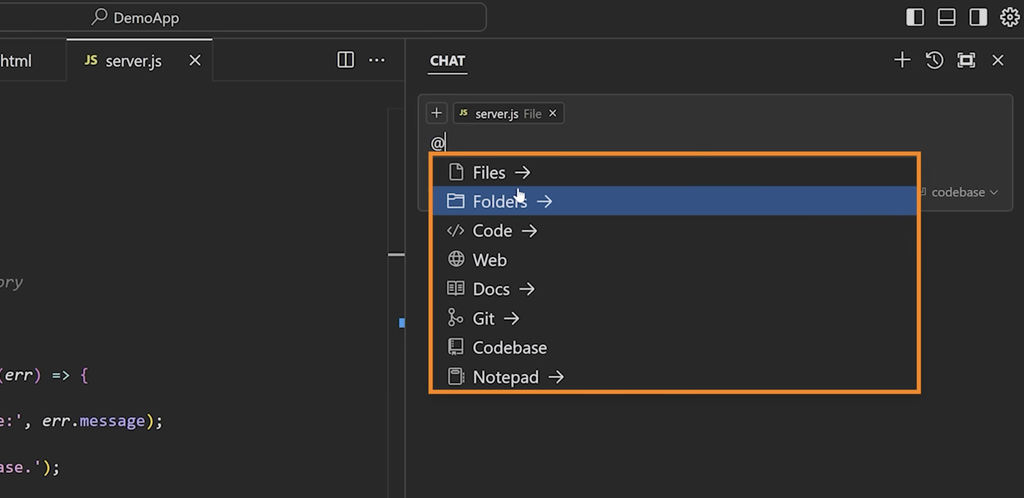
Cursor is built on the VS Code codebase, which explains why it instantly feels familiar to many developers.
That also means you can bring over many of your existing settings, themes, keybindings, and extensions. Cursor includes a VS Code profile import feature, so you don’t necessarily have to set up your entire dev environment from scratch.
The big difference is the AI integration.
While a traditional code assistant often limits itself to suggesting the next line, Cursor can work across much larger parts of your project. For example, you can ask it to:
- find the root cause of a bug across multiple files
- build a new feature
- explain an unfamiliar codebase
- modify existing code without rewriting everything
- create a plan before making changes
- run commands and tests
- review changes afterward
On our Windows 11 machine, this was the biggest difference. For small tweaks, you can almost use Cursor like a very advanced autocomplete, while Agent features become far more interesting when a task spans multiple files.
Cursor download for Windows, Mac, and Linux
Cursor can be downloaded for free, and the publisher provides official builds for Windows, macOS, and Linux.
As of our latest check on August 22, 2026, Cursor 3.17 was the newest desktop release.
The Windows version is available for both x64 and ARM64, while Mac users can choose Apple Silicon, Intel, or a Universal build. On Linux, Cursor offers DEB, RPM, and AppImage packages.
The official system requirements list Windows 10 or newer and macOS 12 Monterey or newer.
Cursor AI in practice – more than autocomplete
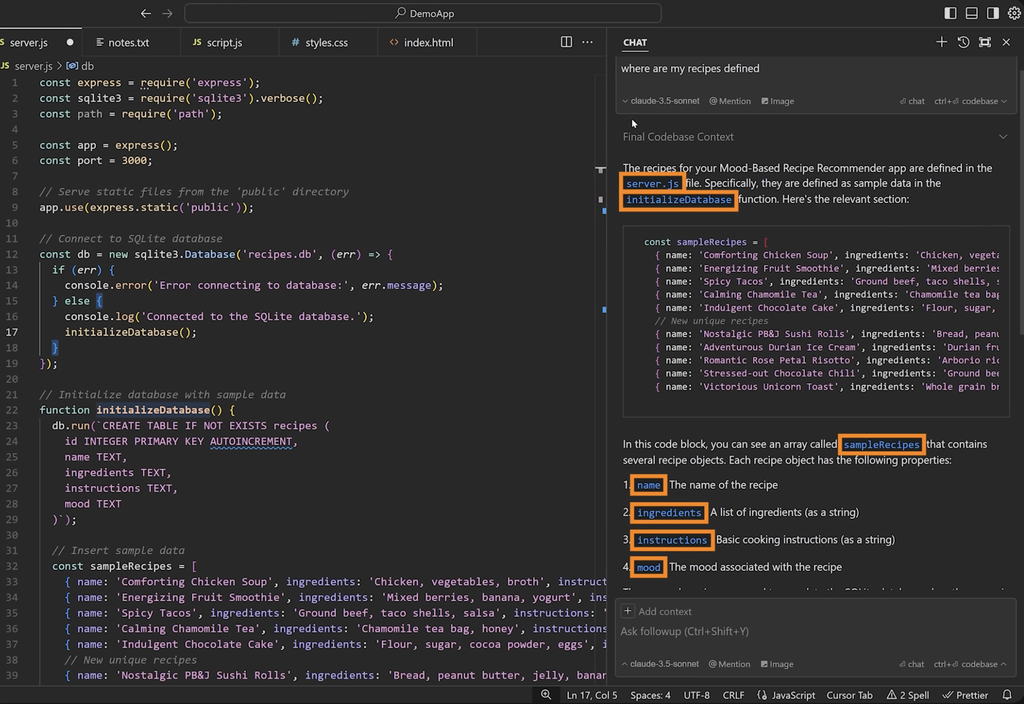
It’s tempting to call Cursor “VS Code with AI,” but that description is increasingly off the mark.
Cursor still offers a classic editor, file explorer, terminal, and extensions, but a growing part of the product revolves around agents.
You can start by describing the feature you want. Cursor can then inspect the project, find the relevant files, and propose—or carry out—the changes. For larger tasks, we prefer to let it draft a plan first. That adds a checkpoint before an agent starts changing five or ten files at once.
AI autocomplete is also one of the features you notice most in daily use. Cursor doesn’t just try to complete the line you’re typing—it can propose larger, coherent edits based on the surrounding code.
It’s impressive when it gets it right—and a bit annoying when it’s overzealous. We still recommend reviewing edits in the diff view rather than accepting everything blindly.
Which AI models can Cursor use?
One of Cursor’s biggest strengths is that you’re not locked to a single AI model.
Cursor supports models from OpenAI, Anthropic, Google, and SpaceXAI, while also developing its own models like Composer. Cursor groups its own models and Grok variants in a dedicated Cursor Models pool.
As of August 2026, that includes Grok 4.6, Grok 4.5, and Composer 2.5.
That makes Cursor appealing if you want to choose the right model for each task instead of building your entire development setup around a single AI provider.
The exact set of available models changes quickly, so model names are one of the things we expect to update in this review over time.
Cursor pricing – is Cursor free?
Yes. Cursor can be used for free with the Hobby plan, and you don’t need a credit card to get started.
The free edition does have limits on AI agent usage. If you use Cursor as your primary development tool, one of the paid plans quickly becomes more relevant.
The current individual plans are:
Hobby: Free
Limited Agent usage and access to Composer.
Pro: $20 per month
Higher Agent limits, Cursor Models, external frontier models, Cloud Agents, MCP, skills, and hooks.
Pro+: $60 per month
More included AI usage than Pro.
Ultra: $200 per month
Designed for very heavy AI and Agent users with significantly higher limits.
There are also Teams and Enterprise options. Cursor itself recommends Pro+ for people who use agents daily, while Ultra targets the heaviest users.
The pricing structure takes some getting used to. It’s no longer just a set number of requests. Different models consume different amounts of included capacity, and overage can be billed separately.
On the plus side, you can set a cap on overages—which we strongly recommend.
Cursor vs VS Code and GitHub Copilot
If you already use VS Code, the obvious question is whether it’s worth switching at all.
VS Code is still the natural choice if you want a free, flexible code editor and prefer to add AI tools via extensions.
GitHub Copilot makes sense if you want to keep your current IDE and simply layer AI assistance on top.
Cursor goes further. Here, AI agents and AI-powered editing are central parts of the editor itself.
We especially think Cursor makes sense for developers who actively want to use AI for more than autocomplete. If you only want suggestions for the next line of code, it’s harder to justify another standalone app and subscription.
Is Cursor safe to use with your code?
This is a topic that deserves more attention than it usually gets.
When Cursor uses external AI models, prompts and relevant code context can be sent to model providers. It’s not the same as working in a completely offline editor.
However, Cursor offers Privacy Mode—including for free and Pro users. When enabled, Cursor says customer data isn’t used for model training and that zero-data-retention agreements are in place with relevant model providers.
Cloud Agents are a bit different, as they need access to a repository over a longer period to complete their work. In those cases, code is processed and stored as needed for the agent’s tasks.
For personal hobby projects, most people likely don’t need to worry much. If you work with client code, company systems, or other sensitive projects, we’d enable Privacy Mode right away.
Cursor is now part of SpaceX
There’s also been a significant development around the company behind Cursor.
On August 14, 2026, Cursor officially announced that it had been acquired by SpaceX. According to Cursor, this provides access to substantially more compute for training and running its own AI models.
The partnership already shows up in the product. Grok 4.6 has been integrated, and Cursor is increasingly betting on its own models and agents that can work autonomously over longer periods.
Just a few days later, Cursor also launched Origin Code Hosting in early beta, bringing repositories, pull requests, code review, and agents together directly inside Cursor, while existing GitHub repositories can be synced.
Cursor is clearly moving far beyond the role of a traditional code editor.
What annoyed us about Cursor
Cursor is powerful, but the product isn’t without quirks.
Extensions in particular can be trickier than you might expect coming from VS Code. Cursor uses Open VSX as the basis for its extension marketplace, and Cursor’s own support forum still includes examples from summer 2026 of extensions that are either missing or lag behind the nyeste (latest) version.
This won’t affect everyone, but if your workday depends on a specific niche extension, we’d verify compatibility before fully switching from VS Code.
The other downside is price. The free version is great for seeing whether the workflow suits you, but heavy use of the best models can quickly make Cursor yet another relatively pricey software subscription.
Top five tips and FAQ
Get more out of Cursor AI
We’ve collected five things that made the biggest difference during our time with Cursor—whether you’re coming from VS Code or already use AI agents daily.
1Import your VS Code setup+
Coming from VS Code? Import your profile, theme, settings, and keybindings. It saves a surprising amount of time and makes Cursor feel familiar from the very first launch.
2Use Plan before big Agent tasks+
For larger changes, we prefer letting Cursor outline its plan first. That helps catch misunderstandings before an agent edits a whole string of files.
3Provide concrete constraints+
A prompt like “fix the page” leaves too much to the AI. Instead, specify exactly what to change, what to keep, and how the result should work. That produced far more precise results in our testing.
4Turn on Privacy Mode+
If you work with client code or projects that shouldn’t be used for training, enable Privacy Mode right away. It’s especially relevant for professionel brug (professional use).
5Set a cap on extra AI usage+
If you rely heavily on paid models, usage can grow faster than expected. We recommend setting a monthly cap so a week of heavy Agent work doesn’t turn into an unnecessarily large bill.
FAQ about Cursor AI
Is Cursor AI free?
Yes. Cursor has a free Hobby plan, so you can install the app and try the AI features without a subscription. Heavier Agent use and advanced models typically require a paid plan.
What is Cursor?
Cursor is an AI-powered code editor built on VS Code. It can write and explain code, find bugs, edit multiple files, and let AI agents work across larger parts of a project.
Is Cursor better than VS Code?
It depends on your needs. VS Code is a strong choice if you want a traditional, free code editor. In our experience, Cursor is more compelling if AI agents and AI-based editing are central to your workflow.
Can Cursor use ChatGPT, Claude, and Grok?
Cursor supports AI models from several providers, including OpenAI, Anthropic, Google, and SpaceXAI, as well as Cursor’s own models. The exact lineup changes over time.
Does Cursor work on Windows 11?
Yes. Cursor supports Windows 10 and Windows 11 and is available for both x64 and ARM64 PCs. There are also official builds for macOS and Linux.
Is Cursor safe to use?
Cursor offers Privacy Mode, which is especially useful if you work with private or professional code. AI features may still require processing code context on external servers, so organizations should review security and privacy settings before use.
Cursor has become much more than an AI code editor
Cursor was already interesting when the core idea was “VS Code with better AI.” In 2026, the app has grown into something much bigger.
Agents can now handle more extensive development tasks, Cloud Agents can work outside the local editor, and Cursor has started moving into areas like code hosting and automated project maintenance.
For casual users, that might be more than you need. But for developers who actively use AI for programming, Cursor is one of the most compelling tools we’ve tried.
The free edition thankfully makes it easy to find out which group you belong to.