
 Martin Jørgensen
Adobe Premiere Pro – Professional video editing for beginners and pros
Adobe Premiere Pro is one of the world’s most acclaimed video editing programs—used by everyone from YouTubers and content creators to professional Hollywood studios. It offers an impressive range of features to cover every need, whether you’re cutting a travel vlog or producing a feature film.
You can download a free trial of Adobe Premiere Pro and test it yourself before you subscribe.
Features and editing capabilities in Adobe Premiere Pro
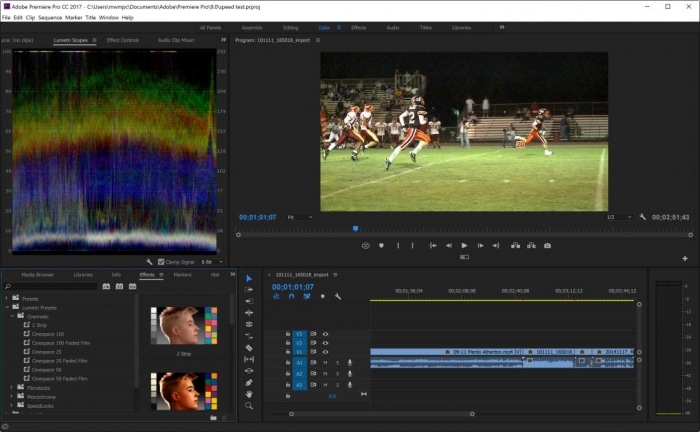
Premiere Pro is known for its flexibility and powerful features:
- Advanced timeline editing with precise control over audio and video.
- Built-in effects and transitions for a professional finish.
- Support for 4K, 8K, and VR content.
- Direct integration with Adobe After Effects, Photoshop, and Audition.
- Large library of templates, LUTs, and plug-ins — many are available online for free.
The program strikes a great balance between ease of use and deep functionality. Beginners can get started quickly with presets and templates, while advanced users gain access to a vast suite of professional tools.
System requirements and performance
Adobe Premiere Pro requires a modern, powerful machine to perform at its best—especially for 4K or heavy effects work.
Minimum requirements (Windows):
- Intel 6th‑gen CPU / AMD Ryzen 1000+
- Windows 10 (64‑bit) or newer
- 8 GB RAM (16 GB recommended)
- 2 GB dedicated GPU
- 8 GB free disk space
- 1920x1080 display resolution
On Mac, similar requirements apply—macOS 11 (Big Sur) or later.
⚠️ Our experience shows that Premiere Pro can slow down during renders and export if your computer only just meets the minimum requirements.
Share your videos — with ease

You can export your projects directly to platforms like YouTube, Vimeo, and Facebook. Premiere Pro also supports virtually all common video formats—and you can customize resolution, frame rate, and compression.
Price and Creative Cloud subscription
Adobe Premiere Pro isn’t available as a one-time purchase—you need a subscription:
- Premiere Pro only: $27/month
- Entire Adobe Creative Cloud (including After Effects and Photoshop):
- Students: $22/month (first year)
- After that: $34/month
You can start with a 7‑day free trial on Adobe’s website.
Alternatives to Adobe Premiere Pro
If you’re looking for free or more affordable options, we recommend:
- 1 — Windows‑based, easy and free
- DaVinci Resolve — free version with professional color grading
- Shotcut — open source and simple video editing
- Adobe After Effects — for motion graphics and visual effects (can be combined with Premiere Pro)
Explore more software in our video editing category.
Top 5 tips for Adobe Premiere Pro
Use presets and templates
Make editing easier with ready-made intros, lower thirds, and transitions.
Learn the keyboard shortcuts
Common ones like "C" (Razor Tool) and "V" (Selection) save tons of time.
Leverage proxy workflows
Use low‑resolution files for editing and switch to full resolution on export—especially helpful on older machines.
Adjust exposure and color with Lumetri Color
A powerful tool built directly into Premiere Pro.
Work with sequences in sections
Split large projects into separate sequences for better overview and performance.



