

 Martin Jørgensen
Celtx – Free screenwriting tool for film, theater, and more
Celtx for Mac is a complete toolkit for anyone who wants to write screenplays, plan scenes, create storyboards, or develop stage plays and podcasts. It’s used by indie filmmakers, educators, and professionals, and it’s available with a generous free plan — especially if you’re using the browser-based desktop version.
Ready to write your own script? Celtx is one of the most user-friendly and polished free options out there.
Screenwriting and features
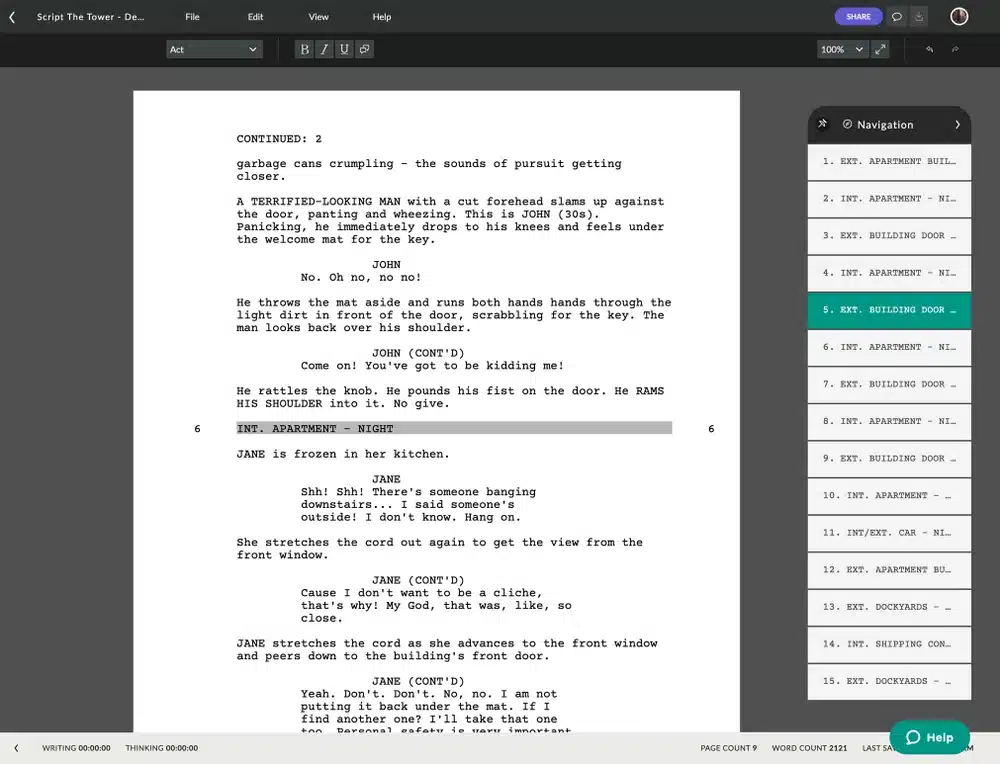
Celtx gives you classic screenplay formatting with correct industry-standard layout. Whether you’re writing a short film, a TV episode, or a stage play, you can pick a template and the app ensures your script follows best practices with clear scene headings, dialogue, and action lines.
Beyond the script itself, you can add:
- Storyboards (with images and notes)
- Shot lists (camera angles and scenes)
- Scene scheduling (date, time, and shooting location)
- Character descriptions and props
- Cloud collaboration when you create an account
Top 5 tips for Celtx
Pick the right template from the start
Select whether you’re writing film, theater, audio, or something else before you begin — formatting will automatically follow industry standards.
Create a free account right away
You’ll need a Celtx account to write in the browser — signing up is free and unlocks all core features.
Use notes to plan your project
Add notes to characters, scenes, and props — use them actively to keep track of ideas as you work.
Save regularly and export as PDF
Celtx autosaves to the cloud, but export to PDF periodically — you’ll have a backup and an easy way to share your script.
Consider a paid plan for larger productions
If you work in a team or need advanced production tools like shot lists and budgeting, upgrading can be worth it.
Interface and usability
Celtx is built for structure and clarity. Everything from screenplay formatting to scene planning happens in a clean, readable layout. New users can get up to speed quickly, and there are plenty of tutorials online.
It’s especially great for:
YouTubers and podcasters
Media students and educators
Independent filmmakers
Writers and playwrights
How to get started with Celtx (web version)
Although Celtx no longer offers a downloadable version, you can get started quickly via their online platform:
- Go to celtx.com
- Click “Start Creating” or “Sign Up” in the top-right corner
- Create a free account with your email or Google login
- Choose a project type (screenplay, storyboard, etc.)
- Start writing directly in your browser — your progress is saved to the cloud
The free plan includes screenwriting and limited cloud storage. You can upgrade anytime if you need collaboration features or more space.



