
 Martin Jørgensen
Driver Easy – Keep your drivers up to date with one click.
Driver Easy – We tested one of the most popular driver updater tools
We tested Driver Easy on a standard Windows 11 PC where several devices were missing drivers — including the graphics card and sound card. The program found and installed the correct versions within minutes, without us having to dig through manufacturer websites.
The interface is simple and guides you step by step, making it a great choice for both beginners and experienced users.
Driver Easy is available in a free version that scans and identifies missing or outdated drivers, while the Pro version automatically downloads and installs them with one click. If you want to save time and avoid mistakes, it’s one of the most effective programs we’ve tested for the job.
Why is updating drivers important?
When your drivers (device drivers) aren’t up to date, communication between your hardware and operating system isn’t optimal. That can cause everything from unstable audio and graphics glitches to issues with your network, printer, or mouse. Many people find that a slow or error-prone PC actually comes down to outdated drivers — not the hardware itself.
During our Driver Easy test, we clearly noticed the difference after a full update. The graphics card delivered better performance, and minor issues like choppy audio and slow Wi‑Fi disappeared entirely. The program scans your whole system and pinpoints exactly which drivers need updating. You can then update everything with a single click — without hunting around on manufacturer sites.
Driver Easy saves you time and frustration while keeping your computer fast and stable day to day.
Features in Driver Easy
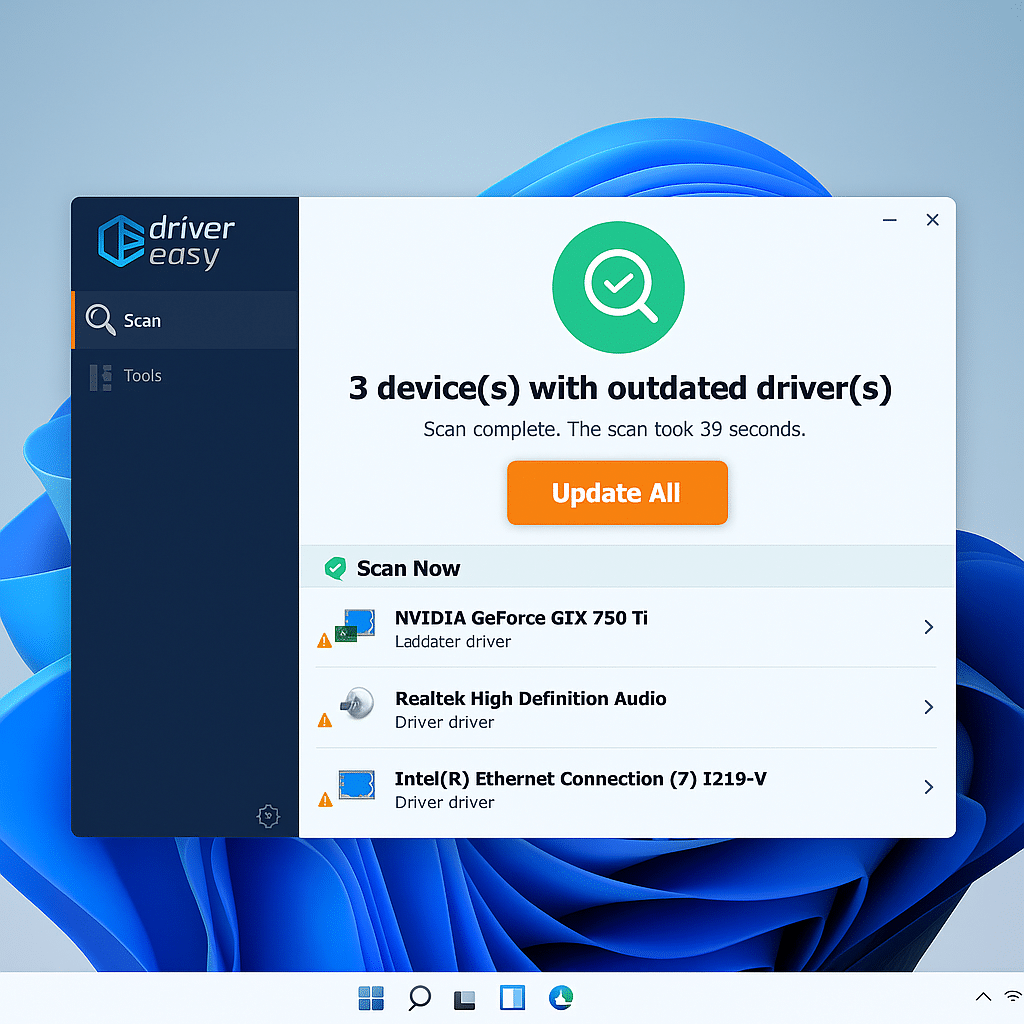
During our test on Windows 11, we were pleasantly surprised by how quickly Driver Easy found and recognized all the missing drivers on the system. Here are some of the features that make it one of the most effective driver update tools.
Fast and accurate scanning
Driver Easy completed a full scan of our test PC in under a minute and found both outdated and missing drivers. The program shows a clear overview of everything that needs updating, and in the Pro version you can install all drivers automatically with one click.
Large and reliable driver database
According to the developer, Driver Easy includes over 8 million drivers, and our test confirmed that the database covers both older and newer hardware. Whether it’s graphics cards, sound cards, or network devices, the program always found a suitable, stable version.
User-friendly interface
The design is very simple and easy to navigate. Even if you’re not technically inclined, you can move through the menus and perform a full driver update without risk of mistakes. Everything is guided step by step.
Extra tools and system info
Driver Easy also offers a range of extras — including backing up your current drivers so you can restore them if something goes wrong. You can also view detailed hardware information, which makes it easier to understand what’s inside your PC.
Free vs. Pro version
We tested both the free and paid Pro versions of Driver Easy on our Windows 11 PC to see how big the difference is in practice.
The free version works well for finding and identifying outdated drivers, but you need to download and install them yourself one by one. That’s fine for occasional use — but it takes time if you have many devices connected.
The Pro version, on the other hand, makes the entire process fully automatic. With one click, all drivers are updated, and the program downloads everything in the background at a much higher speed. In our test, a complete update took under five minutes, and every device worked correctly afterward.
In addition, the Pro edition includes:
- Automatic restore point before changes are made.
- Faster downloads via dedicated servers.
- Support for up to three PCs — handy for families or small offices.
The price for Driver Easy Pro is around $29 per year, making it one of the more affordable paid driver updater solutions on the market.

How Driver Easy works
We went through the entire process from download to finished updates on our Windows 11 test machine, and the experience was surprisingly smooth. Driver Easy requires no technical expertise — everything happens in three simple steps:
1. Installation
Download and installation take just a couple of minutes. During our test, the program installed without ads or extra software and launched automatically afterward. The interface opens directly in the scan window so you can get started quickly.
2. Scan
When you click Scan Now, Driver Easy checks the system for outdated, missing, or corrupt drivers. On our test PC, it took under a minute, and the results are presented in a clear list with driver name, version, and status.
3. Update
In the Free edition you can update one driver at a time, which works fine for smaller tasks. In the Pro version, the entire process is automated — all drivers are downloaded, installed, and backed up with one click. That means you can step away while Driver Easy does the rest.
One of the best driver update tools
After our test, it’s clear that Driver Easy is among the most user-friendly and stable programs for automatically updating drivers on Windows 11. It combines a clean design with fast results and a massive driver database that delivers relevant updates — not just generic suggestions like we see from many competitors.
The Pro version makes things even easier, especially if you want to avoid manual downloads. The price is reasonable, and the ability to use the license on multiple PCs makes it extra attractive for families or small offices.
We experienced no errors, crashes, or incompatible drivers during testing — only a noticeable improvement in performance and stability. We can confidently recommend Driver Easy to both home and professional users who want a safe, efficient way to keep their PC in top shape.
Top 5 tips for Driver Easy
Make it a habit to run a scan after major Windows updates to ensure all drivers still work optimally.
Driver Easy shows version numbers and release dates — use them to decide whether an update is necessary.
The Pro version does this automatically, but you can also enable it in settings for extra safety during updates.
If your PC doesn’t have internet access, use the offline scan feature and transfer the result to another PC.
You can right‑click and choose “Ignore” — useful if you’ve customized audio or graphics drivers and don’t want them overwritten.
Q&A – Frequently asked questions about Driver Easy
A program that updates your drivers quickly and easily, ensuring your hardware works at its best.
The basic version is free, while the Pro version costs about $29 per year and can be used on up to three PCs.
Driver Easy is only compatible with Windows operating systems.
Yes, the free version can be downloaded and used with limited features.
The Free version updates one driver at a time, while the Pro version lets you update all drivers with one click and download faster.
No, the program has a user‑friendly design and requires no technical skills.
After installation, the program scans your PC for outdated or missing drivers in seconds.
A driver is software that connects your hardware to your operating system and ensures devices like printers and graphics cards work correctly.
Yes, the Pro version can be used on up to three PCs, making it ideal for sharing.
Yes, programs like DriverFinder and Driver Navigator are good alternatives with similar features.


