

 Martin Jørgensen
The quickest way to better protection against Trojans and malware
GridinSoft Anti-Malware is a specialized security tool focused on finding and neutralizing Trojans, adware, spyware, and other types of malware — including threats that regular antivirus programs often miss. The software was previously known as Trojan Killer, which still shows in its aggressive approach to remediation.
We installed it on a Windows 11 PC, and the setup took under two minutes. The interface is surprisingly modern, and while the features are technical, navigation feels straightforward.
Features and security
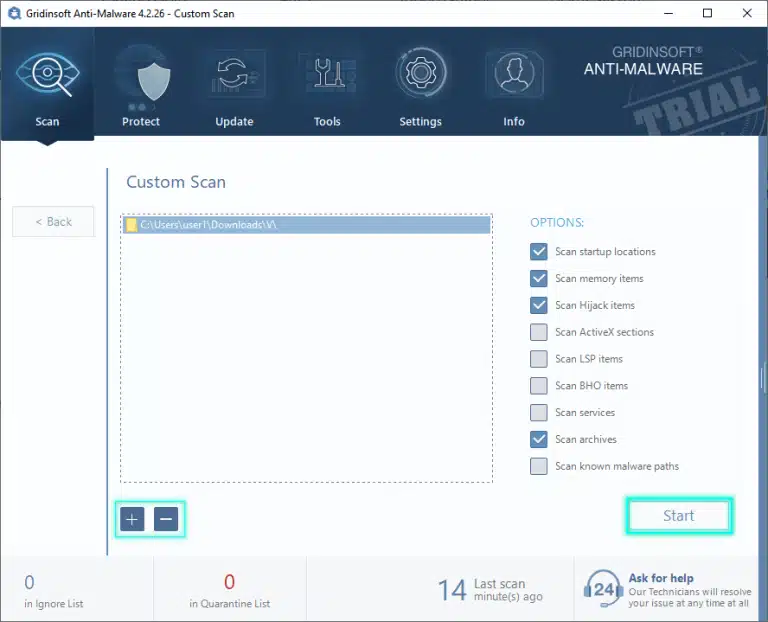
1 Anti-Malware scans files, critical system areas, the registry, startup items, and emails as they arrive in your inbox. In testing, the scanner was very fast — in fact, faster than several traditional antivirus programs, especially on full system scans. Results are presented in a simple plain-text report, which makes it easy to document threats.
The trial version can remove up to two threats but still shows everything it finds. On our test machine, it detected one adware component that Microsoft Defender hadn’t flagged.
Interface and usability
GridinSoft prioritizes a clean, streamlined design. We found the interface intuitive: a left-hand menu, live status at the top, and large action buttons make it easy for less technical users to start scans quickly.
Performance and everyday use
Scanning uses slightly more resources than average — especially during deep scans — but only for short periods. That thorough approach is exactly what makes the software appealing if you suspect the computer is already infected.
Software strengths and weaknesses
While the program is effective at cleaning up infections, it works best as a companion to a full antivirus solution — not as a complete security package on its own. It excels at remediation but is less focused on prevention.
Top 5 tips for GridinSoft Anti-Malware
Use “Quick Scan” daily
The short scan quickly finds recent threats and takes minimal time.
Run a full scan after installation
Your first scan is crucial, as it can catch hidden infections that may have lingered in the system for a long time.
Enable protection against potentially unwanted programs (PUPs)
This is a manual setting — and it’s where GridinSoft often finds things other tools overlook.
Review the reports
The reports are text-based but give a clear picture of exactly what was affected.
Use it as a “second‑opinion scanner”
Run it whenever you suspect an infection, even if another antivirus program is already active.
GridinSoft Anti-Malware FAQ
GridinSoft Anti-Malware is a tool for finding and removing Trojans, adware, spyware, and other malware that may have slipped past your regular antivirus. It’s especially useful as a cleanup tool when you suspect your PC is already infected, suddenly feels slow, is full of pop-ups, or redirects to strange websites.
In our test, the program found unwanted components that a standard antivirus didn’t flag and provided a clear overview of affected files, registry keys, and processes.
GridinSoft Anti-Malware offers a time-limited trial during which you can run full system scans and view all detected threats. In the trial, you can remove only a limited number of threats; after that, you’ll need to purchase a license to unlock full removal and ongoing protection.
We found the trial sufficient to determine whether the program finds more than your current security solution — especially when used as an extra second opinion.
No. We don’t recommend using GridinSoft Anti-Malware as your only protection. It’s strong at detecting and removing infections, but it isn’t a complete security suite with a firewall, web protection, and all the other layers you typically get in a full antivirus.
The best approach is to keep your regular antivirus (for example, Microsoft Defender) and use GridinSoft Anti-Malware as a supplement when you want an extra-deep scan or suspect hidden malware.
Yes. In most cases, you can run GridinSoft Anti-Malware side by side with your existing antivirus. In our test, we ran it with Microsoft Defender without conflicts.
To avoid unnecessary resource use, we recommend letting your primary antivirus handle day-to-day real-time protection and using GridinSoft Anti-Malware for manual scans when you need an extra thorough check of the system.
GridinSoft Anti-Malware is primarily built for Windows and works on most recent versions of the operating system. On our test PC with Windows 11 and a standard SSD, the program ran without issues, though full system scans used noticeable CPU and disk for short periods.
If you have an older PC with a slower hard drive, it’s a good idea to start the first full scan at a time when you won’t need to use the computer intensively. In return, you get a very thorough sweep for Trojans and other malware.



