

 Martin Jørgensen
Download a free trial of the award-winning Norton Security here, or get the full version at a great price in our store.
A reliable security suite is an absolute must for any PC. And finding one that fits your needs can be overwhelming. Norton Security protects your personal information and passwords and helps guard you against identity theft. Norton also offers a money-back Virus Protection Promise if a virus gets through and they can’t remove it.
Stands out from the crowd
There are countless security programs, yet Norton Security manages to stand out.
It’s a well-known problem that many security suites slow down your PC, but you’ll hardly notice Norton Security is installed until you need it. In general, its features are lightning fast and very user-friendly.
Security
Under the Security tab, you’ll find a range of useful information, such as when the program last received a security update.

As shown above, you can also see when the most recent scan ran, along with an overview of your licenses.
Of course, you can also scan your PC for threats.

As you can see above, it doesn’t take Norton Security long to scan through thousands of files, and afterward you get a clear report that tells you about any potential threats Norton Security found and removed. You can even have Norton Security shut down your PC when the scan finishes, so you can start a deep scan before bed and wake up to a fully protected computer.
Before you run a scan, you can customize it to fit your needs.
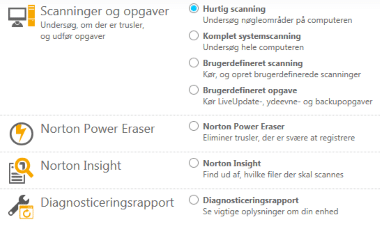
The different scan options are a big plus—sometimes you don’t need a full deep scan. A quick scan can be ideal, for example after a risky download.
Identity
Under the Identity tab, you’ll find protection against identity theft as well as a very useful password generator. It takes a little setup, but after that you’re well protected against phishing attacks.

Norton Safe Web helps ensure you only visit trustworthy websites. When you search online, Norton Security scans the results and tells you which ones are safe.
Backup
With Norton Security, you can also create backups of your files, so even if something goes wrong, they’re safely stored in the cloud.

If the worst happens, it only takes one click on Restore Files to bring your missing files back to your PC. You choose exactly which files, folders, photos, or documents to back up.
Performance
Many people don’t get the maximum performance from their PC. Norton Security includes an optimization toolkit to help you get the best possible performance from your computer.

For example, you can free up disk space, manage startup programs, and more.
Updates
A good security suite needs frequent updates—and Norton Security delivers.
If your security software isn’t kept up to date, you’re at risk as new threats are developed every day. It also helps to have a developer with deep experience handling emerging threats.
Norton has been protecting computers since 1991. That experience shows when you use a program like Norton Security. It’s well developed and highly user-friendly—and with a developer backed by decades of expertise, you’re well covered for the future.
Design and ease of use
Norton Security has a simple, minimalist design. Colors are primarily green and white—and red if you’re at risk. The palette is well chosen and gives the interface a polished look.
The straightforward design also makes it extremely easy to navigate. You’ll find features, buttons, and settings exactly where you expect them.
Conclusion
Norton Security is our preferred security suite—and for good reason. It’s highly capable and meets our needs. Norton Security can be used free for 30 days, which is plenty of time to see if it’s right for you. When your trial ends, you can purchase Norton Security above at an attractive price.
Norton Security is incredibly popular and possibly the most widely used security program. That’s partly because Norton offers guaranteed protection—and if not, you get your money back. It’s a clear sign of the passion and confidence behind Norton. Security is the priority, and you can feel that when you use Norton Security.
Norton Security gets our warmest recommendation.
This is the Windows version, which you can download on this page. You can find other system variants here.



