

 Martin Jørgensen
Panda Free Antivirus – free antivirus focused on simplicity
Panda Free Antivirus is a free antivirus program for Windows aimed at users who want basic protection without paying for a subscription. It’s known for its low resource usage and cloud-based threat detection, making it especially suitable for older or less powerful PCs.
We tested Panda Free Antivirus on a standard Windows 11 PC, and installation was quick with no annoying choices along the way. Within a few minutes, real-time protection was active, and the program began monitoring the system automatically in the background.
How Panda Free Antivirus protects your PC

Panda Free Antivirus works primarily via cloud-based scanning. In practice, that means suspicious files are analyzed online rather than locally, which reduces the load on your computer.
The program monitors:
- Files and apps you open or download
- USB devices when they are connected
- Known and unknown threats via Panda’s shared malware database
In our tests, Panda reacted quickly to suspicious files and automatically placed them in quarantine without interrupting your work with pop-ups.
Quarantine and activity report – a clear overview

When a scan finishes, you get a clear summary of detected threats. Infected files are automatically isolated in quarantine, and you can choose to delete, ignore, or restore them.
The activity report gives detailed insight into:
- Scan times
- Type of threat
- What action Panda took
It’s not advanced, but it’s easy to understand—even for users without a technical background.
Extra features in the free version

Even though Panda Free Antivirus is a free solution, it includes more features than many expect:
- USB protection against infected external devices
- Limited VPN to secure your internet traffic
- Automatic real-time protection with no manual setup
However, the VPN feature is quite basic and best suited for occasional use—not streaming or heavy data traffic.
Upgrade to Panda Antivirus Pro – what do you get?
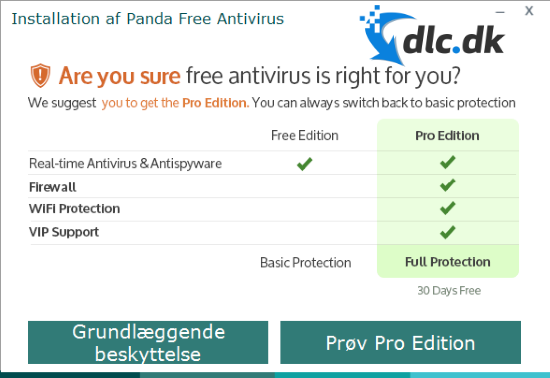
In the “My Products” menu, you’ll regularly be reminded about the option to upgrade to Panda Antivirus Pro. The Pro edition is a paid product and includes, among other things:
- Firewall protection
- Wi‑Fi protection against unsafe networks
- Unlimited VPN
- Access to Panda support
For many everyday users, the free edition goes a long way, but the Pro version provides more control and extra layers of security.
Updates and cloud-based protection
Panda Free Antivirus is continuously updated via the cloud. When a new threat is detected on one Panda-protected computer, information is shared anonymously with the rest of the network.
In practice, that means:
- Faster response to new threats
- No heavy local signature updates
- Minimal impact on system performance
In our tests, we noticed no significant slowdown—even during scans.
Top 5 tips for Panda Free Antivirus
How to reduce pop-ups and distractions
Panda Free Antivirus is free, so it will occasionally show messages about upgrades or extra features. Open Settings and turn off marketing and product notifications so you’re only alerted when a real threat is detected. This makes for a calmer experience—especially on work or school computers.
Automatically scan USB devices for hidden threats
USB drives and external hard drives are still a common infection vector for malware. Enable automatic USB scanning so Panda checks the device as soon as it’s connected. In our tests, external drives were scanned quickly with no noticeable system impact.
Use Quick Scan for everyday protection
For everyday use, Quick Scan is usually sufficient. It focuses on the most exposed areas of the system and is significantly faster than a Full Scan. We recommend running a Quick Scan weekly and using a Full Scan only if you notice suspicious behavior.
Check the activity report for recurring issues
The activity report gives a good overview of what Panda has blocked over time. Check it occasionally to see if the same files or apps are flagged repeatedly. That can be a sign of software that should be uninstalled, or a habit that poses a security risk.
Consider the Pro version on public Wi‑Fi
If you often use open networks at cafés, hotels, airports, or on public Wi‑Fi while traveling, the free edition can fall short. Panda Pro gives you a firewall and full VPN, adding an extra layer of protection on unsafe networks. If you mainly use your PC at home, the free edition may be all you need.
Panda Free Antivirus FAQ



