
A computer desk with a monitor displaying a photo editing program showing a photo of a woman with auburn hair and a yellow sweater. The toolbar shows editing tools like text and filters, while the desk is decorated with potted plants, pencils, and a wireless keyboard and mouse.

PhotoFiltre Free – free photo editing for beginners and intermediate users.

PhotoFiltre Free is a free, user-friendly photo editor for Windows, ideal if you want quick adjustments and simple effects without wrestling with heavy programs like Photoshop or GIMP. It’s easy to install, light on system resources, and packed with handy tools and filters that help you give your photos a polished, personal look.

Simple photo editing with lots of options
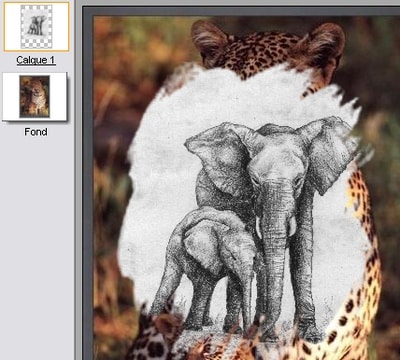
Experimenting with transparency and layers in PhotoFiltre.

1 Free supports the most common image formats and provides adjustment tools like contrast, brightness, sharpness, and color balance. You can easily remove red-eye, crop images, add text, and work with various brushes and shapes. If you want to experiment further, you’ll also find creative filters such as oil painting, sepia, blur, and edge detection.

The program supports layer masks and a form of “batch conversion,” allowing you to apply filters or edits to multiple images at once—ideal when preparing sets of vacation or portrait photos.

Danish language and easy installation

Although the program is primarily in French and English, a Danish language pack can be added manually. Extract the ZIP with the language files and place them in the same folder as the program’s executable (typically pfstudiox.exe).

During installation, note that older versions bundled the ASK Toolbar as optional software. This is often removed in newer builds, but it’s still wise to watch for and deselect any unwanted components.

Free version vs. PhotoFiltre Studio

PhotoFiltre Free is a pared-down version of the more advanced PhotoFiltre Studio, which is paid software. The Studio edition offers better layer support, advanced plugin management, and more editing tools. For most everyday users, the free version is sufficient—especially if you just want quick enhancements or effects for photos you’ll share on social media, via email, or print.




Top 5 tips for PhotoFiltre Free

How to remove red-eye fast
Use the built-in red-eye tool on the toolbar, drag over the area with the mouse, and click once. The result appears instantly with no advanced settings.
Switch the program to Danish
Download the Danish language pack and place the contents of the ZIP in the PhotoFiltre installation folder — the same location as pfstudiox.exe. The program will now start in Danish.
Use batch processing for many images
Go to “Automation” in the menu to apply a filter or adjustment to multiple images at once — perfect for vacation photos or product shots.
Add decorative frames
Under “Filter > Edge > Frame” you can choose different frame styles and colors to give your photos a polished finishing touch.
Restore old photos
Use contrast, color balance, and noise reduction to make scanned images or old photos appear much clearer and more detailed.

Martin Jørgensen

I create software content and Windows guides for Holyfile.com, focusing on up-to-date recommendations and clear, practical explanations. My goal is to help people choose the right software quickly and safely.

Reviewer’s rating with pros and cons, and user ratings

PhotoFiltre Free is a solid, lightweight image editor that delivers impressive functionality for a free program. However, it lacks support for advanced layers and newer AI features found in modern editing tools.


Pros and cons

✅ Very user-friendly and easy to use
✅ Includes most basic editing features
✅ Free and very light on system resources
✅ Can be expanded with a Danish language pack
✅ Perfect for quick, simple edits

❌ Does not support true layers (only masks)
❌ No AI automation or RAW support
❌ Interface looks somewhat dated
❌ Requires manual installation of the Danish language pack


Supported platforms:

🪟 Windows (XP to Windows 11)
🍎 Mac: Not supported
🐧 Linux: Not supported

User Rating

