

 Martin Jørgensen
AIDA64 Extreme Edition – Advanced system testing and hardware analysis for Windows
AIDA64 Extreme Edition is a powerful Windows diagnostic tool that gives you deep insight into your PC’s hardware and performance. We tested it on a Windows 11 PC and were impressed by how detailed and accurate it analyzes everything from the CPU and GPU to RAM, networking, and sensors.
The program is especially popular with enthusiasts and IT pros who want to monitor temperatures, run benchmarks, and troubleshoot system issues quickly and professionally.
Features and ease of use
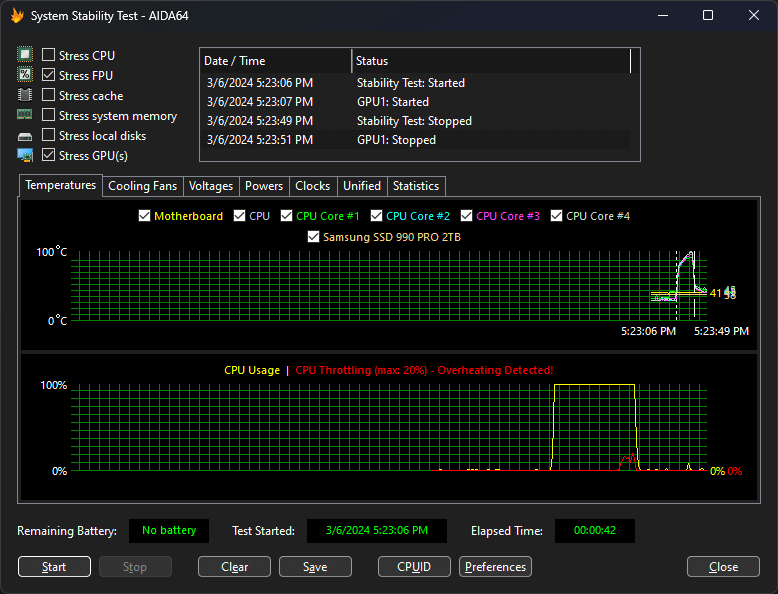
AIDA64 offers a wide range of features that make it easy to test and fine-tune your PC:
💻 Benchmarking: Compare your PC’s performance with other systems.
🧠 Hardware diagnostics: Identify the CPU, GPU, RAM, motherboard, and sensors with precision.
🔥 Monitoring: Track temperatures, voltages, and fan speeds in real time.
⚙️ Stress testing: Simulate heavy loads to uncover stability issues when overclocking.
📄 Reports: Generate detailed reports you can save or share for troubleshooting.
In our test, installation was quick and the app immediately detected every sensor in the system. The interface is classic and technical but logically organized, so even beginners can navigate it quickly.
Performance and reliability
AIDA64 has been around for many years and is continuously updated to support new hardware and the latest Windows versions. In testing it proved stable and lightweight—the resource footprint stays low even during heavy benchmarks.
The app also supports remote monitoring via smartphone, so you can follow temperatures and performance without interrupting games or tests.
Comparison with alternatives
Compared to tools like HWMonitor and 1, AIDA64 delivers much more detailed information—especially around sensors, power consumption, and motherboard components. It is a paid product after the trial period, while competitors like Speccy offer free versions with fewer features.
On the other hand, AIDA64’s stress tests and benchmarking tools are at a professional level that few free alternatives can match.
Top 5 tips for AIDA64 Extreme Edition
How to get the most out of the app:
1. Use Sensor Panel to display temperatures in real time
Build your own dashboard with live data for the CPU, GPU, and fans—ideal for gaming or testing.
2. Save hardware profiles before and after upgrades
Compare before/after results when you replace RAM, an SSD, or your graphics card.
3. Run a stress test after overclocking
AIDA64’s stress test helps you spot instability before it costs you data.
4. Export reports to PDF
Perfect for documentation or troubleshooting when you’re helping others with PC issues.
5. Use the mobile app for remote monitoring
Connect your phone and track temperatures or load live while gaming.



