

 Martin Jørgensen
Download Apowersoft Background Eraser quickly and for free
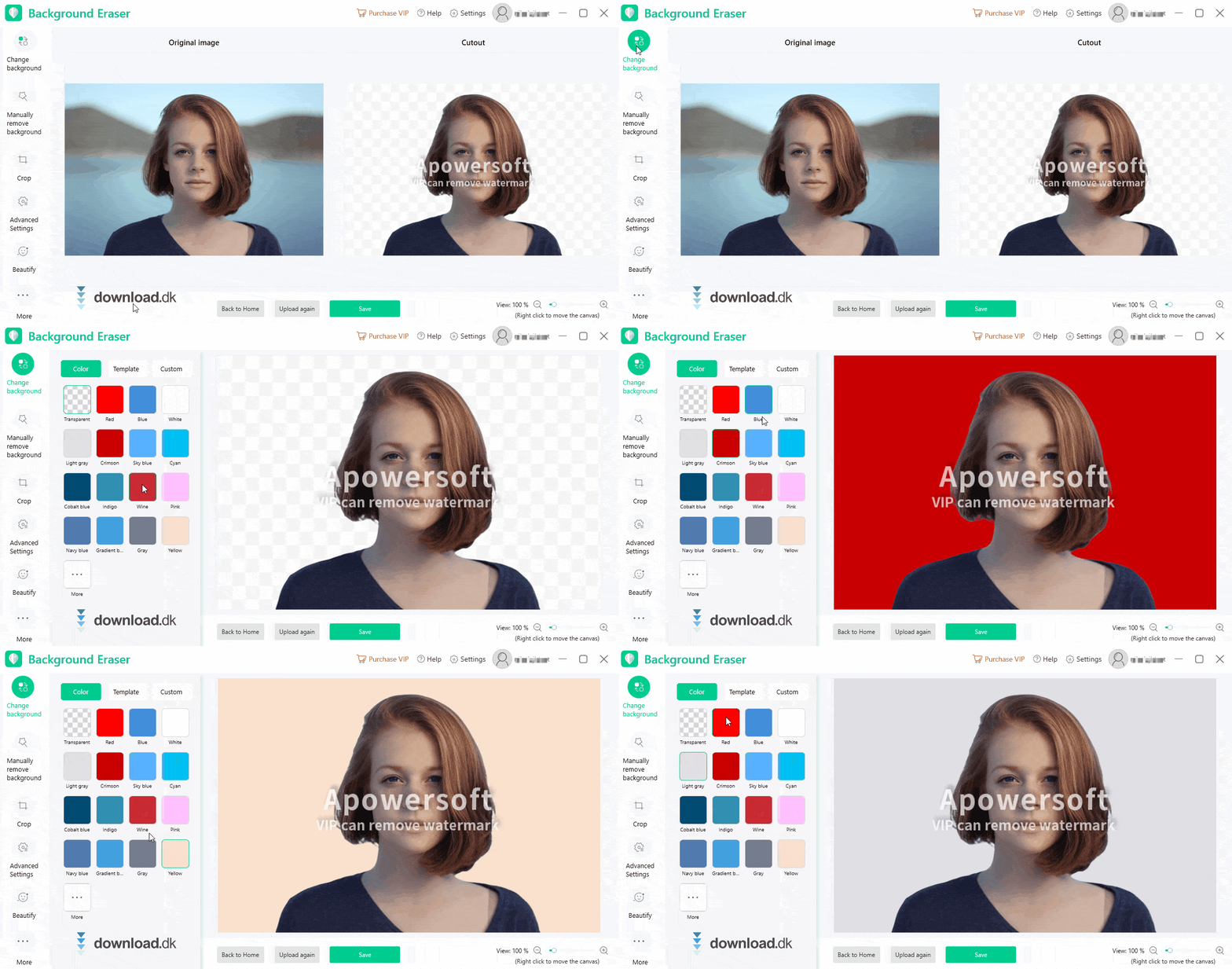
With this demo version linked here on the page, you get an incredibly powerful tool that can automatically detect the background in portrait photos and replace it with a wide range of options.
The software is extremely simple to use—it practically does all the work for you. No headaches getting it to run, and you don’t need a digital design education to achieve eye‑catching image results.
In today’s world, background removal still matters
Despite modern technology that lets us take higher‑resolution photos with far more detail, there still isn’t a built‑in, reliable way to let certain elements (such as people) stand out while hiding the background or replacing it with something else.
This program lets you either pick any color from a spectrum or use an already existing background as your new backdrop. The ready‑made options are organized in folders by category, making it much easier to find exactly what you’re looking for.
Use it for your profile photos
Most people today have some form of digital, online profile to maintain their online presence. First impressions (and all those that follow) are just as important online as they are in real life.
That’s why it can be a good idea to put some effort into a proper profile picture. Once the photo is taken, the hardest part is actually over.
Simply upload the file to the program; then choose to edit a portrait photo, and the software will figure out how to remove the background. If you’re not satisfied with the result, you can always manually add or remove parts you want to keep in the photo—or hide.
Apowersoft, the company behind this program, also has a guide to help you create a fresh, eye‑catching TikTok profile photo. You can find the guide on their website.
Use it for your online store
If you work at a company that sells products online, you know how much great images that align with your brand’s vision can impact sales.
The program includes a built‑in feature for creating product photos. This way, you can easily add a background that matches the other products on your site. And you save both time and money instead of sending those same product shots to a professional redigerings expert.
Background Eraser quickly and effectively removes everything around the products, so you can spend more time selling.

Whether you’re a beginner or a professional photographer, Background Eraser can help
Photography—whether as a hobby or a profession—is fun. It’s even better when you have software that complements your passion. Apowersoft’s Background Eraser is one of those tools: the better the quality of your photos, the easier it is for the program to decide which parts should remain after editing and which should be removed.
Looking for a new passport photo?
If you need a photo for a new ID card, you can create it in the program. You can crop the image to fit perfectly, and even adjust the file size.
Naturally, you can also edit the background to achieve a professional result you’ll be happy with.
Remove watermarks from your images
If you accidentally added a watermark to one of your pictures and want to revert it to the original, Apowersoft has built this in as well. Simply select the area with the watermark and mark it; the software will detect what’s text and what’s image, then blend surrounding background areas so you end up with a normal‑looking photo.
The photos we tested worked extremely well, and it was impossible to spot a difference afterward. Your results may vary depending on what the watermark covers in the image.

Other photo software you might be interested in
If you love editing your photos to refresh your social media profile pictures, you can also try PhotoDiva. With this program, you can adjust lighting and other key aspects of your images. It even gives you tools to whiten teeth, tweak skin tone, and use ‘sculpt’ to change how parts of your face or body appear in the final result.
If you want a place to store your photos once they’re edited, you can install 1. With Google Fotos, you also get basic editing options after importing pictures to your library.
If you’re technically savvy, you can dive into Adobe Photoshop. It offers countless options not only for editing but full‑on photo manipulation. Just keep in mind that Photoshop doesn’t have the same easy, guided approach you get in Apowersoft’s apps.
Conclusion
Overall, Background Eraser is a solid tool from Apowersoft. It lets you edit your images and remove backgrounds with minimal hassle.
The underlying tech delivers surprisingly strong results for AI‑powered editing. We were pleasantly surprised by how good the outputs were from the photos we tested.
It’s highly user‑friendly—every option is self‑explanatory—and the program runs smoothly and reliably.
Download Apowersoft Background Eraser


