
 Martin Jørgensen
Avira Internet Security protects your PC without the hassle
Avira Internet Security is a paid antivirus and security suite for users who want more protection than a free solution—without jumping to a big all-in-one bundle. It’s Avira’s mid-tier product, focused on reliable, automated protection for your computer during everyday internet use.
We tested Avira Internet Security on a standard Windows 11 PC, where installation was quick and straightforward. The program runs quietly in the background and requires only minimal setup before core protection is active.
Protection for everyday internet use
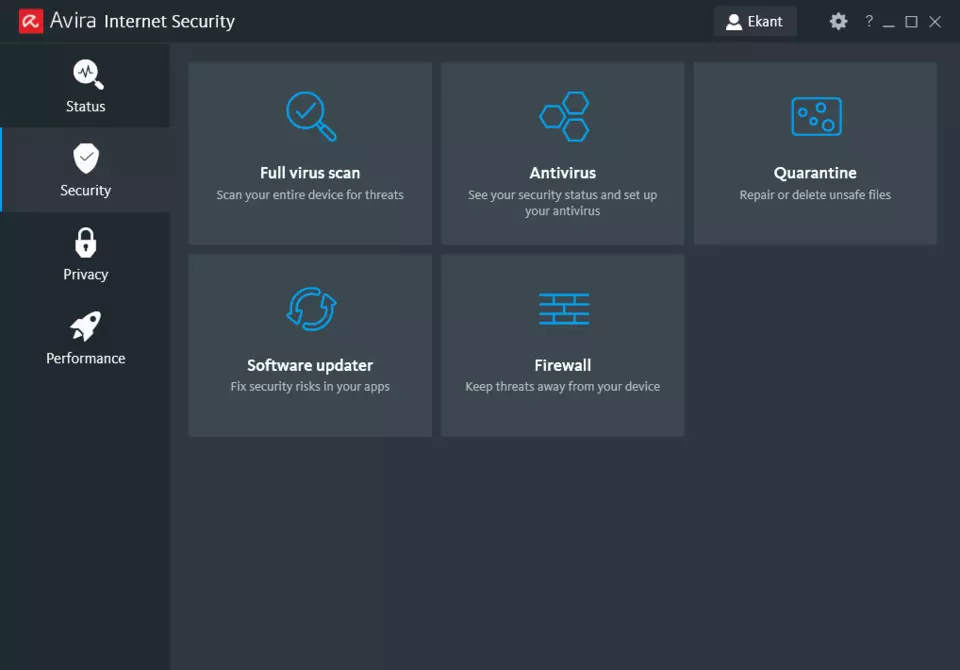
Avira Internet Security is built to protect you where most infections happen: when you browse, open emails, download files, or use online banking. Real-time protection continuously monitors files and processes and blocks known and unknown threats before they can do damage.
In testing, web protection effectively blocked suspicious links and known phishing sites with very few false alerts. That’s especially helpful for less technical users who want to stay safe without constantly dealing with pop-ups and security prompts.
Firewall and network security
One of the key differences between Avira Free Security and Avira Internet Security is the firewall. You get better control over network traffic and protection against unauthorized connections from the outside.
The firewall runs automatically by default, which worked well in our testing. Advanced users can tweak rules manually, but for most people the default settings are more than sufficient. In normal use, you won’t notice the firewall is active—and that’s a quality mark in itself.
Antivirus engine and system impact
Avira is known for its lightweight antivirus engine, and that’s true here as well. During scans we saw low system impact, which is especially important on older PCs or laptops with limited resources.
Quick scans took only a few minutes, while full scans naturally took longer—without making the computer slow or unusable in the meantime. That makes Avira Internet Security a good fit for work, streaming, and everyday use.
Avira Internet Security vs Free and Prime
Here’s where Avira Internet Security fits in Avira’s lineup:
- Compared with Avira Free Security, you get:
- A better firewall
- More comprehensive web and email protection
- Fewer limitations and notifications
- Compared with Avira Prime, you miss out on:
- Unlimited VPN
- Advanced system optimization
- Additional premium tools
Avira Internet Security is a solid choice if you mainly want to protect your PC—and don’t need a VPN, password manager, and extra tools bundled into one big suite.
Avira FAQ
Top 5 tips for Avira Internet Security
How to avoid unnecessary notifications
By default, Avira is set to notify you about many events that don’t necessarily require action. Open the program settings and adjust the notification level so you only get alerts for real security threats like malware, phishing, or network attacks. This makes everyday use calmer—especially if you work, game, or stream and don’t want pop-ups.
Use quick scan for daily checks
Quick Scan focuses on areas where threats most often hide, such as active processes, temporary files, and system folders. In practice, that’s enough for most users and only takes a few minutes. Save Full Scan for about once a month or when you suspect an infection.
Check the firewall’s network profiles
Avira Internet Security uses different network profiles depending on whether you’re on a private, public, or unknown network. Make sure your home network is marked as trusted so the firewall doesn’t block legitimate traffic unnecessarily. On public Wi‑Fi, use a more restrictive profile to increase security.
Keep an eye on web protection
If Avira suddenly blocks a website, check the log to see exactly why. You’ll see whether it’s phishing, suspicious scripts, or known malware. This not only helps you understand the threat, but also whether a block is justified or can be safely lifted.
Let updates run automatically
Avira continuously updates both virus definitions and program components to protect against new threats. Make sure automatic updates are enabled so you’re always protected without having to manage it yourself. This is especially important because new threats often appear quickly and can exploit outdated security software.



