
 Martin Jørgensen
Beyond Compare – advanced file and folder comparison made easy
Beyond Compare is a professional-grade tool for quickly and accurately comparing files and folders. It’s used by everyday Windows and Mac users, developers, system administrators, and technical teams working with code, backups, or large directory structures.
We tested Beyond Compare on a standard Windows 11 PC and a MacBook. On both platforms it started quickly and provided an excellent overview—even with very large folders.
Comparing files and folders in practice
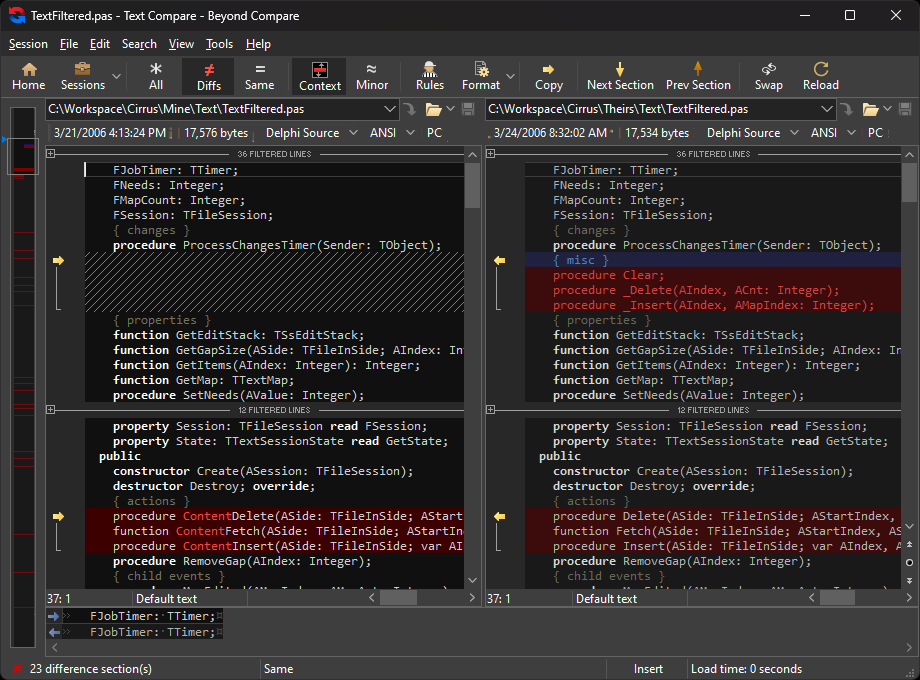
Beyond Compare makes it easy to see differences between two or more files and folders. The app highlights changes visually so you can quickly spot:
- Missing files
- Modified content
- New versions
- Duplicates
You can choose to focus on content, filenames, dates, or sizes. That’s especially helpful for backups, version control, or troubleshooting.
Merge, synchronization, and reports
One of Beyond Compare’s biggest strengths is the ability to:
- Merge changes between files
- Automatically synchronize folders
- Reconcile differences between local and external drives
- Generate detailed difference reports
We used it to compare two nearly identical project folders, and it genuinely saved us several hours of manual work.
Support for text, code, and binary files
Beyond Compare isn’t just for “regular” files. It can also handle:
- Source code (with syntax highlighting)
- Text files
- Images (visual comparison)
- Binary files
- ZIP archives
That makes the tool especially popular among developers and technically inclined users in the United States.
Ease of use and learning curve
Although Beyond Compare is powerful, the interface is surprisingly logical. The basics are easy to grasp, while the more advanced features take a bit of practice. The documentation is solid, and the app feels stable—even with heavy comparisons.
Beyond Compare for Windows, Mac, and Linux
Beyond Compare is available for:
- Windows
- macOS
- Linux
That makes it easy to use the same tool across platforms, which is a big advantage in mixed environments.
Top 5 tips for Beyond Compare
Use filtering to focus on what matters
Filter out irrelevant items (e.g., log files) so you only see what truly matters.
Enable rules for automatic sync
Save time by letting Beyond Compare handle recurring synchronizations automatically.
Use Text Compare for code
Syntax highlighting makes it much easier to find issues in scripts and code files.
Save your sessions
If you frequently compare the same folders, save the setup and reuse it.
Generate reports for documentation
Perfect when you need to document changes for colleagues or clients.



