 Martin Jørgensen
Carpet Cleaning Simulator – satisfying carpet cleaning with a twist
Carpet Cleaning Simulator is a laid-back cleaning game where you scrub dirty carpets, rinse away the soap, and invest your earnings in better gear. It sounds almost too simple, but watching a filthy rug turn spotless at a steady pace makes the game surprisingly satisfying.
We tried Carpet Cleaning Simulator on an iPad, and the first carpets are easy to tackle. You quickly fall into a rhythm: apply soap, scrub the grime loose, rinse with water, and finally push the water and foam toward the drain. It’s reminiscent of the calm satisfaction from PowerWash Simulator, but the upgrades and time pressure give it a distinct identity.
How carpet cleaning works
You start with basic brushes and sponges. Over time, you unlock better tools that let you clean larger areas faster.
The cleaning itself happens in several steps:
- Scrub the carpet with a brush or sponge.
- Work in the soap until it foams.
- Rinse the carpet with water.
- Use a floor squeegee to push water and foam into the drain.
- Get paid and spend it on new upgrades.
The visual payoff is the game’s biggest strength. You can always see how much of the carpet is left to clean, and it’s hard not to do “just one more section” once you get going.
Controls are simple, and after recent updates you can hold the button to scrub continuously. It’s a small detail that makes a clear difference on larger carpets.
A meteor resets time
Carpet Cleaning Simulator isn’t just another cleaning game. At some point, a meteor hits the town and sends you back to the beginning.
That’s where the incremental and roguelite elements come in. Some upgrades disappear when time resets, while permanent improvements carry over into your next run.
There are two types of upgrades:
- Permanent upgrades that stay after a reset.
- Temporary upgrades that only last for the current run.
It pays to decide where your money will have the biggest impact. A strong temporary boost can increase earnings right now, while permanent upgrades are usually the best long-term investment.
The meteor idea sounds a bit quirky for a carpet-cleaning game, but it keeps the experience from becoming a string of identical chores.
Upgrade your tools and automate the work
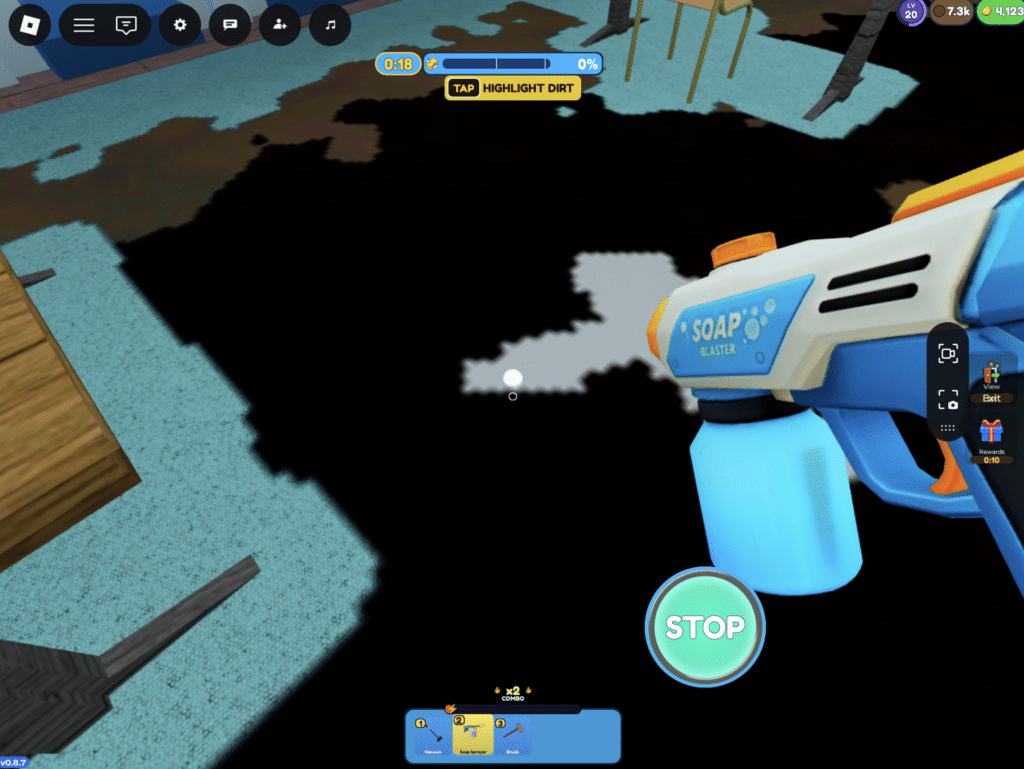
Once you clear the first rugs, Carpet Cleaning Simulator opens up. You can improve work speed, water pressure, and cleaning power, among other stats. Later you’ll unlock more advanced gear and automation options.
Progress feels substantial. A carpet that once needed careful scrubbing can be finished much faster after a few upgrades, delivering that classic incremental-game satisfaction as the same job gets steadily more efficient.
You do need to enjoy repetition, though. The core actions don’t change dramatically, and if you don’t find the cleaning itself satisfying, upgrades probably won’t carry the experience forever.
Carpet Cleaning Simulator for Windows and Mac
You can get the game on Steam for Windows and macOS. There’s also a free demo, so you can try the cleaning before buying the full version.
The official minimum requirements for Windows are:
- Windows 11 64-bit
- Intel Core i7-11800H
- 8 GB RAM
- NVIDIA GeForce GTX 1650
- DirectX 12
- 5 GB of free storage space
On Mac, you need at least macOS 13 Ventura, an M1 Pro chip, 8 GB RAM, and 5 GB of storage.
The requirements are a bit higher than the visuals might suggest. The game isn’t officially available for Linux, and Danish isn’t among the supported languages. The menus are fairly easy to navigate if you’re reasonably comfortable with English.
Updates and technical improvements

The developer, daimaGAME, has already shipped fixes since launch. Early updates added 4K resolution, improved water transparency, and resolved issues with the tutorial, the cleaning robot, and certain upgrades.
In our playthrough we found a fairly straightforward game, though large amounts of foam and water can still make the screen a bit busy. It’s encouraging that the developer continues to improve both performance and foam behavior.
The developer also states openly that AI-generated material was used for a few carpet textures and news icons. It doesn’t affect gameplay, but it’s worth noting.
Top 5 tips for Carpet Cleaning Simulator
1. Prioritize permanent upgrades
It’s tempting to buy the strongest boosts right away, but permanent upgrades persist after each reset. Use the first runs to build a solid foundation.
2. Clear all the foam
You don’t just earn money from scrubbing. Rinse thoroughly and push all foam into the drain to receive full payment for the job.
3. Hold the button while scrubbing
The game supports continuous scrubbing, so you don’t need to click repeatedly. It’s faster and more comfortable, especially on larger rugs.
4. Upgrade water pressure and work speed together
Higher water pressure speeds up rinsing, while better work speed helps during scrubbing. Upgrade both evenly so one step doesn’t become a bottleneck.
5. Plan ahead before the meteor hits
Avoid spending everything on pricey temporary boosts if a reset is near. Prioritize upgrades you can carry into the next run instead.