
 Martin Jørgensen
FormatFactory – free all-in-one media converter
FormatFactory is a free conversion tool for Windows that lets you change the format of virtually any type of file. Whether you’re working with videos, music, images, or documents, FormatFactory handles the job—quickly and without much technical know-how.
We tested the program on a standard Windows 11 PC, and conversion times were surprisingly short. The interface looks a bit dated, but it’s logically organized and fully available in English.
Features and options
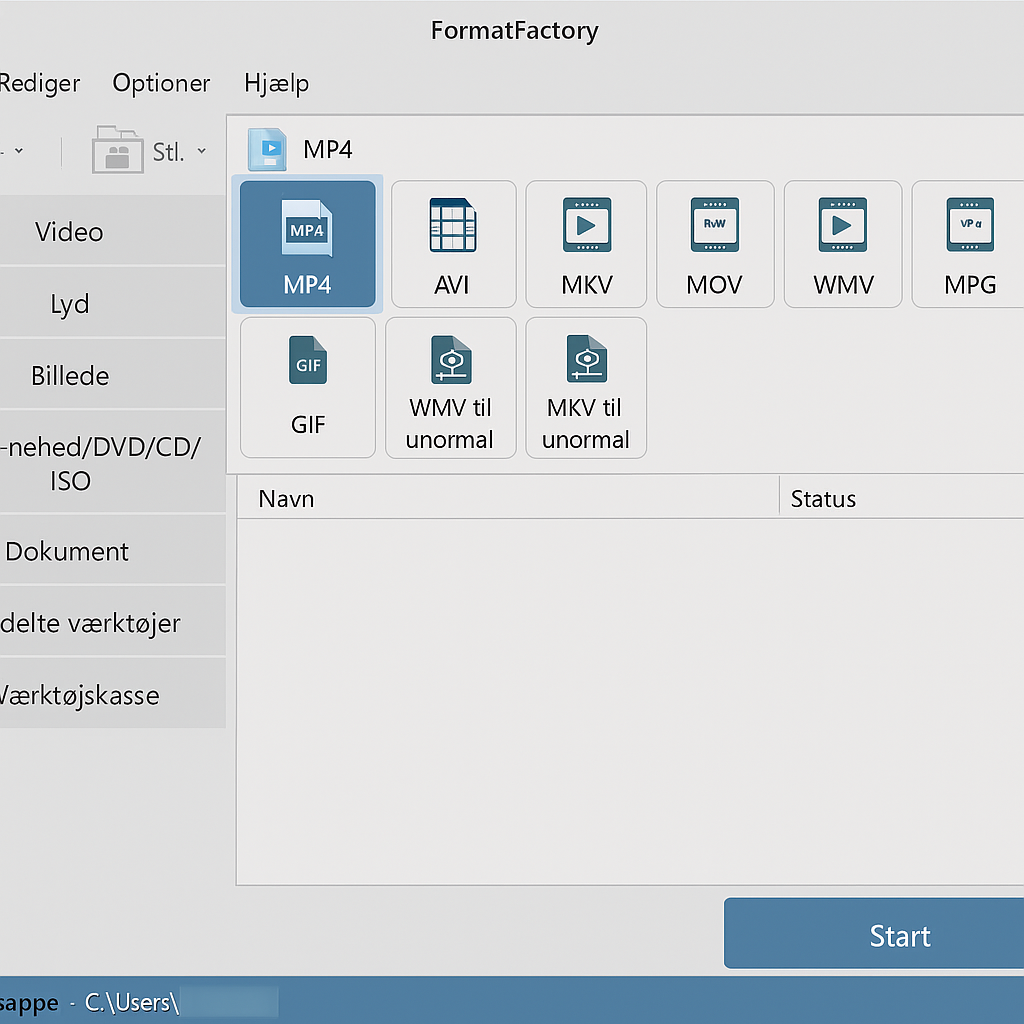
Convert video (MP4, AVI, MKV, MOV, etc.)
FormatFactory supports virtually all common video formats. We tested converting from AVI to MP4, and the process took only a few minutes. It’s especially handy if you need videoer til at fungere on mobile devices, game consoles, or smart TVs, which can have format limitations.
Audio conversion (MP3, WMA, AAC, FLAC, etc.)
If you have music in a format your player doesn’t support, you can easily ændre it. We found that converting from FLAC to MP3 preserved high audio quality while significantly reducing file size—ideal for music libraries where space is limited.
Image conversion (JPG, PNG, WebP, GIF, etc.)
For designers, web developers, or everyday users, it’s a big advantage that FormatFactory can switch between image formats. We used the feature to convert large PNG images to WebP, which resulted in faster load times on a test website without compromising quality.
Option to rip DVDs and CDs
If you still have a collection of old DVD movies or audio CDs, you can digitize them easily. The program saves content in modern formats like MP4 or MP3, so you can take your collection on a laptop or smartphone—without needing an external drive.
Merge video and audio files
A surprisingly useful feature is the ability to merge multiple video files into one. It’s perfect for combining short clips into a longer video, or for blending audio recordings into a single track.
Built-in tools for compression and trimming
FormatFactory doesn’t just convert—it also optimizes. We tested the compression tool on a 1 GB video file, and the result was a 300 MB file with no visible loss of quality. You can also trim both audio and video if you only need a specific segment.
Extra bonus – repair and file optimization
One thing that makes FormatFactory unique is its ability to repair damaged video files. In our test, we managed to revive an MP4 file that otherwise wouldn’t play. You can also reduce the size of existing files to save space on your hard drive or in the cloud.
Ease of use and design
Although the program could use a visual refresh, it’s easy to use. Everything is handled via menuer i venstre side, where you simply choose the file type, drag your files in, and click “Start.” We found that batch conversion (multiple files at once) worked flawlessly, which is a big plus.
Strengths and weaknesses
The biggest strength is undoubtedly bredden i de understøttede formater and the fact that it’s free. The downside is that ads appear during installation, so pay attention and avoid installing unnecessary extra programs.
Top 5 tips for FormatFactory
If you have many files, drag them all in at once and convert them together to save time.
Large video files can be reduced with the compression tool, making them easier to share online or via email.
Adjust resolution, bitrate, and audio quality—perfect for optimizing videos for YouTube or your phone.
Save your DVD movies as MP4 so they can play on modern devices without a DVD drive.
Quickly switch between JPG, PNG, and WebP—ideal for optimizing images for the web and social media.



