

 Martin Jørgensen
Like many other popular writing tools, FreeMind is designed to help you keep your notes organized. Where FreeMind truly stands out is that your content is arranged as a classic mind map. This lets you center your notes around a topic and branch out in every direction with headings, explanations, and subheadings. You can use it as a standard mind map to brainstorm ideas and tasks, and it also gives you an alternative way to take and structure notes.
The program is completely free and can be downloaded for Windows here on this page in no time. No ads or bundled software come with the download, giving you a remarkably powerful tool for your writing without paying a cent. If you’re a Mac user and want to download FreeMind for Mac, you’ll find a download link further down the page under ’Availability’.
Easy to use
FreeMind is laid out like many classic programs such as Microsoft Word and Excel, with the various menus at the top and a wide range of tools you can use. For example, you can choose from many icons to attach to different nodes in your mind map, making it much easier to navigate visually.
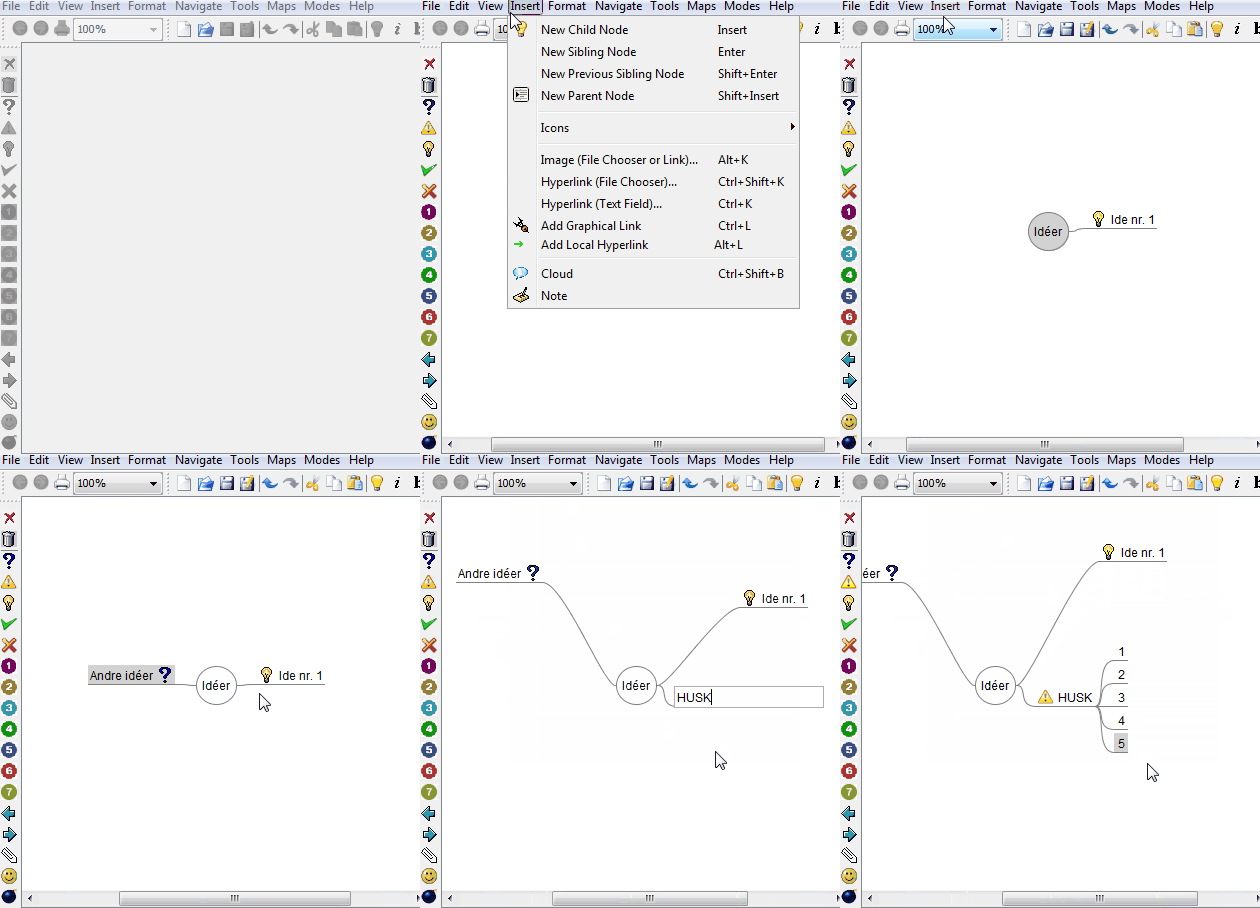
The example above shows a first attempt at using the program, and you’ll likewise quickly learn to navigate FreeMind. It only makes use of a few of the features the app includes. We encourage you to explore all the tools when you get started so you can get the most out of FreeMind. You can add images and use a wealth of colors to help different items stand out.
Boost your productivity
Mind maps have long been used to create an overview of a concept placed centrally in the map, after which branches to the sides give you a complete hierarchical view. Mind mapping imitates how our brain works best: we remember through association. The brain recalls one thing, which leads to another, and so on.
This pattern provides a very different structure than the classic linear layout you know from traditional notes. By using FreeMind, you can quickly get an overview of what’s most important about a specific topic and then work your way outward into deeper detail toward the less and less important aspects.
Mind maps aren’t for everyone
FreeMind can clarify complex problems by creating a structure where different branches create associations between points. However, it can also cause confusion if you’re used to the linear form known from note-taking. Because you decide what goes where and how the mind map should look, some may find it unstructured or messy.
That’s why it’s important to figure out whether this type of program is right for you before deciding to use it in important situations. It’s a good idea to try the program and take the time to understand how FreeMind works before you choose for or against it.
Installs in seconds
FreeMind isn’t a large or storage-hungry program. It’s a relatively small piece of word processing software. Therefore, it only takes a few seconds to download and install, as shown below.
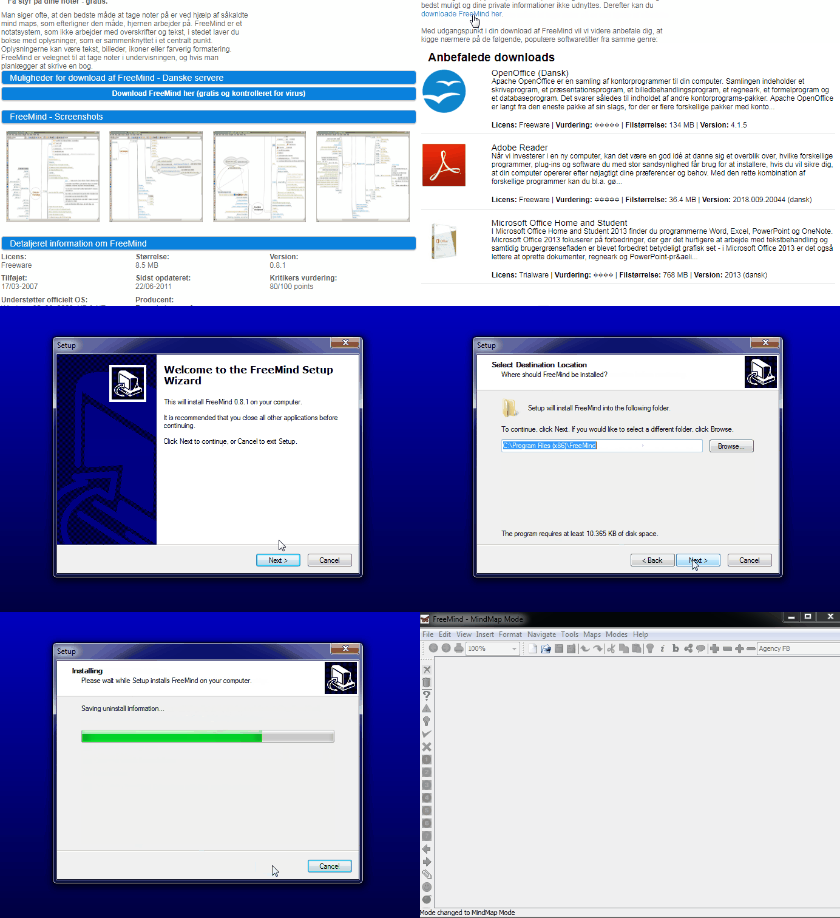
When the program is correctly installed, it’s ready to use, and an icon appears on your desktop. From there, it’s up to you to make the best use of the app. If you need help, under the ’Help’ tab click ’Documentation’ to get assistance with every aspect of the program.
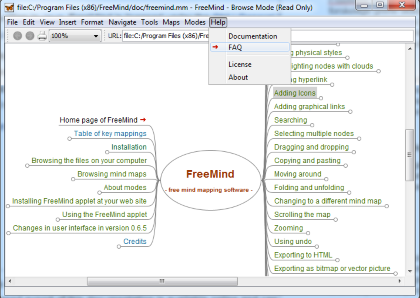
FreeMind runs in English. If you want the program in Danish, under the ’Tools’ tab click ’Preferences’ and choose dk as the language. However, changing the language may introduce mistranslations and other issues, so we recommend using the program in English whenever possible.
Availability
The version of FreeMind available for free download here is developed for users of Windows operating systems. If you’re a Mac user and want to download FreeMind for your Mac, you can do so through this link.
Alternatives
If you’re among those who find mind maps more confusing than structured, take a look at some of the many other note‑taking programs available. For example, the very popular Microsoft OneNote can be downloaded by following this link, where you can also read much more about the program.
Conclusion
FreeMind is a writing tool that lets you create mind maps, making it simple and manageable to work with a topic or problem. Mind maps imitate the way our brain works by drawing branches from the central topic to different points associated with it. In doing so, FreeMind distances itself from classic text programs such as OneNote and Word, where linear text is the norm—often not the optimal setup when you need to work on something concrete.
The program is incredibly easy to use, and you’ll quickly learn to navigate the menus while exploring the many features the developers have built. Of course, some people simply work best in programs like OneNote and Word, which also means FreeMind isn’t necessarily the optimal program for everyone. If you’re skeptical, it’s still absolutely worth giving FreeMind a try. The program is free, and you can download and install it in just a few seconds. That way, you can quickly decide whether it’s right for you or whether you work best in traditional text programs. If you’re more interested in trying Microsoft OneNote, you can read more about it and download it by clicking right here. But if you’re interested in FreeMind, download it just below for Windows, while Mac users can get FreeMind by clicking right here.
Organize your notes with the FreeMind mind mapping app — free.
Download FreeMind


