

 Martin Jørgensen
🔥 GlassWire – See and control your network traffic in real time.
Not sure what your apps are doing online? Want to monitor all network traffic and make sure only the right apps get access? Then GlassWire is an excellent choice.
GlassWire is more than just a firewall — it’s a visual network monitor that makes it easy to understand and control which programs use your connection — and how.
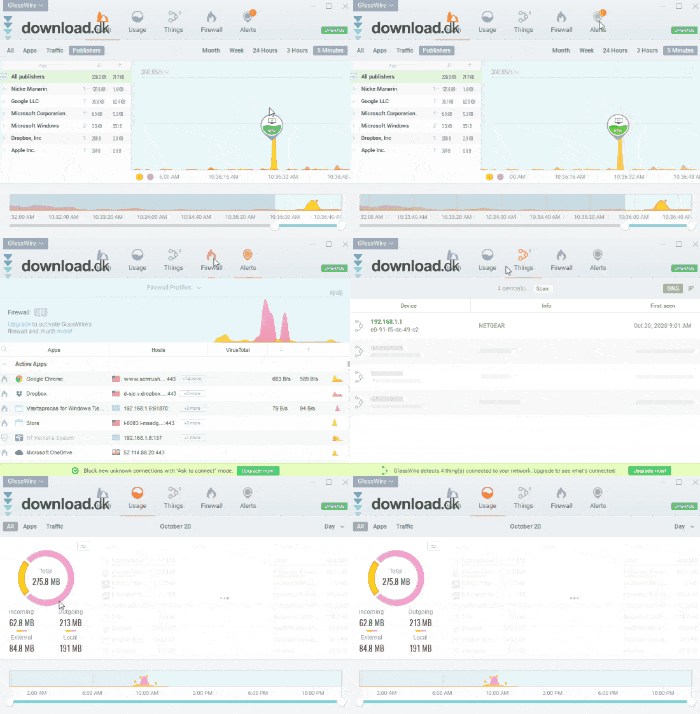
🧠 Features and capabilities
- 📊 Visual overview of real-time network traffic
- 🧱 Built-in firewall with app blocking
- 🔍 See exactly which IP addresses your apps connect to
- 📡 Usage view showing how much data your programs use
- 🔔 Alert system: Get notified about suspicious behavior
- ⏳ History view — see activity across hours, days, or months
- 🖥️ Desktop mini graph for a quick overview
- 👨💻 Remote monitoring (Pro version)
- 🔐 Lockdown mode — stop all traffic with one click

🎨 Design and ease of use
GlassWire is known for its clean, modern interface that makes it useful even for non-technical users. Each section (Graph, Usage, Things, Firewall, Alerts) has its own tab with clear explanations and visual feedback.
The app is fast, stable, and clearly organized — and it’s easy to customize with different themes and filtering options.
💵 Pricing and versions
You can try GlassWire for free, but many advanced features require a subscription. Here’s the overview:
- Basic ($40/year): 6 months of history, 1 PC
- Pro ($70/year): 1 year of history, 3 PCs
- Elite ($100/year): Unlimited history, up to 10 PCs, and multiple remote connections
All plans include the real-time graph, a basic firewall, and alerts.

🔐 Extra security: Pair with a VPN
Want to combine monitoring with stronger privacy? NordVPN is an ideal companion to GlassWire. With fast servers, a kill switch, and strong encryption, you get maximum control over who can see your traffic — and how it’s handled.
👉 Download GlassWire for free here



