
 Martin Jørgensen
📸 Google Photos – Free photo editing, storage, and sharing in one solution.
Google Photos is Google’s modern, cloud-based photo service that offers advanced photo editing, automatic backups, and easy sharing of your images – all wrapped in a user-friendly and free platform.
The service replaced the former desktop app Picasa, but today it offers far more features and is geared heavily toward both mobile and web use. If you previously used Picasa, Google Photos makes it easy to access your old pictures again.
🖼️ Advanced photo editing – right in your browser or app
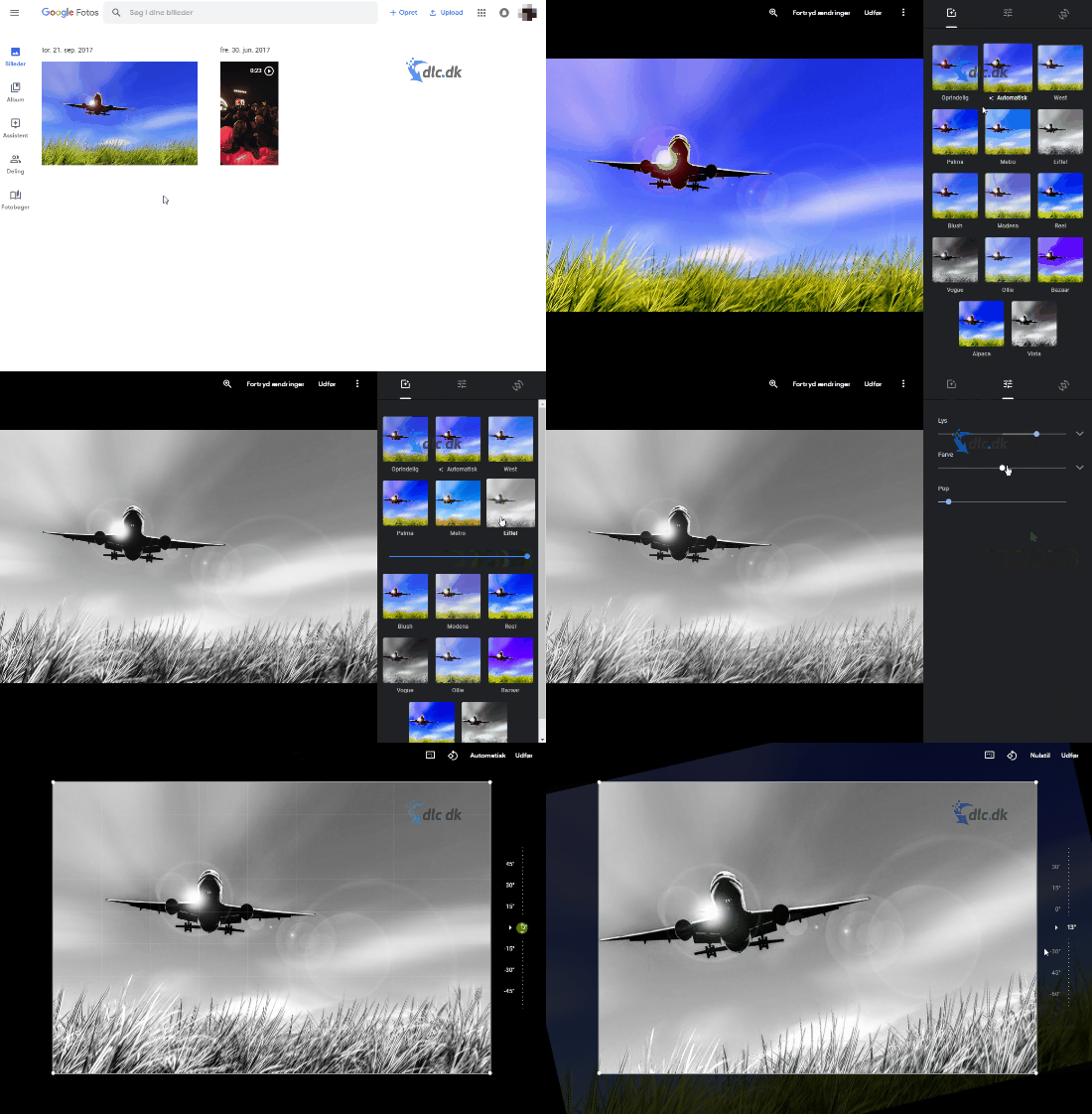
Google Photos isn’t just a gallery – it’s a cloud-based photo editor where you can:
- Adjust brightness and color
- Crop and rotate
- Apply filters and effects (vignette, duotone, and more)
- Compare the original and edited photo side by side
All edits happen in real time and can be undone at any time. You don’t need to download the photos first, and you can avoid heavy programs on your computer entirely.
🔐 Automatic backup and cloud security
One of the biggest advantages of Google Photos is automatic backups. You no longer have to worry about where your photos end up if your phone breaks or your computer crashes. Your photos and videos are stored in the cloud and can be accessed from any device with your login.
- 1 (depending on quality settings and a Google One subscription)
- Sync across all devices
- Option to save photos in original quality
🔍 Smart search and AI recognition
You can search for specific photos without remembering file names. Google Photos uses AI to recognize:
- Faces
- Animals
- Objects and places
- Dates and events
Type “dog on the beach,” and the app shows every matching photo. It makes navigating large photo collections incredibly easy – especially for families and hobby photographers.
🌐 Availability and platforms
Google Photos works as both a web app and a mobile app – and is supported by most systems:
- Windows
- macOS
- Android
- iOS
You can easily sync photos from your computer and then access them from your phone – and vice versa. Share photos and albums directly via a link or through integrations with Google Drive and Gmail.
🔁 Alternatives to Google Photos
Although Google Photos is among the most user-friendly and complete photo services, there are great alternatives:
- Adobe Photoshop Express – more advanced editing, but requires a subscription
- Photoscape – offline photo viewer with many features
- Microsoft OneDrive – also offers photo backup and a gallery
- Apple Photos – perfect if you’re deeply integrated into the Apple ecosystem
🎯 Who is it for?
Google Photos is ideal for:
🧓 Photo enthusiasts who want a simple yet powerful tool
📷 Hobby photographers and bloggers
👨👩👧👦 Families with lots of photos on their phones
📱 Users who want to avoid local storage and manual backups



