
 Martin Jørgensen
Rename multiple files at once with Rename Master
Rename Master is a free Windows utility for batch-renaming files. It’s especially useful if you’re dealing with large folders full of photos, music, videos, or documents that need clearer, more logical filenames. Instead of fixing files one by one, you can create rules and change hundreds of names in a single pass. The official description highlights text replacement, using metadata from image and music files, a preview feature, and support for both files and folders.
This is exactly where Rename Master hits a common Windows pain point: messy filenames from cameras, downloads, old archives, or projects where everything is named almost the same. The program isn’t built to look modern—it’s built to save time. And it does that very well.
What can Rename Master do?
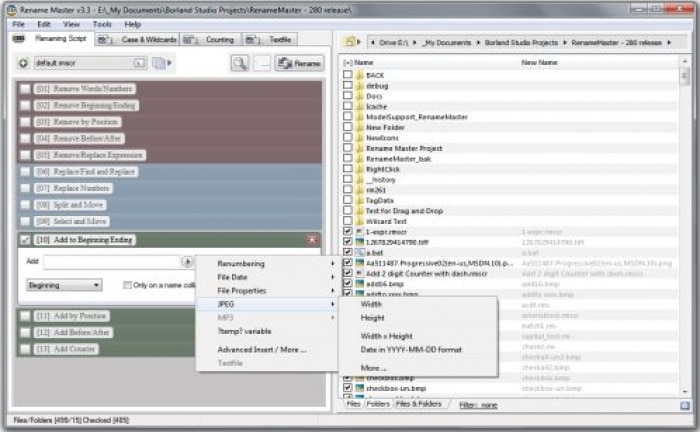
Rename Master is built for users who want more control than Windows File Explorer’s basic rename feature provides. You can add, remove, or replace parts of filenames, work with counters and patterns, sort intelligently, and pull data from JPEG, MP3, and video files as part of new filenames. The official site also mentions wildcard and regex support, plus the ability to save scripts for repeat tasks.
That makes the program ideal for, for example:
– large photo folders from vacations or work
– MP3 collections with messy track names
– video files that need a consistent structure
– document folders with version numbers
– web files and archives that need quick cleanup
If you work with many files at once, the preview feature is one of the most important details. It lets you see the result before you commit. That may sound simple, but it’s exactly the kind of thing that separates a useful tool from one that creates chaos.
Interface and user experience
Rename Master doesn’t have the most modern interface. It looks very much like a classic Windows utility, which some might find a bit dated. On the other hand, there are lots of features gathered in one window, and once you understand the logic, the workflow becomes quite efficient.
This isn’t a program you install for its design. It’s a program you download because you have 800 files that need to be cleaned up now.
The official site also highlights features such as auto-preview, custom columns in the file list, subfolder scanning, File Explorer integration, and command-line options, all of which make the tool more flexible than its somewhat dry UI first suggests.
How good is Rename Master today?
The best thing about Rename Master is that it’s still actively maintained. The developer continued releasing updates in 2025 and 2026 with bug fixes, dark mode improvements, new metadata options, and general refinements. That’s a good sign—and a reason to keep this guide up to date.
It’s also fair to say the program isn’t for everyone. If you only need to rename 10 photos once in a while, a more modern alternative might feel easier. Rename Master is best for users who regularly work with large file collections and want precise control.
Who should download Rename Master?
Rename Master is best suited for:
– people who work with lots of photos or videos
– people who want to clean up old folders
– people who download large file collections
– people who want to use rules, counters, and metadata
– anyone who needs a free batch rename program for Windows
If you prefer a very simple and modern tool, Rename Master can feel a bit technical at first. But if you need control, it’s still one of the more interesting free options in this niche.
Top 5 tips for Rename Master
Start with a preview before renaming everything
It sounds simple, but this is where you avoid classic mistakes. Always check the column with the new names before you apply changes.
Use counters for photo and document series
If you have many files from the same project, numbering is a fast way to bring order to your folders. It makes large photo series much easier to navigate.
Leverage metadata for photos and music
Rename Master can pull data from formats like JPEG and MP3. That’s great if you want to build filenames with dates, artists, or other details.
Save your rules as scripts
If you often perform the same kinds of renames, save your setup and reuse it later. Scripts are a core feature mentioned by the developer.
Test on a small folder first
If you’re working with a large collection, try your rules on 10–20 files first. It’s much easier than fixing 500 names afterward.



