
 Martin Jørgensen
TagSpaces – Organize your files with tags instead of folders
TagSpaces is an open-source file manager that lets you organize your files and folders with tags instead of the classic folder hierarchy. We tested it on a Windows 11 PC and found installation straightforward, while the initial setup took a bit of time to tailor the many features. Once you get going, the tag-based system quickly feels more flexible than traditional file management methods.
Features and ease of use
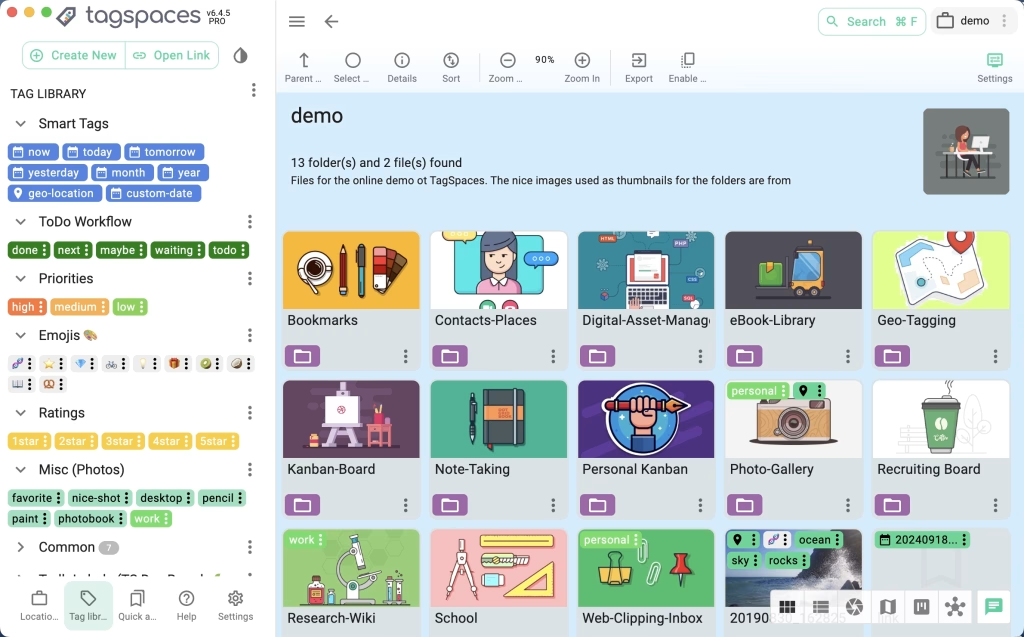
We quickly noticed that TagSpaces stands apart from classic file managers. Instead of being locked to folders, we could add color codes, descriptions, and tags directly to files—without changing the file itself. That meant we could organize documents, images, and PDFs across projects without physically moving them.
One thing we appreciated during testing is that the app works completely offline. There’s no cloud lock-in, no account required, and no hidden backdoors. That gave us a sense of full control over our data—especially important if you work with sensitive files or simply don’t want to hand everything over to Google Drive or OneDrive.
The search function impressed us. When we assigned multiple tags to the same file, we could filter down to what we needed in no time—and it felt more efficient than traditional folder hunting. On top of that, we could get instant previews of images, PDFs, and text files, which saved time when we just needed to check the contents.
We tested TagSpaces on Windows 11 and macOS Sonoma, and the features were nearly identical. There’s also support for Linux and Android, so you can use the same organization approach across platforms. The Android app felt a bit more limited than the desktop version, but it still let us keep our tags and structure on the go.
Interface and design
The interface resembles a modern file explorer with a navigation sidebar, and we found it intuitive after a couple of hours of use. Dark mode is included, which is especially nice for long workdays.
Who benefits most from TagSpaces?
- Students who want to keep notes and documents organized.
- Photographers and designers who manage lots of images.
- Anyone tired of digging through too many folders.
Strengths and weaknesses
The app is powerful but not entirely plug-and-play for new users. There is a learning curve, but in return you get full freedom without being locked into Google Drive or OneDrive.
Top 5 tips for TagSpaces
TagSpaces is an open-source file manager where you organize your files with tags and colors instead of traditional folders. It works completely offline with no need for cloud services.
Yes, TagSpaces has a free version with all core features. There is also a Pro edition with extra features like geo-tagging and more advanced search.
TagSpaces supports Windows, macOS, Linux, and Android. This lets you keep your way of organizing files consistent across devices.
There is a small learning curve, especially if you’re used to folders. But after a short time it becomes easy to navigate, and the benefits of the tag system are clear.
TagSpaces is primarily designed for offline use, but you can store your files in a cloud folder (e.g., Dropbox or OneDrive) and still organize them with TagSpaces’ tags.



