
 Martin Jørgensen
3uTools for PC & Mac – The best free alternative to iTunes
3uTools is a free all‑in‑one tool for iOS devices that lets you manage apps, photos, music, ringtones, videos, and more directly from your computer. It’s widely known for being far more user‑friendly than iTunes while unlocking features Apple typically hides from users.
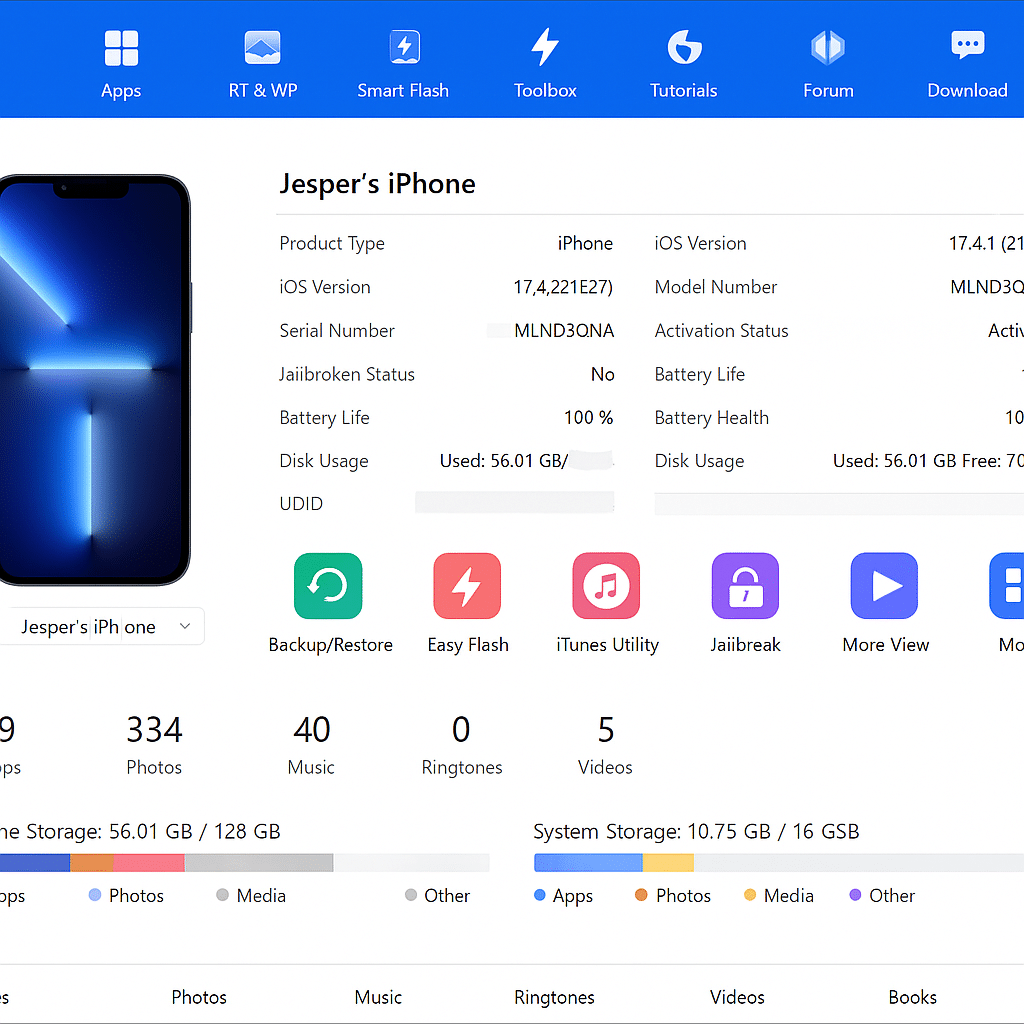
We tested 3uTools on a Windows 11 PC with an iPhone 13, and installation took under five minutes. The interface is simple, and it feels more like browsing a file manager than being stuck in Apple’s somewhat heavy iTunes system.
Features and capabilities
Backup and restore
With 3uTools, you can create a full backup of your entire iPhone or choose exactly which files and apps to save. It’s far more flexible than iTunes, where everything must be included in one large backup. In our tests, we could quickly restore an iPhone after a reset and even choose to bring back only specific elements—such as photos, messages, or apps. That saves both time and space.
App and file management
One of the biggest advantages of 3uTools is the freedom you get with files. Instead of being locked into iTunes, you can easily move music, videos, photos, and documents directly between your computer and iPhone. We tested dragging an entire music folder into the program, and all songs synced without errors. The same goes for photos and videos, which can be transferred in full resolution without losing quality.
Firmware flashing
3uTools lets you upgrade, downgrade, or restore iOS versions. This is especially useful if a new update causes problems and you want to roll back to an older release. The program shows a list of available iOS versions for your specific device, so you avoid downloading the wrong files. Do note that flashing requires some technical know‑how, and there’s always a risk if the process is interrupted.
Jailbreak tools
For advanced users, 3uTools includes integrated jailbreak tools that unlock features and apps Apple otherwise restricts. Using them is completely optional, and for most users it isn’t necessary. But if you want to experiment with themes, tweaks, and third‑party apps, it’s one of the easiest ways to get started with jailbreaking.
Ringtone editor
With the built‑in Ringtone Maker, you can create your own ringtones from any music file on your computer. You can cut the exact section of the song you want, adjust the start and end times, and then transfer it directly to your iPhone. In our test, it worked smoothly, and we had a new ringtone ready in under a minute—without going through iTunes’ cumbersome processes.
Ease of use and design
Unlike iTunes, 3uTools feels fast and logically organized. All menus are clear, and we didn’t experience issues with either the iPhone connection or file transfers. It’s especially handy that you can view detailed device information—from battery health to storage and installed apps—all in one place.
Challenges and limitations
Although 3uTools is a fantastic tool, the more advanced features (e.g., firmware flashing and jailbreaking) require some technical knowledge. For most users who just want to avoid iTunes, there’s no need to touch these.
Top 5 tips for 3uTools
Yes, 3uTools is completely free and ad‑free. Features like backup, restore, file management, and the ringtone editor are all included.
Yes, 3uTools supports both iPhone and iPad. We tested it with an iPhone 13, and all features worked without issues.
Unfortunately, no. 3uTools is Windows‑only. Mac users should use alternatives like iMazing or continue using iTunes.
Firmware flashing is safe if you choose the correct version for your device. However, it can cause issues if you lack experience, so we recommend caution.
Yes, one of the biggest advantages of 3uTools is that you can transfer music, videos, and photos directly between PC and iPhone without using iTunes.



