

 Martin Jørgensen
Free Office suite: WPS Office.
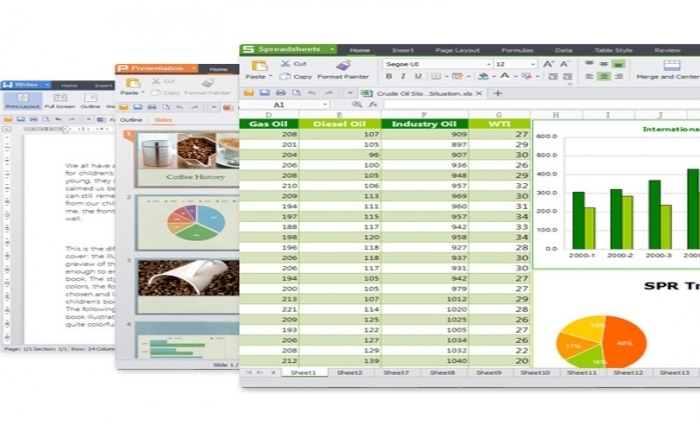
WPS Office is a complete, professional office suite you can download and use completely free — with a full English interface. Developed by Kingsoft, it’s an excellent alternative to Microsoft Office in design, features, and compatibility. With apps like Writer (Word clone), Presentation (PowerPoint alternative) and Spreadsheets (Excel equivalent), you get everything you need for office work, school assignments, or personal use — without paying a cent.
WPS Office isn’t just free — it’s lightweight and quick to install. The suite supports the latest Microsoft Office formats such as .docx, .xlsx, and .pptx, so you can easily open and edit documents created in Word, Excel, or PowerPoint. The visual interface is so similar to Microsoft Office that most users will feel at home right away.
The suite is available for both Windows and Mac, as well as Android and iOS, making it easy to keep working on your files on the go. If you’re looking for a free Office suite in English that’s both easy to use and powerful enough for everyday tasks, WPS Office is one of the best choices in 2025.
Features and benefits
- Compatible with Microsoft Office formats
Open, edit, and save files in popular formats like .docx, .xlsx, and .pptx without issues. Perfect for collaborating with Microsoft Office users. - Full English language and spell check
The entire interface can be set to English, and the spell checker works in English too — a big advantage, especially for students. - PDF editing included
You get a built-in PDF reader and the ability to convert documents directly to PDF. Advanced features like merge, split, and annotations are available in the free version. - WPS Cloud — free cloud storage
With 1 GB of free cloud space via WPS Cloud, you can save and sync your documents online and continue working on them from other devices. - Available on all platforms
Whether you use Windows, macOS, Linux, Android, or iOS, you can install WPS Office and enjoy a consistent experience across your devices. - Dark theme and modern layout
Give your eyes a break with Dark Mode and enjoy a modern, user-friendly interface that resembles the latest Microsoft Office — with virtually no learning curve. - Lightweight and lightning-fast installation
WPS Office takes up far less space than many competitors and installs quickly even on older hardware — ideal for budget laptops and home workstations.
Note: The free version of WPS Office includes occasional ads and prompts to upgrade to the Pro version. You still get the full office suite and can work without paying.
WPS Office is an ideal solution for students, home users, freelancers, and small businesses that want a professional office suite in English — with no license fees. It’s one of the few free alternatives that both look and work like Microsoft Office.



