
 Martin Jørgensen
ZoneAlarm Pro – combined firewall and antivirus with a focus on network security
ZoneAlarm Pro is a Windows security suite that combines antivirus and an advanced firewall in a single package. It’s aimed at users who want more control over network traffic than Windows’ built-in firewall provides.
We tested ZoneAlarm Pro on a standard Windows 11 PC, and installation was quick. Setup requires a bit more attention than many modern one-click solutions, which is both a strength and a drawback—depending on how technical you are.
Firewall and network protection in practice
ZoneAlarm is best known for its firewall, and that’s still where the program stands out. The firewall monitors all inbound and outbound traffic and can be set to Full Stealth Mode. In practice, that makes your PC invisible on the internet to unsolicited external requests.
During testing, the firewall quickly reacted to unknown programs trying to establish network connections. That’s reassuring, but it can also lead to many pop-ups at first—until the system “learns” which apps you trust.
Antivirus and malware protection
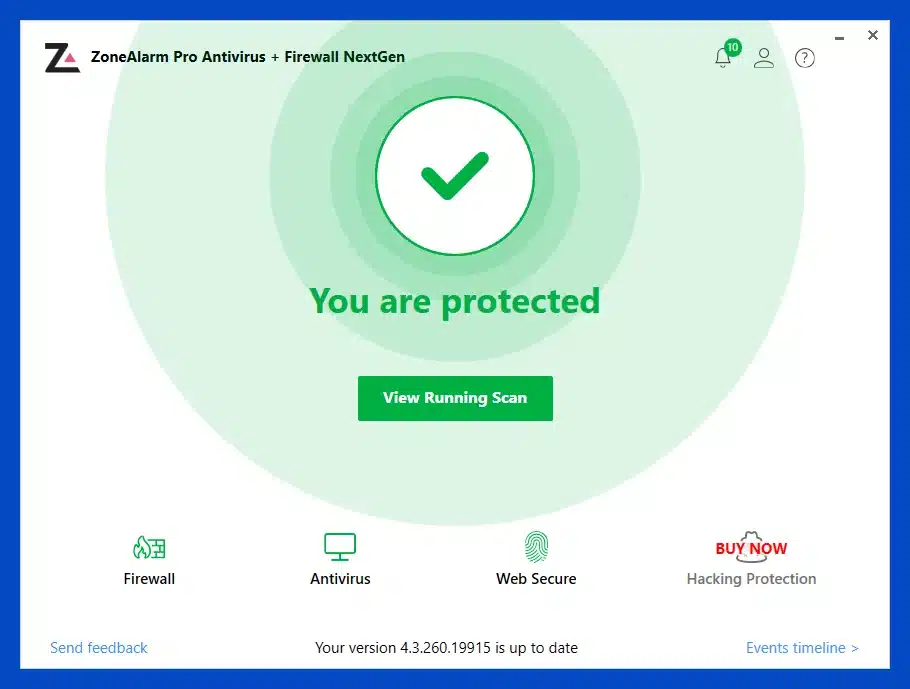
ZoneAlarm’s antivirus protects against viruses, spyware, ransomware, and other forms of skadelig software. Scans can be customized so you can choose specific files, folders, or the entire system.
Performance was reasonable on our test machine. Fuld scanning took time, but it didn’t make the PC unusable. Real-time protection ran steadily in the background with no noticeable slowdowns in everyday use.
Anti-phishing and browser protection
ZoneAlarm includes an anti-phishing feature that can be used with Google Chrome. It analyzes web pages before you interact with them and warns you if a site is suspected of being a scam.
Phishing remains one of the most widespread threats in the United States—especially via fake online stores and emails—so it’s a clear advantage to keep this protection enabled at all times. During testing, several questionable sites were correctly flagged, which can help prevent costly mistakes.
Extra features: backup and Find My Laptop
ZoneAlarm Pro also includes extras like online backup and Find My Laptop. The backup tool works as a basic cloud solution for important files, while Find My Laptop can help you locate a lost computer.
Honestly, these features aren’t among the strongest on the market, but they’re fine as a supplement if you want an all-in-one solution.
Updates and maintenance
The program updates automatically in the background with new virus definitions and security enhancements. That’s crucial at a time when new threats appear constantly, and ZoneAlarm performs as expected here.
We experienced no issues with updates during testing, and the program didn’t require restarts more often than necessary.
Free trial and license
ZoneAlarm Pro is offered as a free 30-day trial. During the trial you have access to nearly all features, which gives a realistic impression of the product.
After the trial, a paid subscription is required to continue using it. That makes ZoneAlarm Pro less attractive if you only want free security, but more relevant if you’re looking for advanced firewall control.
Alternatives to ZoneAlarm Pro
If you’re considering alternatives, there are several strong contenders. Norton and Bitdefender are among the most populære komplette sikkerhedspakker in the United States, while AVG and Avira are solid picks if price matters more.
ZoneAlarm Pro primarily stands out for its firewall—not its antivirus alone.
Platforms and availability
ZoneAlarm Pro is only available for Windows. It doesn’t support macOS, so Mac users should look at alternatives like Avira or Bitdefender for Mac.
A solution for users who want more control over the network
ZoneAlarm Pro is designed for users who want a strong firewall and granular control over network traffic. The antivirus component is solid but not market-leading, and the program’s strength clearly lies in its firewall technology.
For the average user, it may feel a bit more technical than today’s one-click security suites, but that can be an advantage if you want insight and control.
Top 5 tips for ZoneAlarm Pro
Spend a little time with the first firewall prompts
When ZoneAlarm Pro is newly installed, it will often ask whether certain apps may access the internet. That can feel noisy at first, but it’s how you teach the program your habits. Only allow apps you recognize and trust, and the experience will become much quieter afterward.
Enable Full Stealth Mode on public networks
If you use your laptop on café, hotel, or shared Wi‑Fi, Full Stealth Mode adds peace of mind. It makes your computer much harder to discover from the outside and is especially relevant when you work away from home. It’s one of the features where ZoneAlarm still stands out positively.
Schedule full scans for times you’re not working
ZoneAlarm Pro can run in the background without major issues, but a full scan still consumes resources. It’s smart to schedule heavy scans in the evening or whenever you’re not using the PC intensively. That keeps your day smooth—especially on older Windows machines.
Keep anti-phishing enabled in Chrome
Many threats today aren’t classic viruses but fake emails, login pages, and online stores. Let ZoneAlarm’s anti-phishing feature work with your browser at all times. It’s especially useful if multiple people use the same computer and don’t always spot suspicious sites right away.
Use it for firewall control—not just the antivirus
If you choose ZoneAlarm Pro, it’s typically the firewall you’re paying for. The antivirus is fine, but the detailed network control is what makes the suite compelling. If you primarily want classic antivirus, there are often more modern options—but if you want hands-on network security, ZoneAlarm still makes a lot of sense.



