
 Martin Jørgensen
Anvil Studio – free MIDI and music software for Windows
Anvil Studio is free music software for Windows aimed at anyone working with MIDI gear, wanting to record simple audio tracks, or composing directly on a computer. It has been around for many years and is especially popular with musicians, educators, and hobby composers who want a lightweight alternative to full DAWs.
We tested Anvil Studio on a standard Windows 11 PC with a USB MIDI keyboard, and installation was quick and trouble-free. The program launches quickly and doesn’t require complex setup before you can get started.
MIDI editing and recording in practice
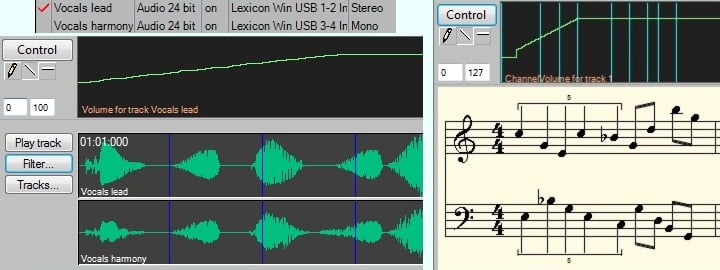
Anvil Studio is built first and foremost around MIDI. You can record, edit, and play back MIDI tracks using external MIDI hardware or directly with your computer keyboard and mouse. The program supports multiple tracks at once, so you can build full arrangements with drums, bass, piano, and synth.
Editing takes place in a classic piano roll interface that’s easy to understand—even if you haven’t worked with MIDI before. Timing, pitch, and duration can be adjusted precisely, and everything feels stable, even in larger projects.
Audio tracks and simple recordings
Beyond MIDI, Anvil Studio can also handle audio tracks. That means you can record vocals or instruments via an audio interface and combine them with your MIDI tracks. The audio tools aren’t as advanced as in professional DAWs, but for simple recordings they work surprisingly well.
In our test, vocal recording worked without dropouts, but the editing options are fairly basic. It’s clear that Anvil Studio is primarily made for MIDI—audio is a supplement.
VST support and extensions
One of Anvil Studio’s biggest strengths is support for third-party VST instruments. This lets you use modern virtual instruments with the software, significantly improving sound quality over standard MIDI sounds.
There are also optional extensions you can purchase separately, such as music notation and advanced multitrack audio. The free version is fully usable for MIDI work and light music production.
Interface, stability, and ease of use
Anvil Studio’s design is old-school but functional. It won’t win design awards, but it’s logically structured and easy to navigate. Buttons, menus, and features are clearly separated, and the program feels stable—even during extended use.
For beginners, it can look a bit technical at first, but the workflow quickly makes sense, especially if you’ve worked with MIDI before.
Top 5 tips for Anvil Studio
Use an external MIDI keyboard
Anvil Studio works best with a USB MIDI keyboard, which gives a far more natural performance than a mouse and computer keyboard.
Install free VST instruments
Download free VST plugins and use them in Anvil Studio to get much better sound than standard MIDI tones.
Split projects into multiple tracks
Work with one instrument per track—it makes editing and troubleshooting much easier.
Save often in larger projects
The program is stable, but during long sessions it’s good practice to save manually at regular intervals.
Use Anvil Studio for learning
The software is great for teaching and practicing MIDI composition because it clearly shows notes, timing, and structure.



