
 Martin Jørgensen
Microsoft Excel – Download, use free online, and get tips for the best features
Microsoft Excel is the world’s most widely known spreadsheet program and is used by individuals, students, and businesses. With the app, you can organize data, perform calculations, design calendars, and analyze large amounts of information. The program is part of the Microsoft 365 suite, but you can also use it free online in your browser.
Features and capabilities
Advanced formulas
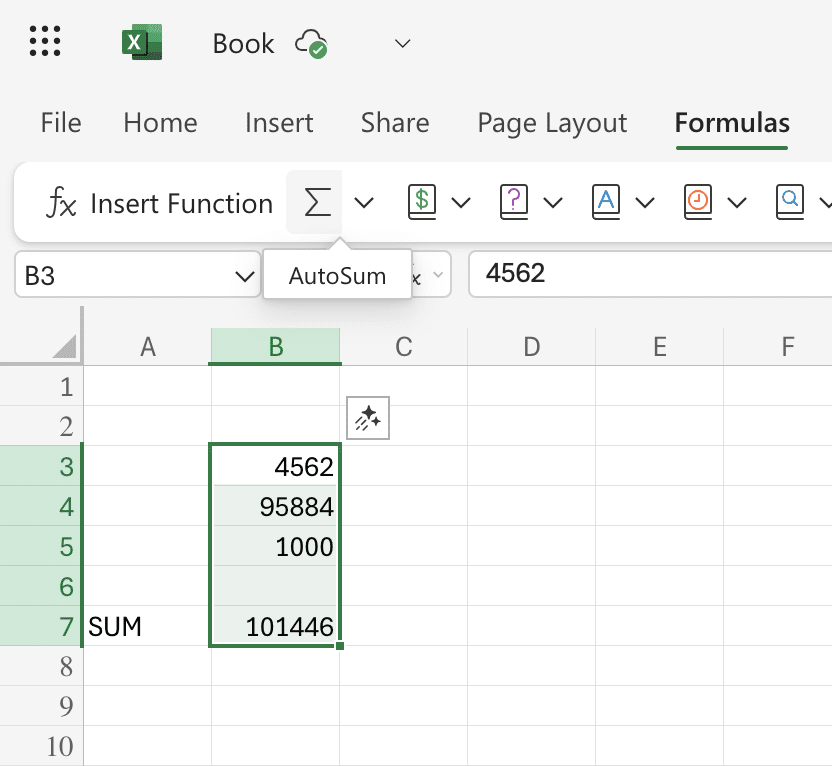
With the app, you can work with everything from simple functions like SUM to logical functions like IF that help you build dynamic calculations. For advanced users, there are also array formulas, financial calculations, statistical functions, and custom formulas you can tailor precisely to your needs. This makes the app one of the most flexible tools for both everyday tasks and advanced data analysis.
Data analysis
Excel offers powerful analytics tools such as PivotTables, which can summarize thousands of rows in seconds. With Power Query, you can import, clean, and transform data from many different sources, while Data Validation helps ensure your entries are correct and consistent. These features make it easy to get an overview of even complex datasets.
Visualization
Beyond crunching numbers, Excel can create professional visualizations. Build anything from simple column and pie charts to interactive dashboards with filters and dynamic elements. Conditional Formatting makes it easy to highlight trends, outliers, and key figures with colors and icons.
Calendar templates
Excel includes a selection of calendar templates you can customize to your needs. For example, download a ready-made 2025 calendar template directly from the app, or create your own with formatting, color-coding, and formulas that automatically adjust dates. Perfect for project planning, vacation overviews, or personal schedules.
PDF to Excel
With the app via Microsoft 365, you can easily import data from a PDF and turn it into an editable spreadsheet. This is useful when you receive reports or tables in PDF format and want to analyze the numbers further. Do it via Data → Get Data → From File → From PDF, and Excel will convert the content into cells you can work with.
Real-time collaboration
Excel lets you collaborate on the same document at the same time, whether you use the desktop app or Excel Online. Through OneDrive, multiple users can edit, comment, and track changes in real time. This is especially useful for teams working on shared budgets, reports, or project management.
Excel Online – the free version
If you don’t have a Microsoft 365 subscription, you can still use Excel for free via Excel Online in your browser. This version has fewer advanced features than the desktop version but is perfect for quick tasks and shared documents. You only need a free Microsoft account.
PDF to Excel – quick conversion
One of the most requested features is being able to convert data from PDF to Excel. You can do this directly in Excel 365 using Data → Get Data → From File → From PDF. Alternatively, there are free online tools, but be mindful of data security.
Calendar 2025 in Excel
Excel is ideal for calendars, and you can either build one from scratch or download a ready-made template from File → New → Search for “Calendar”. There are also free templates on Microsoft’s website that you can customize with your own colors and dates.
Excel course – learn to use it effectively
There are many free Excel courses on YouTube and Microsoft Learn. To learn quickly, focus on:
- Basic formulas (SUM, IF, COUNTIF)
- PivotTables
- Conditional Formatting
- Lock cells and protect sheets
- Keyboard shortcuts
Top 5 tips for Microsoft Excel
=IF(A1>10,"Over 10","10 or less"). Download Excel or use Excel online for free
Use Excel online for free by clicking Download Excel below. From the same button, you can also buy and download the app through Microsoft 365.



