

 Martin Jørgensen
Google Vids – AI video tool directly in Google Workspace
Google Vids is Google’s take on a modern video tool, tightly integrated with Google Workspace. Instead of classic videoredigering, Vids focuses on fast production of explainer videos, presentations, and internal videos—often with help from AI.
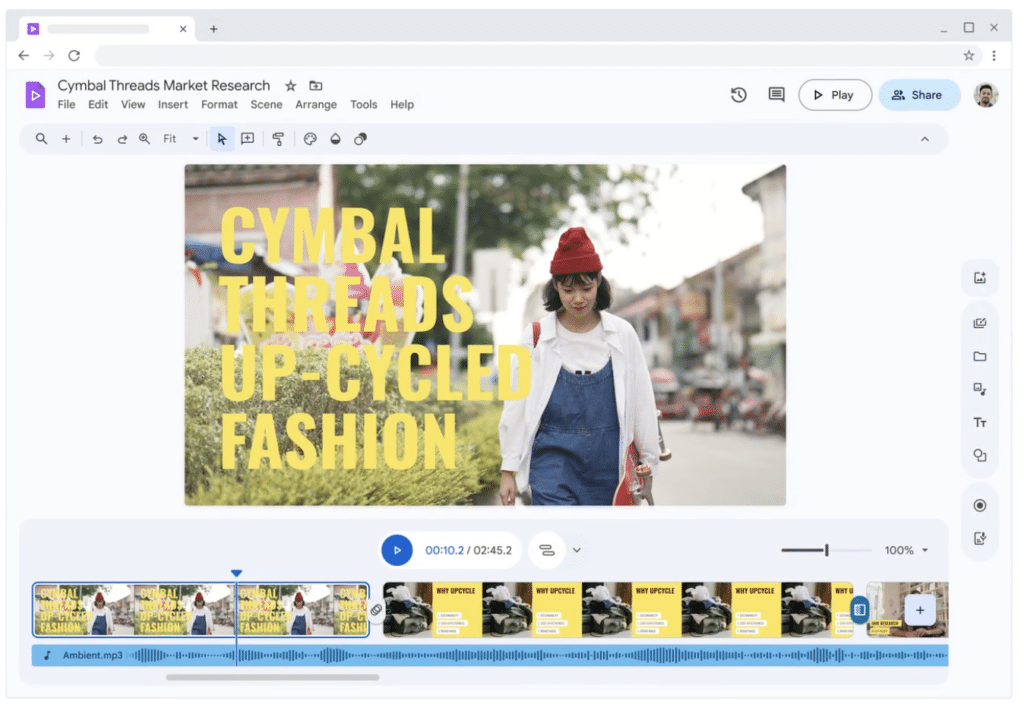
We tested Google Vids directly through a Google Workspace account on a standard Windows 11 PC, and the experience feels more like Google Slides than a traditional video editor. It’s clear Google is targeting businesses and teams—not creative YouTube influencers.
What exactly is Google Vids?

Google Vids is a browser‑based tool that lets you:
- build videos scene by scene
- combine text, graphics, images, and short video clips
- use AI to suggest structure, storyboards, and content
- collaborate in real time—just like in Docs and Slides
Everything runs in the browser, with no installation and no traditional “timeline editing.”
Our test: first impressions of Google Vids
During our test, we especially noticed how quickly you can get started. We created a new video, chose an AI‑generated outline, and had a usable structure ready in minutes.
The interface feels very “Google‑like”:
- clean
- clear
- almost no learning curve
On the flip side, we missed more control over details like timing, animations, and fine‑tuning clips. Google Vids clearly isn’t trying to compete with Premiere Pro or DaVinci Resolve—and that’s by design.
AI features in Google Vids
AI plays a central role in Google Vids, but in a more restrained way than pure AI‑video platforms.
In practice, AI is mainly used for:
- suggesting storyboards and structure
- generating text content
- structuring key messages
- quick layouts for presentation‑style videos
In our testing, AI worked best as a sparring partner—not a finished solution. You get a solid starting point, but you still need to adjust things if you want the video to feel personal.
Google Vids vs Google Slides (and traditional video tools)
Many will naturally ask: “Isn’t this just Slides with video?”
The answer: both yes and no.
Google Vids:
- is built for video from the ground up
- organizes content as scenes rather than slides
- is better for voiceover, motion, and flow
Google Slides:
- is still best for traditional presentations
- requires more arbejde for video
Compared with Canva Video or Loom, Google Vids is more structured and less creatively free, but it’s extremely easy to use in teams.
Who is Google Vids for?
Google Vids makes the most sense for:
- companies already using Google Workspace
- internal presentations and onboarding videos
- product explainers and internal guides
- training and e‑learning in organizations
For kreative videoer, sociale medier or marketing videos, the tool is still too limited.
Limitations and what you should know
Even though Google Vids has launched, there are still clear limitations:
- requires Google Workspace (not freely available)
- no advanced video editing
- limited creative freedom
- AI features are helpful but conservative
- dependent on Google’s ecosystem
It’s a tool that works best if you embrace Google’s way of working.
Top 5 tips for Google Vids
Use AI as a framework—not as a finished video
The AI suggestions in Google Vids work best as a starting point. In our tests, results improved markedly when we used the AI‑proposed structure but wrote the content ourselves and refined the wording.
Think in scenes—not classic video editing
Google Vids is built around scenes instead of a traditional timeline. Once you accept that approach, the workflow becomes much faster and more manageable.
Invite teammates early in the process
The biggest strength of Google Vids is collaboration. Comments, live editing, and feedback directly in the video saved us time compared with classic videoværktøjer.
Use Docs or Slides for prep work
We got the best results by first sketching the content in Google Docs or Slides and then transferring the structure to Google Vids.
Keep expectations realistic
Google Vids is not a creative video editor. It’s an efficient tool for explainer and internal videos – og fungerer bedst, når man bruger det for exactly that.
Is Google Vids worth it?
Google Vids isn’t a standalone product—it’s part of Google Workspace. If your organization already pays for Workspace, Vids is a strong add‑on, especially for internal videos.
For solo users or creative makers, it makes less sense. But as an efficient B2B tool, Google Vids delivers exactly what it promises.



