

 Martin Jørgensen
IObit Uninstaller – remove programs completely from your PC
IObit Uninstaller is a free tool that makes it easy to uninstall unwanted programs and apps from your PC—right down to the last leftover files and registry entries. It’s especially helpful when Windows’ built-in “Add or Remove Programs” (Apps & features) can’t get the job done.
We tested 1 on a Windows 11 PC and quickly cleared out old games, drivers, and apps that had been taking up space for years. The software removed everything without issues and even cleaned up leftover files automatically.
Features and ease of use

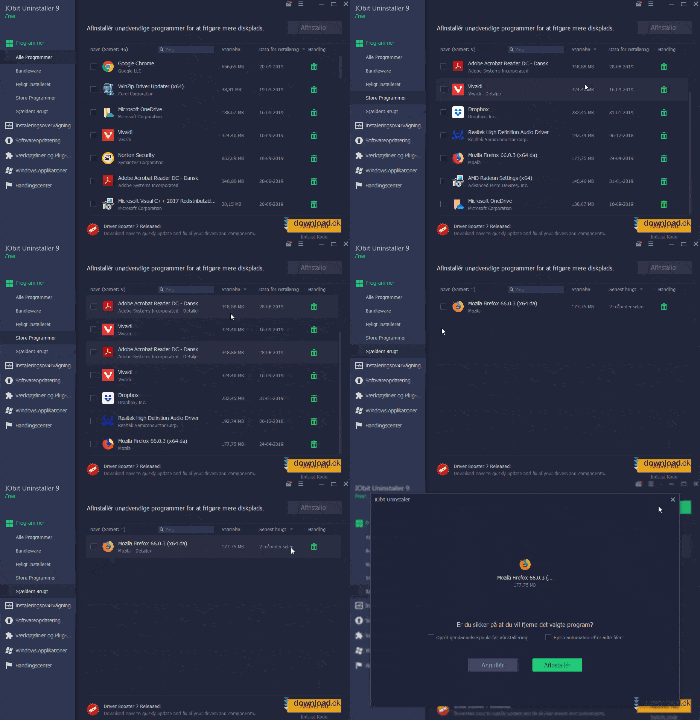
IObit Uninstaller presents a clean dashboard where all installed programs and Windows apps are listed. You can easily sort by size, install date, or how often you use them.
Under the Large Programs tab, you can quickly see which apps take up the most space, while Rarely Used shows the ones you seldom open.
With a single click, you can mark the programs you want to remove—the app handles the rest.
The program is available in English, and the interface is modern and easy to navigate—even for beginners.
Free vs. Pro: what’s the difference?
The free edition covers most needs. It handles thorough uninstallations, removes leftovers, and cleans up Windows apps.
With IObit Uninstaller Pro, you also get:
- automatic software updates
- real-time install monitoring
- removal of stubborn browser extensions
- even deeper leftover cleanup
The Pro version is ideal if you install lots of software and want to keep your system as clean as possible.
Extra tools and recommendations
IObit Uninstaller also includes a tab with recommended tools like Smart Defrag, which defragments your hard drive and can speed up startup.
There’s also a handy toolbox with features for removing browser extensions, Windows updates, and software bundles that often come with free downloads.
Alternatives to IObit Uninstaller
While IObit Uninstaller is among the best tools for removing software, alternatives include Clean Disk Free or Revo Uninstaller.
These often focus primarily on deleting temporary files or general system cleanup, whereas IObit Uninstaller goes further—removing the program at its root.
Top 5 tips for IObit Uninstaller
1. Use “Batch Uninstall” to remove multiple programs at once
Save time by selecting several programs and removing them in one click—IObit handles everything automatically.
2. Remove hidden browser extensions
Check the Browser Extensions tab to delete plugins that are often installed without your consent.
3. Use install monitoring (Pro)
Let the app monitor installations so it can remove everything when you uninstall later.
4. Switch to the “Large Programs” view
See which apps take up the most space on your hard drive and free up storage fast.
5. Clean up after every uninstall
After each uninstall, IObit offers to remove leftover files—accept it to keep your system truly clean.
Why IObit Uninstaller is a must-have for Windows users
If your PC has slowed down, old and unnecessary programs are often to blame.
With IObit Uninstaller, you can easily free up space and improve performance without risking anything important. The program is fast, safe, and takes just a few clicks.
FAQ about IObit Uninstaller
Save time by selecting multiple programs and removing them in one click. IObit handles the uninstall and automatically deletes leftovers afterward.
Under the “Browser Extensions” tab, you can view and remove unwanted plugins installed without permission. This improves both security and browser speed.
IObit Uninstaller Pro can monitor installations in real time so all files and registry entries are completely removed when you uninstall later.
Under “Large Programs,” you can quickly see which apps consume the most disk space. Remove those you no longer use to optimize performance.
When IObit Uninstaller offers to remove leftovers after an uninstall, always accept. It keeps your system clean and fast.



