
 Martin Jørgensen
Malwarebytes: Fast, effective protection against malware on Windows, Mac, iOS, and Android.
Malwarebytes is one of the most trusted antivirus and anti-malware solutions on the market, delivering powerful protection without unnecessary system slowdown. It’s compatible with Mac, iOS, Android, Windows 10 and 11, and is ready for future versions of Windows as well.

Real-time protection without slowing down your PC
Malwarebytes stands out with real-time protection that monitors files, downloads, and system activity without slowing your computer. While many antivirus tools can make older PCs feel sluggish, Malwarebytes runs fast and quietly in the background.
Advanced scanning options
Malwarebytes gives you three powerful, purpose-built scan types for maximum flexibility and deep security—no matter your experience level or needs:
🔍 Threat Scan:
This is the recommended default scan for most users. It combs through your entire system—including your key folders, system files, registreringsdatabasen (Windows Registry), and active processes—to find and neutralize viruses, malware, spyware, and other threats. It’s ideal for periodic checkups or when you suspect something is wrong.
📁 Custom Scan:
Advanced users can tailor scans exactly as needed. Choose specific drives, folders, or files to inspect—and optionally include rootkits, archives, and potentially unwanted programs. This is especially useful if you work with sensitive files or repeatedly encounter issues in certain areas of your system.
⚡ Hyper Scan:
This lightning-fast scan focuses solely on the active processes running on your computer. It skips static files and goes straight for malware attempting to manipulate your system in real time. Use Hyper Scan when you think something is happening right now or when you just want a quick overview without taxing your system.
All three methods provide detailed scan reports, and each detected item can be deleted, quarantined, or ignored—whatever makes the most sense to you. In short, Malwarebytes delivers a top-tier scanning engine for both beginners and power users.

Threat handling with Malwarebytes Anti-Malware
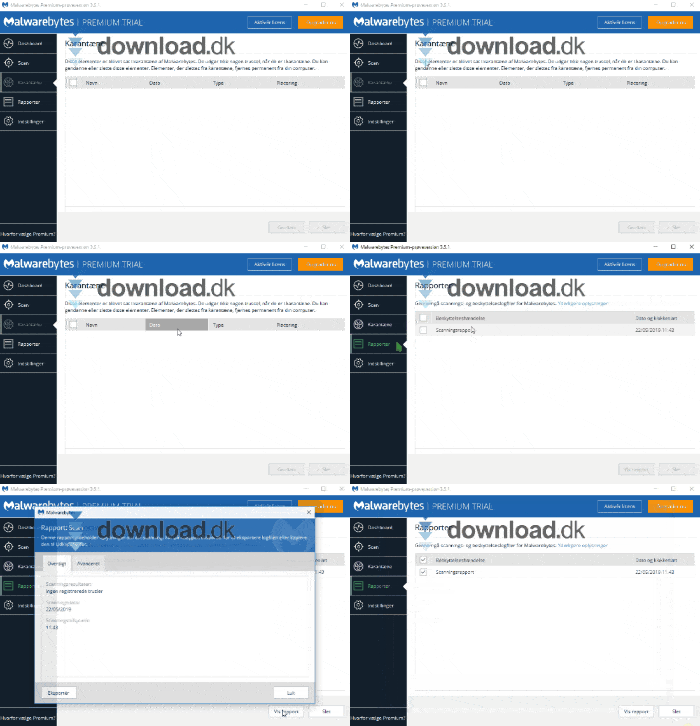
Malwarebytes places detected threats in quarantine so they can’t harm your system. From there, you can permanently remove them or allow files you know are safe. This flexibility is great for advanced users, yet the app remains simple enough for beginners to navigate with confidence.
Detailed reports and system monitoring
After every scan, Malwarebytes saves detailed reports that give you a clear picture of system health. Reports also help improve Malwarebytes’ threat database, boosting protection for everyone.
Interface and ease of use
Malwarebytes features a clean, intuitive design. Features are logically grouped, and each section includes helpful descriptions so you can quickly understand your options. Even first-time users can take full control of their security in minutes.
Alternatives
- Kaspersky Free: A solid free alternative, but it lacks some of the advanced features you get with Malwarebytes.
- AVG Anti-Virus Free: Kendt for effektiv (known for effective) basic protection, but Malwarebytes is quicker in real-time scans.
Why Malwarebytes is a smart choice
Malwarebytes combines high performance, advanced real-time protection, and user-friendly design in one package. For anyone who wants a secure, fast, and dependable antivirusprogram (antivirus program) that won’t tax your system, Malwarebytes is one of the best picks for 2025.
Download Malwarebytes Anti-Malware
Top five Malwarebytes tips and tricks
- Run a Threat Scan once a week
Even though real-time protection runs in the background, it’s a good idea to perform a thorough scan regularly to catch anything that slipped through. - Enable scheduled scans and updates
Under “Settings,” you can automate both scans and definition updates so you never forget. - Keep an eye on the Quarantine folder
Review quarantined files regularly. Legitimate files can occasionally be flagged—especially in development environments or when using cracked software (not recommended). - Pair Malwarebytes with Windows Defender
Malwarebytes works great alongside Windows Defender, and the combination provides broader protection than a single solution alone. - Check scan reports for patterns
If you repeatedly see threats from the same source (e.g., your browser’s temp folder), consider changing your browsing habits or installing a better ad blocker.
FAQ – Frequently asked questions about Malwarebytes
🛡️ Is Malwarebytes free?
Yes. There’s a free version with manual scans. Real-time protection, scheduled scans, and ransomware protection require the Premium version.
💻 Can Malwarebytes replace my antivirus?
In many cases, yes—Malwarebytes Premium works as a full antivirus. However, some still choose to combine it with, for example, Windows Defender for maksimal (maximum) coverage.
🌐 Am I protected while browsing?
Yes. Malwarebytes Premium includes browser protection that blocks phishing sites, ad networks, and suspicious URLs in real time.
🧠 Is Malwarebytes resource-heavy?
No—that’s one of its strengths. It’s designed to be lightweight and typically has minimal impact on system performance.
📱 Fungerer Malwarebytes også på mobil?
Yes. Versions for Android and iOS include malware scanning, web protection, and app permission analysis.



