
 Martin Jørgensen
Download MetaTrader 5 – Professional trading platform for all levels
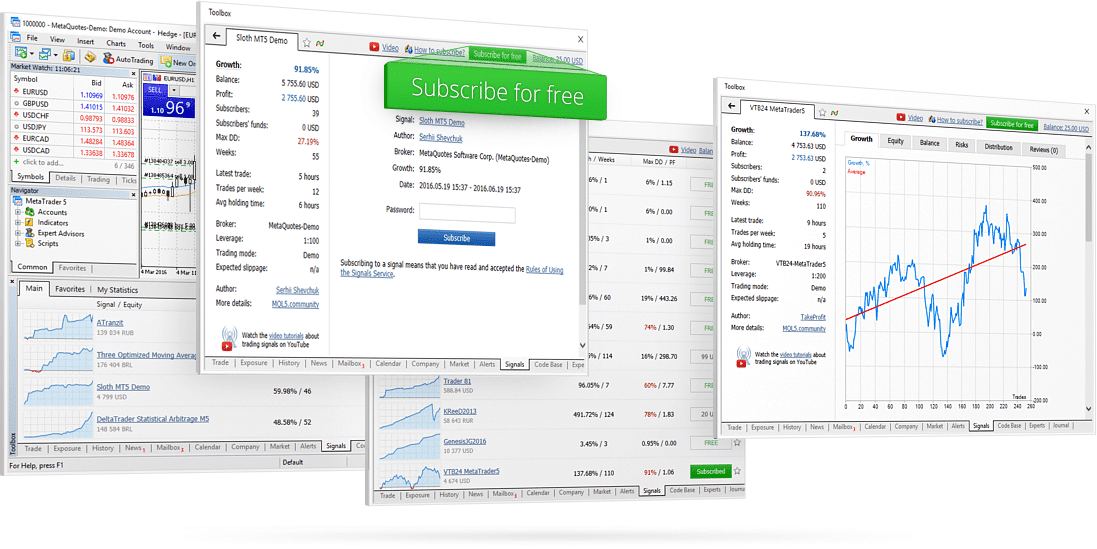
MetaTrader 5 is one of the most popular platforms for trading financial instruments such as stocks, forex, commodities, and cryptocurrencies. The platform is known for its ease of use and advanced analysis tools.
It supports automated trading through scripts and robots. With MetaTrader 5, both beginners and experienced traders can optimize their trading strategies and access markets in real time.

Why choose MetaTrader 5?
1. Powerful analysis tools:
MetaTrader 5 offers advanced technical analysis tools, including a wide range of indicators and charting features. You can customize your diagrammer and analyze the markets in detail.
This makes it easier to make informed decisions.
2. Automated trading:
The platform supports automated trading strategies using Expert Advisors (EAs). These scripts can execute trades on your behalf based on predefined rules, saving time and reducing emotion-driven mistakes.
3. Real-time data:
MetaTrader 5 provides access to real-time quotes and market data, keeping you up to date with the latest trends and price moves.
4. Compatibility:
The platform is available on multiple devices, including Windows, macOS, iOS, and Android. That means you can trade whether you’re at your computer or on the go.
5. Free and accessible:
MetaTrader 5 is free to download, and you can easily create a demo account to test the platform risk-free before trading with real money.
What does it cost?
The platform itself is free to download and use, but costs vary depending on the broker you choose. Many brokers include free access to MetaTrader as part of their trading solutions, though trading fees and spreads may apply.
An indispensable platform for traders at every level
For both beginners taking their first steps into trading and experienced traders who want a powerful, reliable solution, this platform is essential.
With access to a bredt udvalg af tekniske analyseværktøjer and automated trading options, the platform offers everything you need to make informed decisions.
The interface is designed to be intuitive, so even those without prior experience can get started quickly. At the same time, advanced features and customization options let power users tailor strategies precisely to their needs.
Compatibility across multiple devices — including Windows, macOS, iOS, and Android — ensures you can trade anytime, anywhere. Whether you work from a desktop, tablet, or smartphone, your trading experience is smooth and seamless.
With the ability to integrate third-party indicators, scripts, and automated strategies, the platform becomes even more versatile. This makes it an ideal solution for anyone seeking a deep, customizable trading experience.
If you’re looking for a flexible, reliable, and versatile trading platform that combines ease of use with advanced features, this is without a doubt one of the best choices on the market.
Regardless of your experience level, this platform can help you navigate complex markets and optimize your trading strategy.
Download MetaTrader 5 now and take the first step toward successful trading!
Top five MetaTrader 5 tips
1. Use a VPS for automated trading
If you run Expert Advisors (EAs), consider a Virtual Private Server (VPS). It keeps your setup running 24/7 without leaving your PC on.
2. Create price alerts
Click a price line in the chart and choose “Create Alert.” You’ll be notified when the market reaches a specific level — ideal for day trading and swing trading.
3. Test strategies in Strategy Tester
MT5 includes powerful backtesting to trial automated strategies on historical data. Use this before going live.
4. Leverage advanced technical indicators
MT5 offers hundreds of built-in and custom indicators. Use combinations (e.g., RSI + Bollinger Bands) to confirm trends.
5. Use multiple timeframes in one window
Analyze the same asset across multiple timeframes in parallel — for example, 1-minute, 15-minute, and daily — to gain deeper market insight.
Q&A
What is this platform?
A professional trading solution for stocks, forex, and commodities with avancerede funktioner.
What does it cost?
The platform itself is free, but trading fees depend on the broker you choose.
Which devices are supported?
Available on Windows, macOS, iOS, and Android.
Can you try it for free?
Yes, a free demo account is available for trading with virtual funds.
What are automated trades?
Trades executed automatically based on predefined rules and strategies.
Is it hard to use?
Not necessarily, though new users may need time to learn all the features.
How do I choose a broker?
Look for low fees, reliability, and strong reviews.
Is sikkerheden in order?
Yes, advanced encryption protects your data and transactions.
Can the features be customized?
Yes, with add-ons such as indicators and third-party scripts.
Are there multiple versions?
Yes, one version focuses on forex trading, while another offers broader asset options.



