
 Martin Jørgensen
rEASYze – Free and portable image tool for Windows
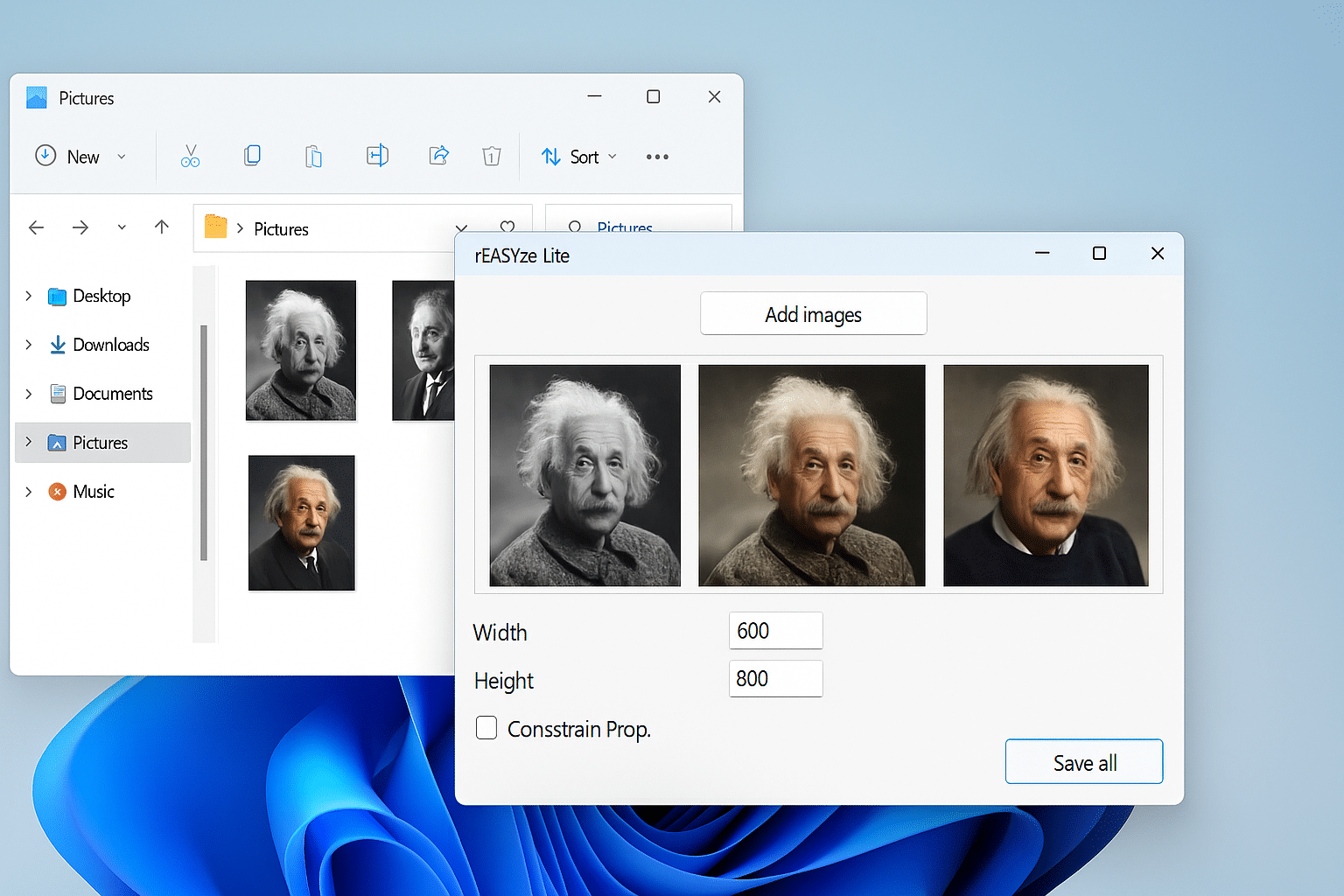
rEASYze is a user-friendly, portable image tool for Windows that makes it easy to resize multiple images at once. With a minimalist design and essential editing options like brightness, contrast, saturation, and watermarks, it’s ideal when you want to optimize images quickly without installing heavy software.
Batch resizing without hassle

The core of rEASYze is the ability to resize many images simultaneously. It saves time for bloggers, photographers, shop owners, and everyday users who work with lots of images. Just add your images, set the desired dimensions, and click "Save all" — all images are exported in the new size at once.
The program automatically preserves aspect ratio so images don’t get distorted, unless you choose to disable it.
Simple photo editing with basic tools

Although rEASYze is built primarily for resizing, it also includes these editing features:
- Adjust brightness, contrast, and saturation
- Crop, rotate, and flip images
- Add text or a watermark (center or corners only)
However, note that there are no advanced tools like layers, masks, or precise element placement. That makes rEASYze easy to use — but not suited for complex image editing. If you need that, try GIMP or Photopea as free alternatives.
Portable and easy to take with you
A key advantage of rEASYze is that it’s a “portable program.” It requires no installation and can run directly from a USB drive. It’s perfect for use across different computers — at work, school, the library, or while traveling — when you need to edit images quickly without admin rights or installed software. The program leaves no traces on the host computer and can be removed by simply deleting the folder or unplugging the USB drive.
Compatibility and language
- Supported operating systems:Windows only (tested on Windows 7, 10, 11)
- Language: English
- Price: Free
There’s no version for Mac or Linux, and the interface language can’t be changed. For most users this isn’t a big issue, as the program is very simple.
Top 5 tips for rEASYze

Gather all your images in one folder and drag them into the app at once for fast resizing.
Keep "Constrain Prop." enabled to prevent distortion.
Choose a new destination folder on export to avoid overwriting your originals.
Insert your name or website address as a watermark on images you publish online.
Put the app on a USB drive and you’ll have a simple image tool ready on any Windows PC.
"Metabeskrivelse:"rEASYze is a free, portable Windows image resizer. Batch resize, crop, rotate, add text/watermarks, and export fast—no installation required.



