

 Martin Jørgensen
Want the latest stock prices right on your desktop? Download the free edition or buy the full Pro version of Stock Desktop Widget for Windows and Mac!
If you’re tired of constantly opening your browser to check the latest stock prices, there’s a faster and much easier way. With Stock Desktop Widget, you can place stock widgets directly on your desktop. In short, widgets are like mini windows that keep live stock quotes right at your fingertips.
Get a feel for how the interface and different stock widgets look in the Windows version by checking the GIF below.
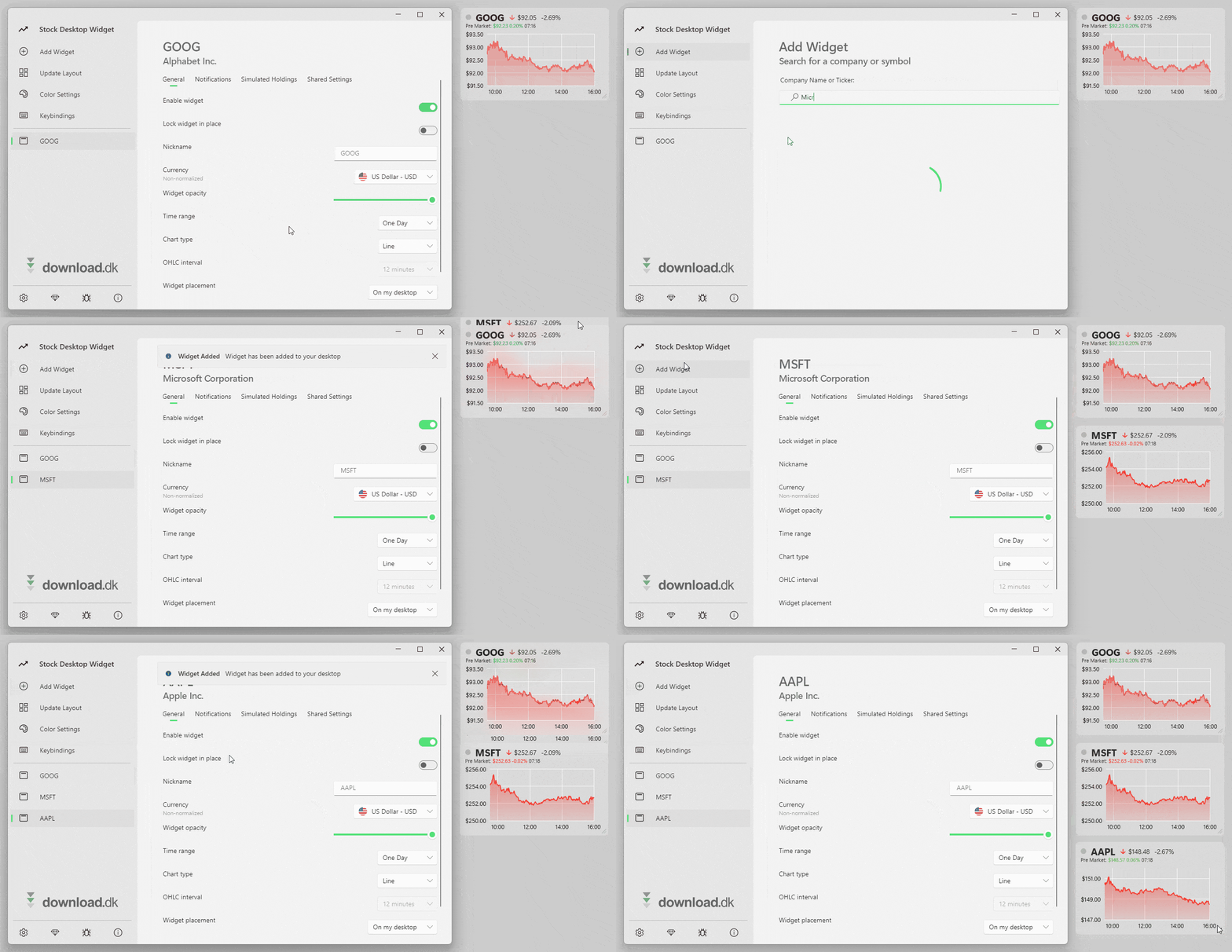
Stock Desktop Widget is available for Windows and Mac. It’s also worth noting that it comes in two editions: a free version and a Pro edition for about $10. In the next section you can read about the specific differences between them, followed by our own impressions from a quick test of the free edition on a Windows 11 PC.
Differences between the free and paid versions
If you decide to try Stock Desktop Widget, we naturally recommend starting with the free version. There’s no reason to pay for something you haven’t tested yet. However, be aware that many features and settings are only available in the paid edition, Stock Desktop Widget Pro.
The main (and most annoying) limitation in the free edition is that you can place a maximum of three widgets on the desktop at a time. If you add more, you’ll be prompted to purchase the Pro version. There are also several other restrictions, with the most important highlighted in the screenshot above.
Stock Desktop Widget Pro costs $10. We think that’s fair, and if you end up loving the program after using the free version, it may be worth supporting the developer—especially because the free edition’s limits can be pretty frustrating at times.
Installing Stock Desktop Widget
It only takes a moment to get Stock Desktop up and running on your computer. First, click the download button just below this review to go to the developer’s official website. Then choose your platform. If you’re on Windows, you’ll be redirected to the Microsoft Store; on Mac, you’ll be sent to Apple’s App Store.
The GIF below shows the installation of the Windows version on our PC. As you can see, we just clicked “Install,” and Stock Desktop Widget was ready to use moments later.

We expect the installation process on Macs to be similarly quick.
Features and settings
When you open Stock Desktop Widget for the first time, the app automatically starts on the “Add Widget” page so you can get going quickly. If you know the exact stock name you’re looking for, type it in; you can also search by company name, and Stock Desktop Widget will show you the matching tickers. After clicking one, a widget appears on your desktop automatically—quick and easy!
In the screenshot below from our own desktop, you can see three different widgets showing stock prices for Google, Microsoft, and Apple.
Click and hold any widget to drag and place it anywhere on the desktop. If you’re worried about accidentally moving a widget later, you can lock it by right‑clicking and choosing “Lock.” With a right‑click you can also change the time range to 1 day, 1 week, or 1 month. Six months or longer is available in the paid edition, Stock Desktop Widget Pro.
To explore more options, open the main app window. On the left, select “Update Layout” and “Color Settings” to adjust size, position, text and background colors, and more. If you want to delete a widget (for example, if you’ve hit the annoying three‑widget limit in the free edition), right‑click the widget and choose “Delete Widget.”

There’s also a small gear in the lower‑left corner that opens “Global Settings,” where you can access general options such as language, color theme, and whether Stock Desktop Widget should launch at startup.
As shown in the screenshot higher up comparing the free and Pro editions, several settings are only available if you pay for the program.
Stock Desktop Widget - A good experience
In short, we have a positive impression of Stock Desktop Widget. The free version worked flawlessly on our PC, but its functionality is relatively limited compared to Pro. If you want to use more than three widgets and unlock all settings, it’s probably worth paying for the program. That said, it makes perfect sense to try the free edition first!
Tip: Also try Free Stocks Ticker
If you’re specifically interested in this kind of software, you’ll find more tools in our Stocks & Trading category. For example, we recommend trying the free program Free Stocks Ticker, which, like Stock Desktop Widget, gives you access to the latest stock quotes. The difference is that Free Stocks Ticker appears as a scrolling ticker at either the bottom or top of your desktop.
Compared with Stock Desktop Widget, Free Stocks Ticker lets you view more stock prices in less screen space. Its RSS feature also lets you receive news from many different websites and blogs. So if you care about stock quotes and news, and you want a free program without the limitations of Stock Desktop Widget’s free edition, Free Stocks Ticker might be a great alternative!
Download Stock Desktop Widget



