
 Martin Jørgensen
TreeSize Free — find the folders that are eating up your disk space
TreeSize Free is a free Windows tool that analyzes your drive and shows exactly which folders and files take up the most space. It’s especially helpful when storage is running low and Windows’ built‑in tools don’t give you a clear picture.
The program scans very quickly and presents results in an easy‑to‑read tree structure, where even hidden system folders can be reviewed — provided you run it with administrator rights.
Overview and real‑world features
TreeSize Free does one thing — and does it really well: it visualiserer diskforbrug (visualizes disk usage).
In our testing on a typical Windows 11 PC with a nearly full SSD, it took under a minute to get a complete overview of the entire system drive. It immediately highlighted the biggest space hogs — such as old backup folders and cache files that Windows doesn’t surface clearly.
The program shows:
- Folder sizes in real time
- Disk space distribution by percentage
- Number of files and subfolders
- Open folders directly in File Explorer
Even though it’s the free edition, TreeSize Free doesn’t feel limited in day‑to‑day use.
Interface and workflow
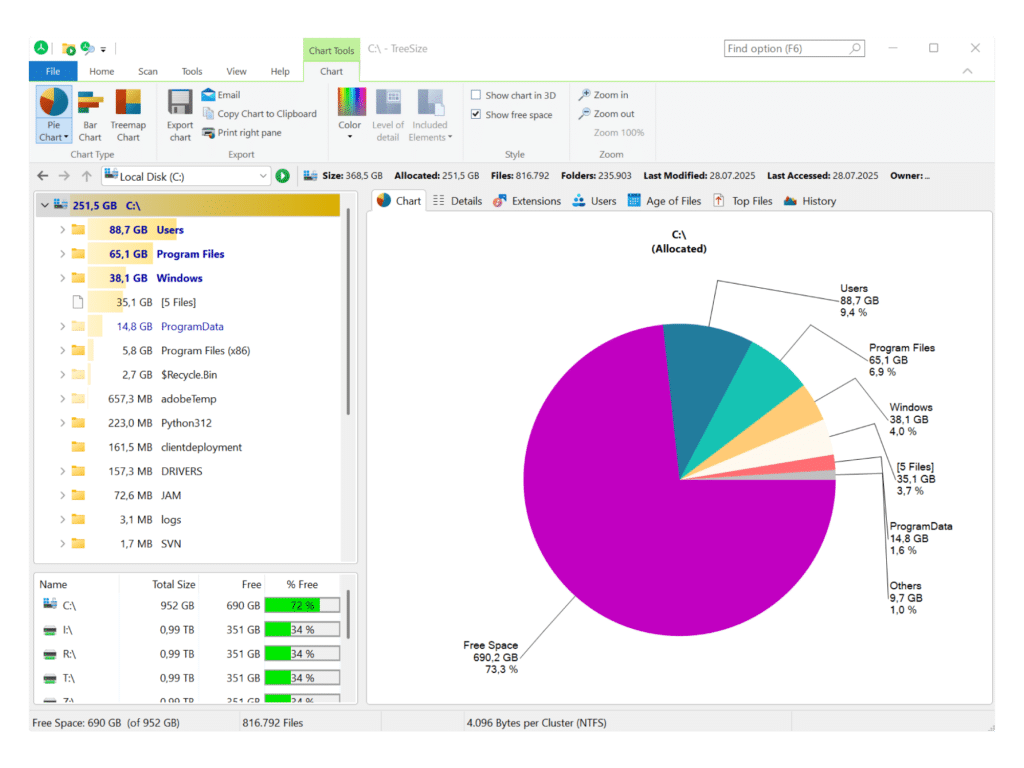
The interface is classic Windows — clean and familiar. During testing, the workflow was immediately clear: choose drive → scan → sort → clean up.
It’s especially handy that you can sort folders by size with a single click. That makes it easy to find the biggest space hogs without manually digging through the entire folder structure.
Do note that advanced visualizations like detailed charts are reserved for the paid versions — but for most home users, that’s not a real drawback.
When does TreeSize Free provide the most value?
TreeSize Free is particularly useful if you:
- Have a nearly full drive and want to free up space fast
- Need to find hidden or forgotten folders
- Work with lots of large files (video, backups, VMs)
- Want an alternative to Windows’ built‑in storage view
In the U.S., we often see both home users and IT‑savvy users rely on it because it’s fast, free, and ad‑free.
Top 5 tips for TreeSize Free
Tip 1: Run the program as administrator
If you want to see the entire system drive, including the Windows and ProgramData folders, start TreeSize Free with administrator rights.
Tip 2: Sort by size — not name
Click the “Size” column to quickly find the largest folders instead of browsing manually.
Tip 3: Use the File Explorer shortcut
Right‑click a folder and open it directly in File Explorer for quick cleanup.
Tip 4: Scan external drives and USB devices
TreeSize Free can also reveal space hogs on external hard drives and USB flash drives.
Tip 5: Use it regularly
Run a quick scan from time to time — especially if you work with large files or install lots of apps.
A solid free alternative for disk cleanup
TreeSize Free is one of the few free tools that genuinely giver et klart og ærligt overblik (gives a clear, honest overview) of disk usage. In testing, it lived up to its reputation: fast, stable, and without hidden limitations.
If you want to figure out what’s filling your hard drive — without messing with advanced system tools — TreeSize Free et oplagt valg (an obvious choice).
Free vs. paid — what's the difference between TreeSize Free and Pro?
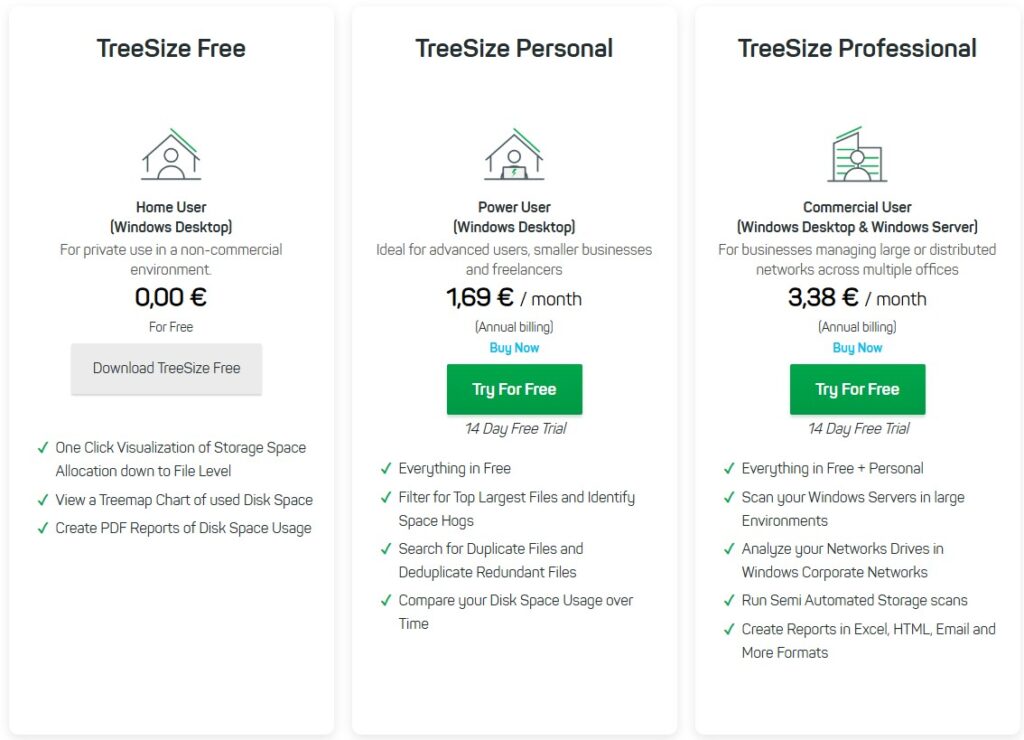
TreeSize Free and the paid editions share the same core scan engine, but they target very different users.
In our tests, we used the free version to analyze an almost full system drive, and TreeSize Free delivered exactly what you’d expect: a quick overview of which folders and files are using the most space. For routine cleanup, the free version is more than enough.
The differences become clear if you manage storage professionally or work in IT administration.
TreeSize Free is best for:
- Getting a quick overview of disk usage
- Finding large folders and files
- Home use on a single PC
- Manual cleanup
TreeSize Professional (paid) is aimed at:
- Advanced charts and visualizations
- Automated scans and scheduling
- Reports in PDF, Excel, and HTML
- Finding duplicates and aging files
- Use in businesses and IT departments
The free version isn’t a time‑limited trial, but a permanently free edition with fewer features. JAM Software does emphasize their paid products, which may give the impression that TreeSize Free is discontinued — it isn’t.
For most home users in the U.S., TreeSize Free will be more than sufficient.



