
 Martin Jørgensen
Download WinRAR for free to compress and extract your files!
It’s the most popular compression tool on the market — and for good reason. First, the software is available in countless languages, including Danish, and supports special characters. It’s also blazing fast, and paying for it is completely optional. There are no limits on how long or how much you can use it. If you want to support the developer, you can choose to purchase a license.
Benefits of compression tools
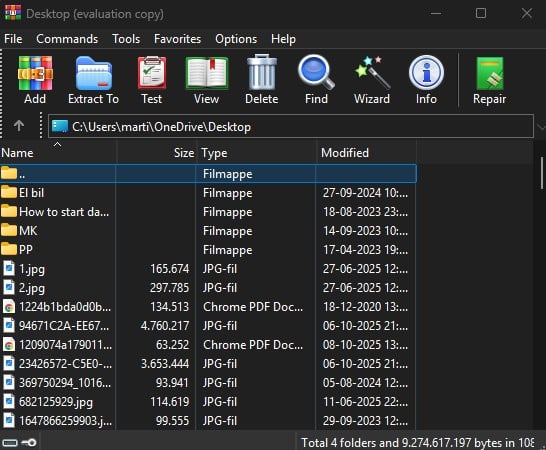
So what are the benefits of a compression tool, and how does it work? A typical example is when you download a compressed folder. In that case, you need a program to extract and access the files.
The advantage of compressing files is that they take up significantly less space. If a file is compressed, it’s almost certainly because it’s faster for you to download and much faster for the sender to upload. WinRAR, of course, also lets you compress your own files.
For example, if you want to share a video with friends that takes up a lot of space, you can easily compress it and then send the file via email. Alternative compression tools have struggled to match the standard this program has set. Its huge popularity is due in part to the fact that it can compress to about one third the size of similar .ZIP-filer.
File formats

This is a powerful piece of software that’s frequently updated, meaning the latest file formats are always supported. CAB, ARJ, LZH, TAR, GZ, ACE, UUE, BZ2, JAR, ISO, Z, 1 are all supported for both compression and extraction.
Ease of use and interface
The program is incredibly simple to use and doesn’t require much technical knowledge. In fact, you can get very far just by right-clicking the files you want. You rarely need to open the app itself. If you do, there are plenty of features to explore. For example, you can change and customize the theme to make the program feel personal. You can also download it in multiple languages, including Danish. Clicking the download button on this page takes you to the official website, where you can choose installers in many different languages.
Security
If you want to send sensitive files such as photos or documents, you can password‑protect your archives. You choose the password for the archive yourself. When you share the file, the recipient must use that password to extract it.
That way, even if your files end up in the wrong hands, no one can access the contents without the password, keeping your data protected.
Updates
Keeping your software up to date is essential. In today’s tech world, there are always new file formats and new ways to make the program faster. Updates typically don’t change the interface or design, but they often improve performance and add support for more formats. When you click our download button, you’ll be redirected to the software’s official download page, where the newest version is always available.
Download WinRAR - An all-time favorite
The program has existed since 1995 and has been a favorite compression tool ever since. Many alternatives have appeared, but this one outperforms much of the competition and is available in many languages. You’ll barely notice it’s installed — until you need to extract something. There are no annoying ads or pressure to buy. Enjoy!
Top 5 tips for using WinRAR
Right-click a file or folder in File Explorer and choose “Add to archive…” to create a ZIP or RAR in seconds. It’s much faster than opening WinRAR itself.
Click “Set password” in the creation window to encrypt your files. WinRAR uses AES‑256 encryption for strong protection against unauthorized access.
If a RAR archive won’t open, click “Repair” on the toolbar. WinRAR can often recover parts of the data and rescue the contents from corruption.
Enable “Test archive after extraction” in settings. WinRAR will automatically check file integrity every time you unpack files.
Power users can automate backup tasks with the command rar a backup.rar C:\Path\To\Files. This lets you compress data in scripts or scheduled tasks.
"Metabeskrivelse:"Download WinRAR for Windows. Free tool to compress and extract RAR, ZIP and more with AES‑256 encryption, right‑click menus, and frequent updates.



