

 Martin Jørgensen
Avira Free Antivirus – One of the best free antivirus for Windows 11 in 2026
Avira Free Antivirus is one of the most reliable free antivirus apps on the market in 2026. This German‑developed tool has been known for years for its effective protection against viruses, malware, and ransomware—and it takes no tech skills or money to get started.
Whether you use Windows, Mac, or mobile, you get a lightweight antivirus that updates automatically and runs quietly in the background.
💡 Top 5 tips for Avira Free Antivirus
Avira Free Antivirus for Windows installs quickly with the Express option, but it’s worth reviewing the settings afterward. If you want fewer interruptions, you can mute notifications and customize the scan schedule. That makes Avira more discreet and effective day to day.
Real‑time protection is enabled by default, but we recommend scheduling a full scan weekly. It helps catch any hidden threats and keeps your PC protected—especially if you download a lot or share files.
Avira Browser Safety blocks dangerous sites and trackers, and it can be a solid add‑on if you’re not already using another security extension like uBlock Origin. If you want free antivirus with browser protection, this feature is worth considering.
Avira updates virus definitions and security modules automatically, but major updates may require a restart. To get the most from your free antivirus protection on Windows 10 and 11, allow restarts when prompted.
Want to upgrade from free antivirus to an all‑in‑one cybersecurity suite? Avira Prime adds a VPN, password manager, and PC optimization for about $29/year. Ideal if you want antivirus with a VPN for Windows in one package.
What do you get with Avira Free Antivirus?
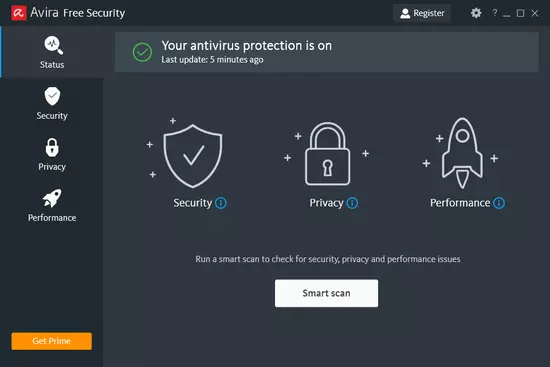
With Avira Free Antivirus, you get real‑time protection without paying a dime. The app continuously monitors your PC and reacts immediately if suspicious files or processes are detected. It’s quick to install, and the interface is even more streamlined after the latest redesign.
Features in the free version:
- ✅ Real‑time virus and malware protection
- ✅ Automatic scanning and updates
- ✅ Protection against phishing and fake websites
- ✅ Easy setup with “Express Setup”
- ✅ Cloud‑based threat analysis
All of this is completely free—without annoying ads inside the app itself.
New in the 2026 version
The latest version brings several improvements:
- Redesigned interface that makes it easier to find and customize settings
- GenericRepair technology that automatically attempts to repair infected files
- ExpressInstallation: From download to protection in under five clicks
- Improved performance with lower system impact
The app updates itself in the background and requires minimal maintenance—ideal for both non‑technical users and anyone who just wants peace of mind.
Is the free version enough?
Yes—for most home users. If you mainly use your computer for browsing, streaming, online banking, and email, the free version of Avira is more than sufficient.
You can upgrade to Avira Prime for about $29/year and get extra features like:
- VPN with unlimited data
- Password manager
- System optimization tools
- Extended support
But it’s not necessary for solid antivirus protection.
Comparison: Avira Free Antivirus vs. other free antivirus in 2026
When you’re looking for the best free antivirus for Windows 10 and 11, Avira often goes up against competitors like Avast, AVG, and 1. Here’s a quick overview of how Avira stacks up against the most popular alternatives:
| Antivirus | Real-time protection | Browser protection | Built-in VPN | Ads / bloatware |
|---|---|---|---|---|
| Avira Free Antivirus | ✅ | ✅ (optional add-on) | 🔸 500 MB/month | 🔸 Some pop-up ads |
| 1 Free | ✅ | ❌ | ❌ | ✅ Minimal |
| 1 Antivirus | ✅ | ✅ | 🔸 Requires account | ❌ Many upsell prompts |
| AVG Antivirus Free | ✅ | ✅ | ❌ | ❌ Frequent ads |
Avira Free Antivirus is among the best free antivirus apps in 2026—especially if you want real‑time protection and browser safety in one package. It shows fewer ads than Avast and AVG and offers more functionality than Bitdefender Free—though the free VPN is limited and you’ll see occasional upgrade prompts.



