
 Martin Jørgensen
Download and try Bitdefender Total Security here
Bitdefender Total Security is one of the most comprehensive security suites on the market. It not only protects your computer against viruses, malware, and ransomware, but also includes tools that keep your privacy and data safe—both online and offline.
We tested the software on a Windows 11 PC, where installation was quick and system scans ran smoothly. It’s clear that Bitdefender focuses on both security and ease of use.
Best-in-class antivirus and malware protection

Bitdefender Total Security performs dybdegående scanninger, der finder og fjerner even the most hidden threats on your computer.
You can choose between Quick Scan for fast checkups or a Full System Scan that examines everything down to the smallest detail.
The suite also protects against ransomware that tries to lock your files, as well as malware that often hides behind seemingly harmless files and apps.
During testing, fandt Bitdefender flere potentielle trusler, som andre gratis antivirusprogrammer didn’t react to—great news for your security.
Protect your privacy with VPN and advanced threat protection

One of Bitdefender’s strongest features is the built-in VPN, which hides your IP address and prevents trackers from following your activity online.
This is especially relevant in the United States, where many websites collect detailed data about users’ browsing habits.
With Advanced Threat Defense, the software continuously analyzes how your applications behave so malicious activity can be stopped before any damage is done.
Bitdefender also offers webcam protection to prevent hackers from abusing your camera, plus File Shredder and file encryption to ensure deleted files can’t be recovered or read by others.
Optimize your PC with one click
Beyond security, Bitdefender Total Security includes several tools to improve your computer’s performance.
OneClick Optimizer cleans up junk files and cache, while Startup Optimizer speeds up boot times by removing unnecessary background programs.
With Disk Cleanup, you can free up a lot of space, and the Anti-Theft feature helps you lock and protect your device if it’s stolen.
User experience and design

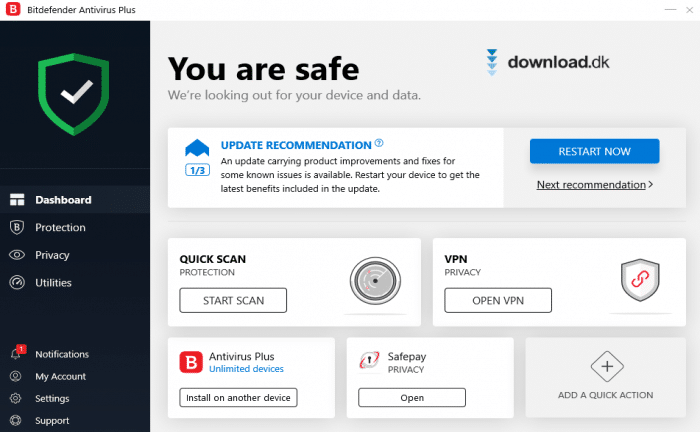
The interface is modern, straightforward, and easy to navigate. Features are clearly separated into sections like Protection, Privacy, and Utilities, so even beginners can find what they need quickly.
The color scheme and icon layout make navigation simple without being overwhelming, and most actions can be completed with a single click.
As a result, Bitdefender feels both professional and approachable—a balance many antivirus programs struggle to achieve.
Alternative programs
If you’re looking for et gratis alternativ, er Adaware Antivirus Free a sensible choice.
It provides basic protection against viruses and spyware, but lacks the advanced features Bitdefender Total Security delivers—including VPN, ransomware protection, and performance optimization.
For complete peace of mind, we recommend Bitdefender as the best choice for both home and professional users.
Top 5 tips for Bitdefender Total Security
While Quick Scan is fast, Full Scan often finds hidden threats that can linger in the background and cause damage. Schedule a full scan at least once a month.
Make sure Bitdefender’s real-time protection is always on. It automatically blocks viruses and malware before they can harm your PC.
Using public networks at coffee shops, hotels, or airports? Enable the VPN to hide your IP and protect your data from hackers and snoops.
Files deleted the usual way can often be recovered. Use File Shredder to permanently remove personal documents so they can’t be restored by others.
Set Bitdefender to run scans automatically when you’re not using your PC—e.g., overnight. You’ll stay protected without interruptions.



