 Martin Jørgensen
Clip It (Roblox) – create short clips, memes, and outfits right in the game
Clip It is a creative, social Roblox experience that focuses on content creation rather than classic gameplay. The goal is to make short clips with your avatar, use scenes, emotes, and outfits—and share the result in a feed where other players can like, save, and get inspired. Think TikTok meets Roblox, wrapped in a game world where all the tools are already built in.
We tested Clip It as part of our review of popular Roblox experiences, and it quickly became clear why it’s especially popular with creative players and content creators.
Gameplay and features
Clip It’s gameplay revolves around a simple but effective loop: pick a scene, style your avatar, record a short clip, and share it. There are no levels, no points, and no traditional progression—the reward is visibility and creative feedback from other players.
In our testing, it was surprisingly quick to get started. Within minutes, we had our first clip, and the editing tools are intuitive enough for younger players to follow. At the same time, there are enough options in scenes and animations for experienced Roblox players to fine-tune timing and expression.
Scenes, emotes, and avatar focus
One of Clip It’s strongest features is its library of ready-made scenes. Instead of building everything yourself, you choose from environments that already signal “drama,” “comedy,” or “meme.” That makes it much easier to tell a tiny story in just a few seconds.
Avatar customization also plays a big role. Outfits, accessories, and style are often the point of the clip itself, and many use Clip It as a kind of fashion or role-play sandbox rather than a traditional game.
Graphics and design
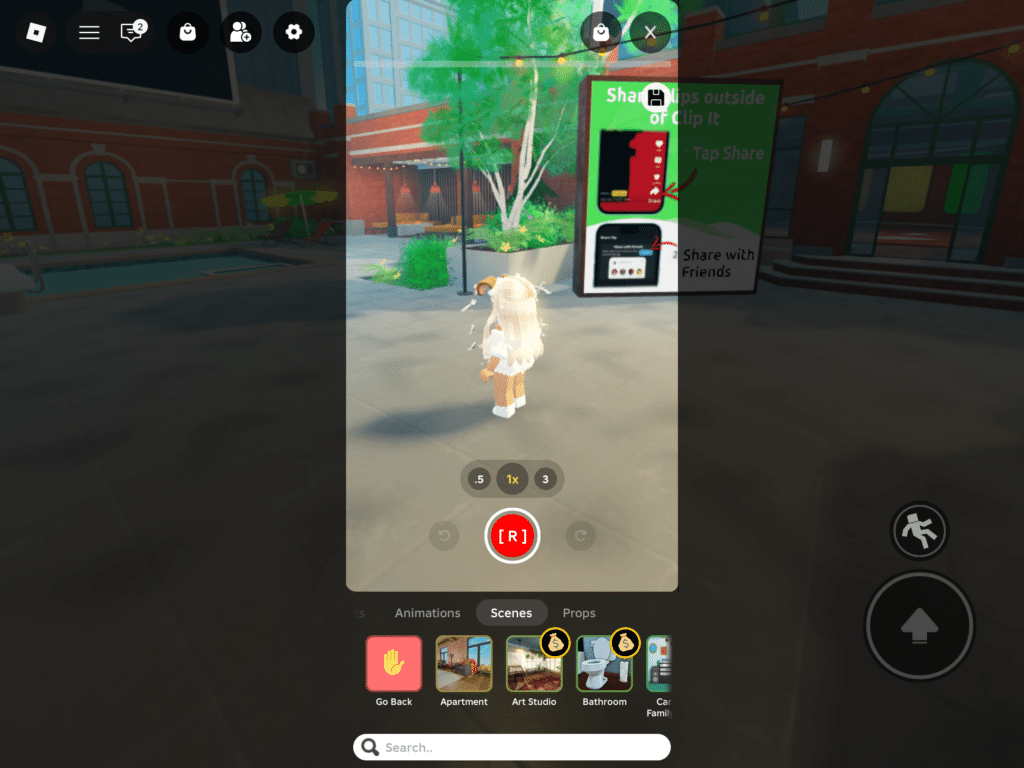
Visually, Clip It is distinctly Roblox—and that’s not a criticism. The style is familiar, lightweight, and runs smoothly on most devices. The visual focus is on avatars and animations, while the environments act as a backdrop. In our testing on a standard Windows 11 PC, the game ran without issues and with stable frame rates.
Design-wise, the interface is simple but can feel a bit overwhelming at first because so many options are in one place. Once you’ve found your favorite scenes and emotes, the experience flows much better.
Social elements and moderation
Clip It is very much a social game. The feed is central, and it’s where you discover trends, popular outfits, and new ideas. It can be highly motivating—but also a bit absorbing. Fortunately, Roblox’s reporting and moderation tools are easy to access, which is important for a game that largely appeals to younger users.
Who is Clip It for?
Clip It is best for players who:
- love expressing themselves creatively
- enjoy short, funny clips and memes
- are into avatar styling and trends
On the other hand, if you’re looking for action, levels, or clear goals, Clip It will likely feel empty. Here, you—and your content—are the “game.”
Top 5 tips for Clip It (Roblox)
Top 5 tips: Get more out of Clip It (Roblox)
Use scenes, emotes, and outfits more strategically so your clips are funnier, clearer—and easier to get seen in the feed.
Keep it short—and end while the joke is hot
In our testing, 5–8 seconds often worked best. One setup, one reaction, done. If you drag it out, the feed loses interest.
Pick scenes with instant context
Classroom, living room, office, and drama scenes make it easy to understand the clip without explanation—better payoff in seconds.
Use a signature outfit across a mini‑series
Make 3–5 clips with the same avatar look so people recognize you in the feed. Change only one detail at a time (hat, color, or accessory).
Coordinate emotes with a friend for more punch
Two avatars with timing (one says “no,” the other panics) make clips feel more alive. Just agree on 1–2 emotes beforehand.
Save inspiration—but don’t copy 1:1
When you spot a good format, save it and make your own version: new scene, new outfit, or new reaction. It feels more original—and more fun.