
 Martin Jørgensen
DocHub – Easy PDF editing and e-signatures right in your browser
DocHub is a web-based PDF tool that makes it easy to edit, comment, fill out, and sign documents right in your browser. It’s especially strong for e-signatures, sharing, and fast document workflows, and it integrates tightly with Google Workspace, Gmail, Dropbox, and other cloud services.
We tested DocHub in a standard browser setup on Windows 11, and the first impression was genuinely positive: you can get started fast, and it feels more like a tool for getting paperwork done than a heavyweight PDF suite you have to learn. That’s exactly where DocHub shines. It’s not the most comprehensive PDF solution on the market, but for signatures, comments, and forms it’s very straightforward.
PDF editing and signing with no installation
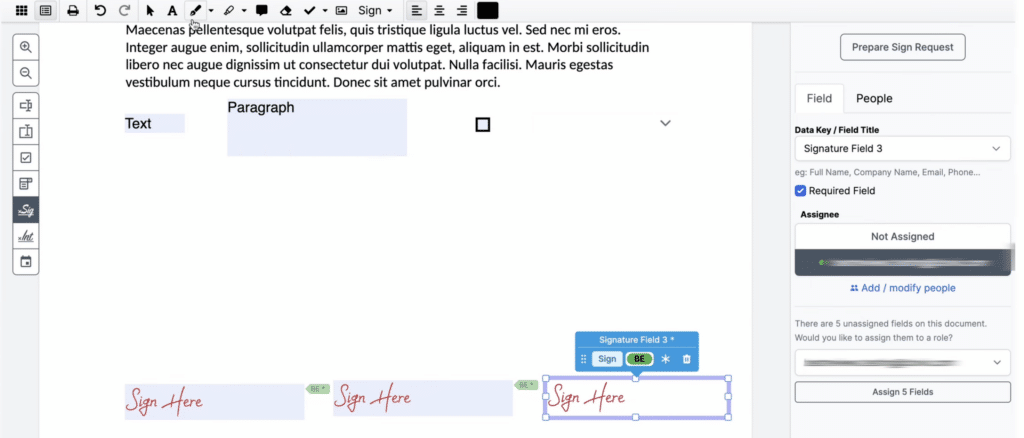
DocHub runs directly in your browser, so there’s no traditional installation. That makes it ideal for quick office tasks, schoolwork, and working from home when you just need to open a PDF, add text, add initials, or send the document out for signing. The service promotes editing, signing, sharing, and reusable PDF templates as its core features.
In practice, it’s especially helpful if you frequently receive contracts, consent forms, quotes, or applications via Gmail or Google Drive. Here, DocHub feels more streamlined than many traditional PDF programs because the document can be imported, adjusted, and saved back to the cloud quickly.
Features and user experience
DocHub focuses on the tools most people actually use day to day:
✅ electronic signatures and initials
✅ text fields and form filling
✅ markup, highlighting, and comments
✅ sharing and requesting signatures
✅ templates for documents you use repeatedly
✅ autosave and sync across devices
During our test, the interface felt simple enough that you don’t need to hunt for basic features. That’s a strength, especially if the audience isn’t technical users but everyday employees, educators, or freelancers who just need to send something out. On the flip side, DocHub can feel a bit narrow if you expect deep PDF conversion, heavy layout editing, or advanced document production like larger desktop programs.
Free version or Pro?
DocHub offers a free account that lets you edit, sign, and share PDFs, with limits on things like uploads, signatures, and some premium features. On its pricing page, DocHub also highlights that you can start free and try advanced features for 30 days at no cost.
That makes the free tier appealing for light personal use or occasional tasks. If you have defined workflows with many documents, frequent signatures, or need more professional control, the Pro plan will typically make the most sense.
Platforms and compatibility
DocHub is effectively platform-agnostic because it runs in the browser. The service states it works on both desktop and mobile devices without requiring a separate app, making it a good fit for Windows, macOS, Linux, Chromebooks, Android, and iPhone via a modern browser.
That’s one reason it’s popular in the United States, where many schools and workplaces already rely heavily on Google Workspace. If you’re on a Chromebook—or just want to avoid installing yet another program on your PC—this is a real advantage.
Security, compliance, and GDPR
DocHub has an official security and compliance page where the company describes technical and organizational safeguards, GDPR-related work, and access to DPA materials. The help center also notes that documents and user data are encrypted, and that files are stored encrypted in AWS S3.
For U.S. users, that means DocHub isn’t just a “quick PDF site,” but a service that actively aims to meet security and data protection expectations. That said, businesses and public agencies should still evaluate whether the platform fits their specific compliance requirements and data types—especially for sensitive personal information or documents that require a formal data processing agreement.
When DocHub makes the most sense
DocHub is best if you want to:
✅ sign PDFs online fast
✅ fill out forms in your browser
✅ annotate documents without heavy software
✅ work closely with Google Drive and Gmail
✅ send documents for signature without hassle
If you’re looking for a more complete PDF suite for large-scale conversion, OCR, advanced editing, or offline desktop work, stronger alternatives exist. DocHub focuses on speed, simplicity, and collaboration rather than depth.
A solid choice for signatures and fast document workflows
DocHub targets a very specific user: someone who doesn’t want to wrestle with heavyweight PDF software, but just wants to open, tweak, sign, and send documents. It handles that really well, and the Google integrations make it extra useful day to day.
It’s not the most advanced PDF solution on the market, and it doesn’t need to be. For many, speed matters more—the fact that it runs in the browser, and that signatures and comments can be handled without friction. That’s where DocHub gets a lot right.
Top 5 DocHub tips
Top 5 DocHub tips
Use “Sign Yourself” for quick self-signing
If you only need to sign a document yourself, it’s often faster to use DocHub’s self-signing instead of creating a full signature request with invitations.
Open files directly from Google Drive
DocHub works best when you use the Google Drive integration. You avoid unnecessary downloads and can save the document back to the same place immediately.
Create templates for documents you use often
If you have contracts, permits, or standard agreements, you’ll save a lot of time by building a reusable PDF template with fixed fields and signature spots.
Use comments for review and approval
DocHub isn’t just for signatures. It also works well for highlighting text, adding comments, and sending documents around for quick approvals.
Use your mobile browser for quick edits on the go
You don’t need a dedicated app to add a quick signature or text edit. DocHub also works on phones and tablets via the browser.



