
 Martin Jørgensen
DuckDuckGo — private browser with no tracking
DuckDuckGo is a private search engine and free browser that limits tracking, blocks many trackers, and lets you search the web without building a personal search history.
We tested DuckDuckGo on Windows 11, Mac, and iPhone, and the difference from a typical Chrome setup shows up in the little things. Cookie pop‑ups appear less often, you can see how many trackers were blocked, and the signature Fire Button lets you clear tabs and local browsing data with one tap.
DuckDuckGo is no longer just an alternative search engine. Today, you can download a full DuckDuckGo browser for Windows, macOS, Android, and Apple’s mobile devices. You can also stick with DuckDuckGo Search or install an extension for Chrome, Firefox, Edge, and Opera.
Pick your platform, or use DuckDuckGo right inside your current browser.
What is DuckDuckGo?
DuckDuckGo started as a private search engine and has gradually grown into a broader privacy suite.
You can use DuckDuckGo in three different ways:
As a search engine:
Go to DuckDuckGo.com and search directly without installing anything.
As a browser extension:
Keep Chrome, Firefox, Edge, or Opera, but add tracker blocking and private search.
As a standalone browser:
Install DuckDuckGo Browser on your computer or phone to get private search, tracker blocking, passwords, sync, the Fire Button, and more — all in one app.
We prefer the standalone browser on mobile, where it feels like the most polished product. On desktop, the choice depends on how much you rely on Chrome extensions, your Google account, or Microsoft services.
DuckDuckGo in the United States
DuckDuckGo supports region and language settings. Under Search Settings, choose United States as your region so nearby businesses, U.S. websites, and local news are weighted more heavily.
DuckDuckGo also supports a distinct U.S. region/language setting with the code us-en. You can save preferences locally in the browser or anonymously via DuckDuckGo’s Cloud Save feature.
There’s an important difference between the interface language and the quality of local results. The UI can be in English, but ultra‑local searches aren’t always on par with Google.
Queries like “pizza near me,” “store hours nearby,” or very specific U.S. businesses may take a bit more work. It helps to select United States as the region and optionally allow an approximate location. DuckDuckGo says your precise position is replaced with a random nearby location before being used for local results.
Key features in DuckDuckGo Browser
Private search by default
DuckDuckGo Search is the browser’s default engine. According to DuckDuckGo, it does not build a personal search history that can later be used to profile you.
You will still see ads — but they’re based on your current query rather than a long record of past searches, purchases, and site visits. If you search for a new laptop, you may see computer ads without DuckDuckGo building a persistent ad profile about you.
Third‑party tracker blocking
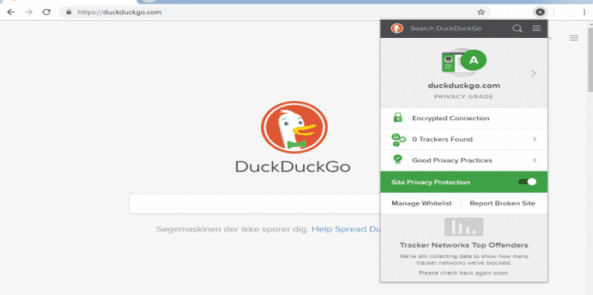
When you visit a site, the browser attempts to block many known trackers before they load. You can usually see which companies were detected and blocked by opening the protections panel.
It works well on most news sites, blogs, and online stores. Some pages may act oddly if a necessary feature is mistaken for a tracker. DuckDuckGo notes that no browser can block every tracking method without risking site breakage.
Fire Button for quick cleanups
The Fire Button is one of our favorite features. One tap closes open tabs and clears selected local browsing data.
You can mark specific sites as “Fireproof,” so you stay signed in to your bank, streaming service, or favorite store even when the rest of your browser data gets burned away.
Fewer cookie pop‑ups and intrusive ads
The browser tries to auto‑handle many cookie prompts with privacy‑friendly choices. It doesn’t work on every site, but it removes a surprising number of those dialogs you’d otherwise click through multiple times a day.
Because many targeted ads rely on trackers, some of them disappear too when the browser prevents those trackers from loading.
Passwords and private sync
DuckDuckGo can save passwords, bookmarks, and other autofill info. Sync & Backup can transfer data between DuckDuckGo on desktop, phone, and tablet.
Sync covers bookmarks, passwords, Email Protection settings, and Duck.ai conversations. Right now it’s bundled, so you can’t selectively sync only bookmarks without passwords.
DuckDuckGo Email Protection
With Email Protection, you can create an address ending in @duck.com. Messages are forwarded to your normal inbox while known email trackers are removed in transit.
You can also generate random Duck addresses for giveaways, newsletters, and stores. If one address starts receiving spam, disable it without changing your primary email address.
Duck.ai — private AI built into DuckDuckGo
DuckDuckGo has integrated an AI entry point called Duck.ai. You can use different third‑party AI models while DuckDuckGo acts as a proxy and attempts to anonymize the connection.
DuckDuckGo states that prompts aren’t used to build a personal profile or train models. Recent chats can be stored locally on your device, and AI features can be hidden or turned off.
We especially appreciate that AI can be disabled. If you prefer a traditional search engine without Search Assist or Duck.ai, change the settings or use DuckDuckGo’s dedicated No‑AI page.
Duck.ai is handy for quick questions, summaries, and text suggestions. You should still verify important details — just as you would with ChatGPT, Claude, Gemini, or other AI tools.
Where do the search results come from?
DuckDuckGo has its own web crawler and uses specialized sources for sports, facts, images, and local info. A large share of traditional links and images still comes from Bing.
Requests to external partners are routed through DuckDuckGo’s servers, so partners don’t receive your IP address or a personal ID from DuckDuckGo.
That’s also why some results resemble Bing. For broad queries, quality is generally solid. For breaking U.S. news, nearby stores, or very niche topics, we sometimes had to tweak the query or use the Google shortcut.
Is DuckDuckGo really anonymous?
DuckDuckGo provides stronger protection against many common tracking methods, but it doesn’t make you invisible online.
Websites you visit can still see information like your IP address unless you also use a VPN or Tor. Your internet provider can also see which services you connect to, even though content is typically encrypted with HTTPS.
DuckDuckGo Browser is therefore not the same as:
- A VPN connection
- Tor Browser
- Antivirus software
- Complete anonymity online
Think of it as a regular browser with significantly stronger privacy defaults.
DuckDuckGo or Google?
Google is still stronger for ultra‑local U.S. businesses, addresses, and information tightly integrated with Maps, YouTube, Gmail, or other Google services.
DuckDuckGo, on the other hand, takes a much simpler approach to privacy. You don’t need an account to search, ads aren’t built around a long personal search history, and AI features can be turned off.
Our practical recommendation:
Choose DuckDuckGo if you prioritize:
- Private search without a personal history
- Built‑in tracker blocking
- Fewer cookie prompts
- A simple browser without a Google account
- AI you can opt out of
Consider staying with Google if you rely on:
- Very local U.S. searches
- Google Maps and business reviews
- Google Workspace
- A large catalog of Chrome extensions
- Sync via your Google Account
You don’t have to go all‑in either. You can set DuckDuckGo as the default search engine in Chrome, Firefox, Safari, and Edge without changing browsers.
Download DuckDuckGo Browser
DuckDuckGo Browser is free. We recommend downloading it directly from DuckDuckGo’s website, Apple’s App Store, or Google Play to avoid unofficial copies.
Pick your platform, or use DuckDuckGo right inside your current browser.
Top five tips to get the most out of DuckDuckGo
1Select United States as your region
Open Search Settings and choose United States. It noticeably improves results for local stores, news, prices, and nearby services.
2Learn the best !bangs
Type !w for Wikipedia, !yt for YouTube, or !g for Google before your query. You’ll jump straight to that site’s results.
3Use Fireproof for trusted logins
Mark sites where you want to stay signed in as Fireproof. Then the Fire Button can clean the rest of the browser without logging you out everywhere.
4Customize or turn off Duck.ai
AI is optional. Hide Duck.ai and Search Assist in settings, or use noai.duckduckgo.com if you prefer a more traditional search experience.
5Start with the extension
If you’re not ready to leave Chrome or Firefox, try DuckDuckGo’s extension first. Get private search and extra tracker protection without moving all your data right away.
Frequently asked questions about DuckDuckGo
Is DuckDuckGo free?
Yes. The search engine, browser, and core privacy features are free. DuckDuckGo also offers an optional subscription with VPN and access to more advanced AI models.
Does DuckDuckGo work in the US?
Yes. Choose United States as the region in Search Settings for more local results. The browser’s language usually follows your device or app settings.
Is DuckDuckGo more private than Google?
DuckDuckGo doesn’t build a personal history of your searches and primarily shows ads based on the current query. The browser also blocks many third‑party trackers.
Is DuckDuckGo the same as a VPN?
No. The browser can block trackers, but it won’t automatically hide your IP address from websites you visit. A VPN is a separate layer of protection.
Does DuckDuckGo have its own browser?
Yes. DuckDuckGo Browser is available for Windows, Mac, Android, iPhone, and iPad. There’s no official standalone Linux desktop browser yet.
Does DuckDuckGo include AI?
Yes. Duck.ai provides access to several AI models through DuckDuckGo. It’s optional and can be hidden or turned off if you only want traditional results.
Who owns DuckDuckGo?
DuckDuckGo is run by an independent U.S. company and isn’t owned by Google or Microsoft. The company was founded in 2008.
Are DuckDuckGo’s results as good as Google’s?
They’re often good enough for general searches. Google is typically stronger for hyper‑local U.S. searches and services closely tied to Google Maps and its broader ecosystem.



