 Martin Jørgensen
WordFeud – A popular mobile word game
Download WordFeud for iPhone, iPad, or Android
We only link to the official app stores so you get the real WordFeud app from Bertheussen IT—no copies or unsafe APKs.
Download WordFeud for iOS
For iPhone and iPad. Great if you play multiple matches on the go or use WordFeud with friends and family.
Download for iOSDownload WordFeud for Android
For Android phones and tablets. The official free version from Google Play with ads and in‑app purchases.
Download for AndroidWordFeud is a digital word game that has been a staple on smartphones for years. It’s similar to classic board-based word games, but adds online multiplayer, leaderboards, and ongoing, asynchronous matches you can play at your own pace. In our testing, we quickly saw why WordFeud still holds up in a world full of flashy mobile titles—it’s simple, addictive, and surprisingly strategic.
WordFeud has earned near‑cult status among word‑game fans. Many use it for relaxed matches with friends and family, while others play competitively and aim for high scores and consistent wins.
What is WordFeud and how does it work?
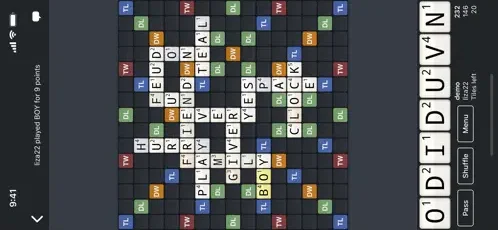
At its core, WordFeud is about forming words on a board using randomly drawn letters. Each letter has a point value, and the board includes bonus tiles that can double or triple both letter and word scores.
The game is turn‑based, which means you can run multiple matches at once and make your moves whenever it suits you. That makes WordFeud ideal for both korte pauser and longer games where you plan several moves ahead.
In testing, we played against friends and random opponents alike—and matches versus unfamiliar players were often more challenging and unpredictable.
Strategy and tactical play in WordFeud
Even if WordFeud looks simple at first glance, there’s a lot of depth beneath the surface. It’s not only about knowing many words, but also about placement and timing.
A big part of the game is to:
- plan several moves ahead
- protect bonus tiles from your opponent
- use high‑value letters at the right time
During testing, we found that defensive play can be decisive. It’s often better to block a square than to chase a high score if it prevents your opponent from making an even stronger move.
Top 5 WordFeud tips and questions (help/cheating & strategy)
Top 5 WordFeud tips that actually move your score
Short, practical tips we used during testing—focused on bonus tiles, defensive play, and getting WordFeud help without killing the fun.
Play defense first — the big scores will follow
We won the most matches by shutting down dangerous openings. If you can block a triple word, do it—even if your own move is low scoring. Many losses start with one greedy play.
Keep your rack “clean” of heavy letters
If you’re stuck with several awkward tiles, your plays become predictable fast. Try to shed Q, X, Z and other tough letters early so you’re freer later in the game. It matters more than you think.
Use bonus tiles as traps, not gifts
A classic beginner mistake is hitting a bonus while leaving an even better bonus open for your opponent. It’s often smarter to score a bit less if it locks down premium squares. In WordFeud, great defense can outvalue a single flashy word.
Cheating vs. help: agree before you play
There are word lists and external tools some players use for assistance. In friendly matches, this can feel like cheating. We recommend agreeing on ground rules upfront to avoid hard feelings later.
Short words win games — especially late
Players hunt for long words, but short ones often save the day. Two‑ and three‑letter words are gold when the board tightens. Memorize a handful of short English words to keep the game flowing and open new angles.
WordFeud cheating: does it exist, and what’s fair?
Search for WordFeud online and you’ll quickly bump into “cheats.” Not always because people want to ruin the game—many just want a little help when they’re stuck with a tough rack and a closing board against friends, family, or coworkers.
In practice, “WordFeud cheating” usually refers to three things:
- Word lists and dictionaries
Some use regular dictionaries or curated word lists for support. This is the most “acceptable” kind of help—especially in casual play where learning new words is part of the fun. - External helper tools
There are sites and apps where you enter your letters to get word suggestions. Tempting, but in many friendly matches it’s seen as cheating—especially if the other player isn’t using the same tools. - Agree on play style (the big one)
Our testing conclusion was simple: the drama isn’t about the tools—it’s about mismatched expectations. If you’re playing friends, decide upfront whether you play “clean” or allow dictionaries/helpers. It prevents a lot of frustration in close games.
If you want to win the “right” way, there’s a better long‑term tactic than tools: learn solid defense. Many players don’t lose for lack of vocabulary—they lose because they leave triple‑word opportunities open.
Graphics, design, and usability
WordFeud isn’t trying to wow you visually—and that’s fine. The design is clean, functional, and approachable. The board is easy to read, tiles are clear, and navigation is straightforward.
On both iPhone and Android we experienced stable performance with no lag. The app loads quickly, and jumping between ongoing games is easy. The chat works well and adds a social layer many players actively use.
Platforms and availability
WordFeud is available for both smartphones and tablets and works on:
Operating systems
✅ iOS (iPhone and iPad)
✅ Android
The game requires an internet connection for online matches but uses very little data, making it great for play on the go.
Free vs. paid version – what do you get?
WordFeud can be played for free but includes ads. There’s also a paid version that removes ads. In our testing, the ads in the free version can be distracting if you play a lot every day, but the paid version doesn’t offer gameplay advantages.
That keeps WordFeud fair—wins come from strategy and word knowledge, not from paying.
Download WordFeud for iPhone, iPad, or Android
We only link to the official app stores so you get the real WordFeud app from Bertheussen IT—no copies or unsafe APKs.
Download WordFeud for iOS
For iPhone and iPad. Great if you play multiple matches on the go or use WordFeud with friends and family.
Download for iOSDownload WordFeud for Android
For Android phones and tablets. The official free version from Google Play with ads and in‑app purchases.
Download for Android