Martin Jørgensen
Play classic Amiga games on PC with FS-UAE – the most authentic Amiga emulator for Windows and macOS
FS-UAE is an Amiga emulator for PC that lets you play classic Amiga games like Lemmings, Monkey Island, IK+, Kick Off, and many more on modern computers. The program acts as a bridge that makes your PC behave like a real Commodore Amiga, so the original games run correctly.
We tested FS-UAE on a standard Windows 11 PC, and installation was quick and trouble-free. The initial setup does require a bit of patience the first time—especially if you want joystick, graphics, and audio tuned perfectly—but the payoff is a very authentic Amiga experience.
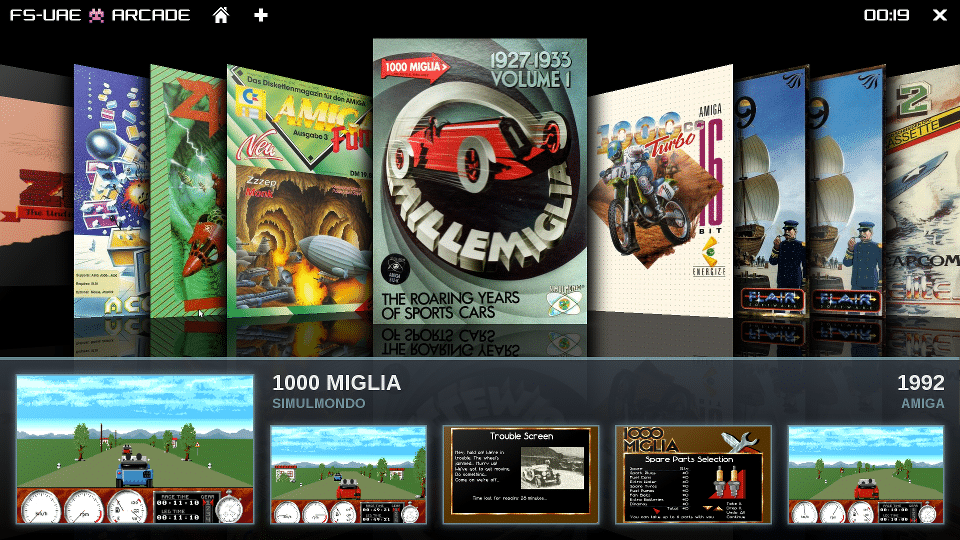
FS-UAE supports Amiga-modeller fra Amiga 500 all the way up to Amiga 4000, making it suitable for both early arcade-style titles and more advanced games from the Amiga’s heyday. Emulatoren er særligt populær blandt retrofans because it prioritizes accuracy over flashy effects—the games feel just like you remember.
The software ships without games (ROMs and disk images), which makes it completely legal to download and use. You must own your game files, but once they’re in place, FS-UAE is stable and surprisingly smooth.
A clear advantage is that FS-UAE also works well with modern gamepads and joysticks. We experienced no noticeable input lag, which is crucial in games like IK+ and Kick Off, where timing is everything.
If you want to genopleve Amiga-nostalgien på PC – without messing with aging hardware – FS-UAE is one of the best options available today.
Top 5 tips for FS-UAE
How to get the bedste Amiga-oplevelse on PC
- Use the right Amiga model
Choose the Amiga 500 for older games and the Amiga 1200/4000 for newer titles—it solves many compatibility issues. - Enable manual joystick mapping
The default settings aren’t always optimal. Spend a bit of time mapping the buttons correctly. - Adjust CPU speed
Too high a speed can cause gamle spil to behave oddly. Stick to the defaults if you’re unsure. - Use fullscreen with the correct resolution
FS-UAE looks best at the original resolution with light scaling—avoid excessive upscaling. - Save per-game configurations
Some games require special settings. Save profiles so you don’t have to tweak them every time.