 Martin Jørgensen
Microsoft Mahjong – A classic board game in a modern package
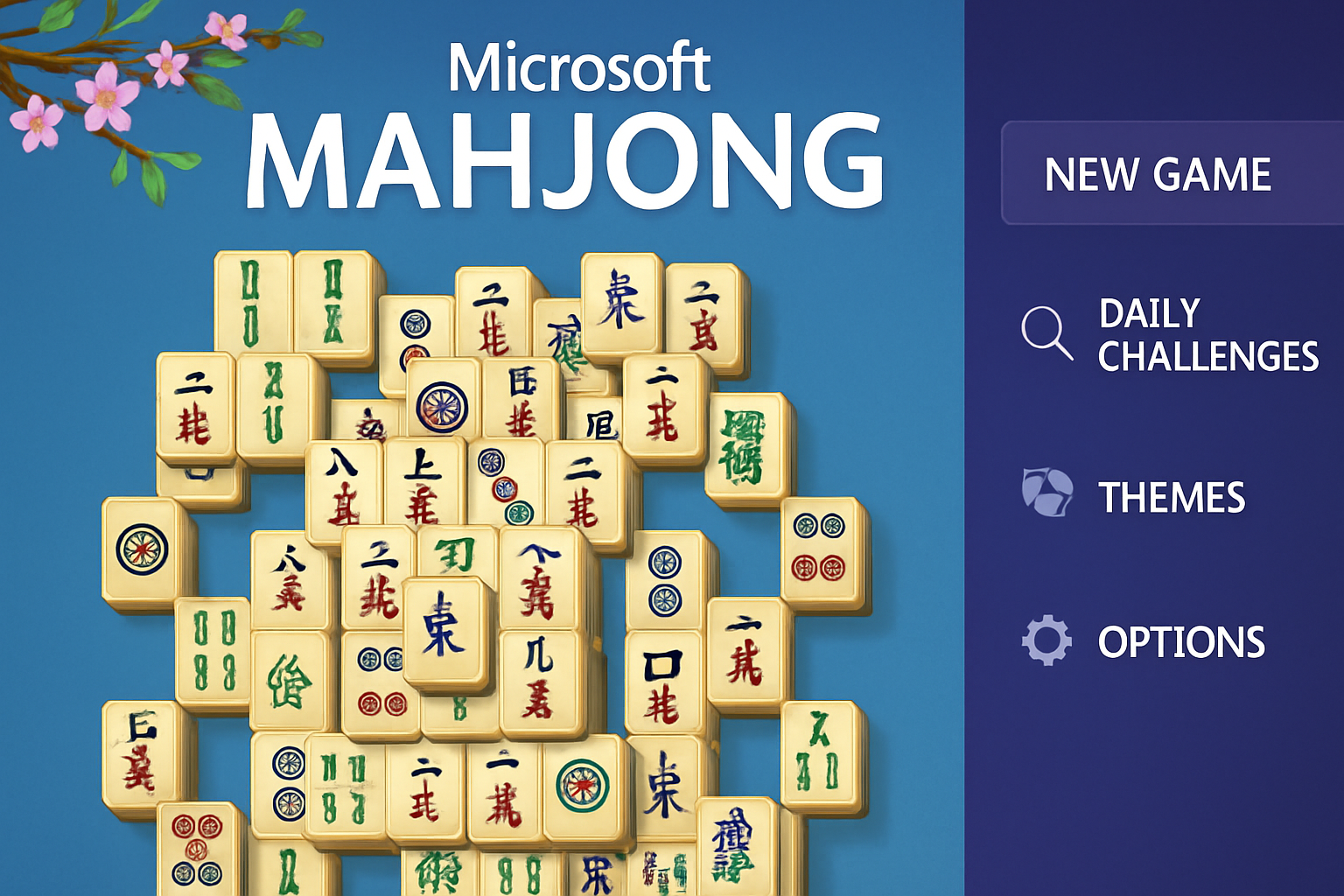
Microsoft Mahjong is a modern, updated take on the classic Chinese board game Mahjong Solitaire, where the goal is to match identical tiles in pairs to gradually clear them from the board. The concept is simple yet addictive — and that’s exactly why the game has been loved for decades by both casual and dedicated players worldwide.
This digital version was developed by the experienced game studio Arkadium in collaboration with Microsoft Studios, and it’s clear that both aesthetics and user experience have been carefully crafted. Microsoft Mahjong is free to download and play, and it supports multiple platforms, including Windows (via Microsoft Store), Android (Google Play), and iOS (App Store). That means you always have access to a relaxing moment of tile-matching — whether you’re at your computer at home or need a quick break on the go with your phone in hand.
What sets Microsoft Mahjong apart from many similar titles is its polished visual presentation and the many options to tailor the experience to your preferences. You can switch between different themes and backgrounds, choose your favorite tile set, and even enjoy calming background music that contributes to a meditative gameplay experience.
The game also offers daily challenges where you can earn prizes and badges by solving varied and sometimes more complex tasks. This adds an extra dimension and makes it appealing to return every day to take on something new.
Whether you’re a beginner looking for a cozy, visually pleasing puzzle to relax with, or a Mahjong enthusiast who cares about stats, strategic play, and challenges, is Microsoft Mahjong et solidt bud on a well-balanced and accessible game that successfully combines traditional gameplay with modern technology and user-friendliness.
Features and gameplay
Classic gameplay with modern features
Microsoft Mahjong skillfully preserves the classic, intuitive gameplay that has made Mahjong Solitaire one of the world’s most popular brain teasers. The core is still simple and elegant: find and match identical tiles that can be removed from the board until the entire layout is cleared. It may sound straightforward, but the strategic depth and many variations make it both challenging and highly addictive.
The game includes over 40 carefully designed layouts that vary in shape, complexity, and balance — from simple, symmetrical patterns ideal for beginners to more advanced and demanding formations that require precise planning and overview. To accommodate players of all levels, Microsoft Mahjong offers four difficulty settings. That means you can steadily build your skills and gradually take on more complex challenges without losing motivation.
Another strong advantage is the built-in Undo feature, which lets you experiment with moves without feeling locked in. It’s especially useful if you want to analyze the consequences of your choices and try different strategic approaches — without having to start over. This also makes the game more accessible and relaxing, as you can take your time and play with the tiles at your own pace.
The combination of classic mechanics, rich layout variety, and flexible difficulty makes Microsoft Mahjong a versatile and satisfying experience — whether you play to unwind or to sharpen your tactical thinking.
Daily challenges and rewards
Every day, Microsoft Mahjong presents new challenges with unique gameplay modes like “Golden Tiles,” where the goal is to find and match hidden pairs of golden tiles. By completing these daily challenges, you can earn prizes and badges, adding extra motivation to keep playing.
Customization and themes
The game offers multiple visual themes and backgrounds so you can tailor the experience to your preferences. From soothing nature themes to more colorful and imaginative designs, there’s something for everyone. You can also choose between different tile sets and background music to create the perfect atmosphere.
Platforms and availability
Microsoft Mahjong is available on the following platforms:
- Windows: Download Microsoft Mahjong for Windows from Microsoft Store here (you must be signed in)
- Android:Download Microsoft Mahjong free for Android on Google Play here
- iOS:Download Microsoft Mahjong free for iOS on the App Store here
The game supports syncing via your Microsoft account, which means your progress is saved in the cloud and can be accessed from multiple devices.
Top five tips for Microsoft Mahjong
🀄 1. Start with open corners and top layers
Always go for tiles that sit on top and on the outer edges — especially those with open sides. The more layers and corner tiles you remove early, the more matching options you’ll unlock for your next moves.
🧠 2. Use Undo strategically
Microsoft Mahjong has a built-in Undo feature, and it’s not just for mistakes. Use it proactively to test alternative moves and compare which matches give you the most open tiles in the next round.
📅 3. Check in daily for bonus challenges
The daily challenges are not only fun — they also let you earn prizes and badges. It’s a great motivator to train your brain a little every day while adding long-term value to the game.
🎨 4. Customize your theme for better clarity
If you find it hard to tell tiles apart, try different themes and tile sets. Some designs have better contrast and make it easier to spot matches — especially on smaller screens.
☁️ 5. Sign in with your Microsoft account to sync
By signing in with your Microsoft account, your progress is automatically saved to the cloud. That means you can keep playing on another device — for example, start on your PC and continue on your phone right where you left off.