
 Martin Jørgensen
SameSystem unifies shift scheduling, time tracking, and payroll in one place
SameSystem is a Danish-developed workforce management system, widely used in retail, hospitality, and the service sector. The platform is built for companies with many hourly employees, rotating shifts, and a need for better visibility into staffing, hours, and payroll—without drowning in Excel sheets and manual corrections.
We tested SameSystem from a classic operations perspective, focusing not on HR theory but on whether everyday work actually gets easier for store managers and leaders. Our impression is clear: the system is built for operations, not the back office.
Scheduling and staffing in practice
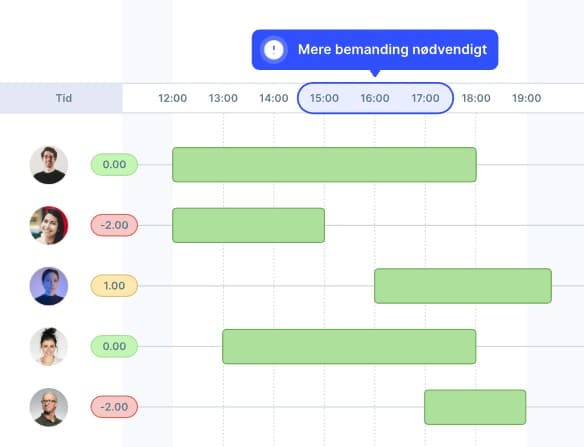
The core of SameSystem is shift scheduling. The system is built on the idea that staffing isn’t just about filling shifts, but about hitting the right level at the right times.
In practice, this gives managers a quick overview of:
🧩 which shifts lack coverage
🧩 where there is overstaffing
🧩 how work hours are distributed across departments and days
When we tested the platform in a browser on a standard Windows 11 PC, it was clear that SameSystem is designed for chains and stores with recurring patterns. Templates and fixed weekly structures save a lot of time, especially when new managers take over a department.
Time tracking and attendance
SameSystem offers check-in and time tracking via a mobile app, creating a tight connection between planned and actual hours. That can be a big advantage in industries where small deviations quickly add up.
At the same time, this is also where the system requires discipline from users. If employees forget to check in, breaks aren’t recorded correctly, or app permissions aren’t set properly, the manager has to follow up. Our experience is that a short internal guide and faste rutiner make a noticeable difference.
Payroll, approvals, and integrations
One area where SameSystem can really save time is the handoff from schedule to payroll. Timer kan godkendes løbende, og data kan eksporteres videre til løn- og økonomisystemer.
For companies that previously gathered hours manually or fixed errors at the last minute before payroll runs, this is where the benefits are often felt fastest. It does take some initial setup, but in return the process becomes more stable over time.
Mobile app for employees
Employees typically use the app to:
📱 view shifts
📱 swap shifts
📱 report absence
📱 clock in and out
In practice, this reduces many small day-to-day questions because the information is gathered in one place. However, it requires a proper introduction to the app—otherwise, managers will still end up answering the same questions.
Who should choose SameSystem?
SameSystem makes the most sense for:
🏪 stores and chains with multiple locations
🍽️ restaurants and cafés with many hourly workers
📊 businesses with clear peak periods
🕒 teams where payroll and hours often require extra checks
For very små teams with few employees, the system can feel more extensive than necessary. But for operations-heavy environments, it’s clear the solution is built for the real world—not just the HR department.
Top 5 tips for SameSystem
- Use standard weekly templates
Create templates for the most common weeks—it saves a huge amount of planning time. - Agree on clear rules for shift swaps
One defined process for swapping and approval reduces misunderstandings and conflicts. - Review hours continuously
Don’t wait until payroll—a weekly review is much easier. - Introduce the app properly
A short guide for employees removes 80% of the typical issues. - Use data proactively
Look at historical patterns rather than gut feeling when adjusting staffing.



