
 Martin Jørgensen
Screaming Frog SEO Spider – The ultimate SEO crawling tool
Screaming Frog SEO Spider is one of the most popular SEO tools on the market—and for good reason. It works like a crawler, scanning your website the way Google does and surfacing technical SEO issues you can fix right away. We’ve tested it on both small and large sites and were impressed by how quickly and thoroughly it delivers results.
Features in Screaming Frog SEO Spider
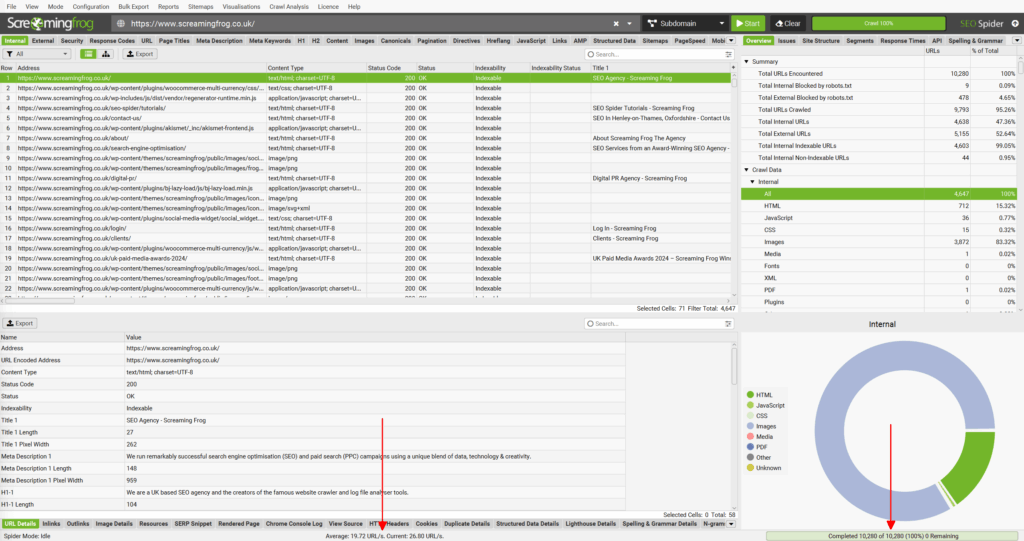
We tested Screaming Frog SEO Spider across a range of websites—from small blogs to an online store with over 50,000 products—and the tool impressed us especially in the following areas:
✅ Crawl your entire website — find broken links (404), redirects, and pages missing titles/descriptions
One of Screaming Frog’s biggest strengths is its ability to crawl your site just like Googlebot. For example, on a large ecommerce site the tool quickly surfaced more than 200 broken links that were otherwise buried deep in the menu structure. For an SEO specialist, being able to run a “screaming frog crawl website” report that consolidates 404s, 301 redirects, and missing titles in one place is gold.
✅ Metadata analysis — check title tag length, meta descriptions, and H1/H2 headings
With just a few clicks you get a complete list of all pages and can see which ones are missing titles or have meta descriptions that are too short or too long. During our test we discovered 17 blog posts with identical H1s—a classic SEO trap. Many users search for “screaming frog meta tag analysis”, and the tool outperforms cloud solutions by giving you every detail instantly.
✅ XML sitemaps — generate and validate sitemaps directly in the app
Creating an XML sitemap manually is time-consuming. Screaming Frog can generate one with a single click and, more importantly, validate that it meets Google’s requirements. We used it to build a new sitemap for a site with 5,000+ products, giving Google a much clearer crawl structure. Searches for “screaming frog xml sitemap generator” are very popular—and this feature makes it simple.
✅ Integration with Google Analytics & Search Console — combine data to find pages with no traffic or low CTR
This is one of the features that puts Screaming Frog in a different league. Connect Google Analytics and Search Console to see exactly which pages are technically sound but still don’t get traffic. We tested this on a knowledge portal and found 42 articles with thousands of impressions but a CTR below 1%. That gave us a concrete list of pages where optimizing titles and descriptions could move the needle.
✅ Site architecture visualization — see how your website fits together with graphs and diagrams
When you work in SEO, it can be hard to show a client why their site structure is a problem. Screaming Frog visualizes the entire information architecture in an interactive graph. We used this to show a client that much of their content sat more than three clicks from the homepage—a major issue for link equity. That’s why many search for “screaming frog site structure visualization”.
✅ Custom extraction — pull specific data with XPath or regex (e.g., price fields, schema markup)
One of Screaming Frog’s most advanced—and underrated—features is Custom Extraction. You can, for example, extract prices from product pages, schema markup, or even elements like Open Graph tags. We set this up on an ecommerce store and exported all prices within minutes to verify they matched the schema.org markup. Many SEO specialists search for “screaming frog regex xpath guide”, and this is clearly where the tool does what competitors can’t.
Free vs. paid version
There’s a free version of Screaming Frog SEO Spider that lets you crawl up to 500 URLs. That’s enough for many small blogs or local businesses.
But for larger websites, the paid version (about £199/year) is a must-have. It removes the crawl limit and unlocks advanced features like:
- 1 rendering
- Integration with GA & GSC
- Save & reload crawls
- Schedule automated crawls
Comparison with competitors
We tested Screaming Frog against other well-known technical SEO tools:
- SEMrush Site Audit: Fast and cloud-based, but not nearly as in-depth as Screaming Frog.
- Ahrefs Site Audit: The interface is sleeker, but Screaming Frog is faster for deep technical details.
- Sitebulb: More visual and user-friendly, but it requires far more computing power than Screaming Frog.
For technical SEO, Screaming Frog is still the tool we return to—especially because it runs locally and can crawl exactly as deep as we need.



