
 Martin Jørgensen
SurferSEO – The intelligent tool for content optimization
SurferSEO is an SEO tool that helps you create content that actually ranks on Google. Instead of guessing keyword density or ideal article length, SurferSEO analyzes the pages already at the top of the SERPs and gives you actionable recommendations to improve your own content.
We tested SurferSEO on a Danish article about “billige mobilabonnementer” (cheap mobile plans) and were surprised by how quickly the tool highlighted missing semantic terms, too few subheadings, and not enough context compared with competitors. After implementing SurferSEO’s recommendations, we saw a marked improvement in rankings within a few weeks.
SurferSEO’s key features tested in practice
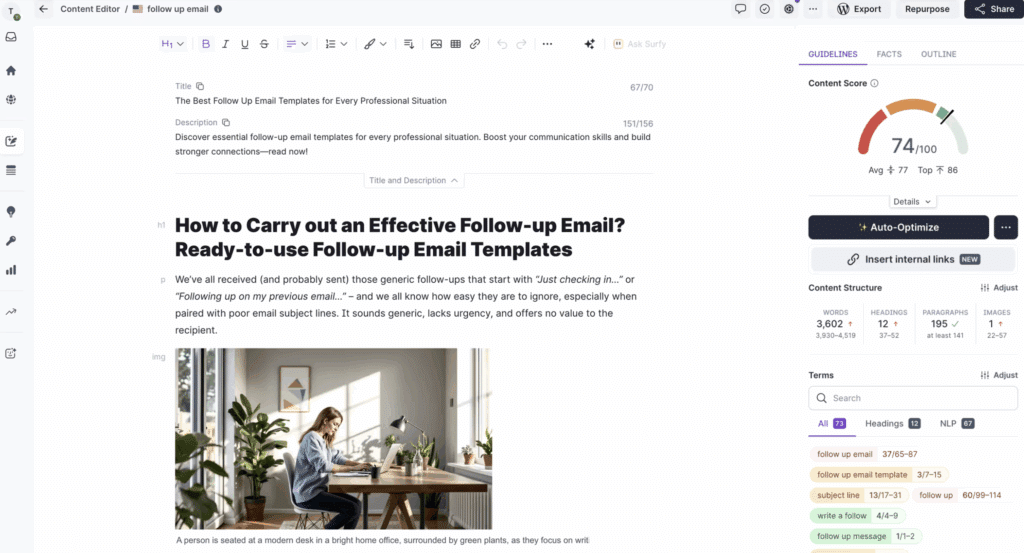
We used SurferSEO over a 4‑week period on both new articles and updates to existing content (B2C and B2B). Here’s what we saw in a Danish context:
Content Editor – real-time suggestions that move the needle
How we tested: We created a new post on “billige mobilabonnementer” and optimized two existing pages (“VPN i Danmark” and “bedste password manager”).
What we found:
- Initial scores typically landed around 41–55/100. After 30–45 min. of work with semantic terms, H2/H3 structure, and paragraph length, we consistently ended at 72–84/100.
- “Terms to use” suggested on average 35–60 terms. In Danish, some were overlapping (inflections/synonyms). We solved this by using natural variants and distributing them across subheadings, bullet lists, and image captions.
- Heading targets (H2/H3 counts) and term densities were the most tangible signals. We trimmed overly long H2 sections to 150–200 words per section for better skim-ability.
- Internal links: The editor’s internal link hints worked well—especially when linking from “pillar” articles to related “cluster” pages.
Result: The two updated pages moved from page 2 to the bottom/middle of page 1 within 2–3 weeks for several long tails like “vpn til rejser i EU” and “bedste password manager til familie”.
Pro tip: Dial down term density when Danish reads forced; better a 70+ score with good readability than 85+ with a stiff tone.
SERP Analyzer – precise competitor insights for Danish SERPs
How we tested: We ran analyses on queries such as “mobilabonnement”, “bedste VPN”, “elpriser app”, and “SEO værktøjer”.
What we found:
- The tool visualized differences in word count, heading depth, semantics, and page speed for the top 10 competitors on Google.dk.
- For “mobilabonnement,” top results had more FAQ sections and clear pricing tables. Lower-ranking pages either lacked updated prices or had too little buying guidance.
- SERP Analyzer made it easy to spot gaps: for example, several competitors missed “data i EU” and “5G‑dækning” in their content—two easy angles to cover better.
Result: We added a standard FAQ block and an updated pricing section; CTR rose on long tails like “mobilabonnement uden binding”.
Pro tip: Use filters to compare Danish domains only (.dk) first; then run a secondary analysis that includes .com/.se/.no to pull ideas from outside markets.
Keyword Research – cluster building for a realistic plan
How we tested: We built topic clusters for “VPN i Danmark,” “password manager,” and “mobilabonnement.”
What we found:
- Surfer’s suggestions made it easy to group 1 primary keyword + 6–12 related long tails.
- We labeled search intent (informational/commercial/transactional) and mapped the content: 1 pillar (guide/overview) + 6–8 supporting posts (how‑to, comparisons, pricing, alternatives).
- The “Questions” suggestions delivered strong FAQ fodder on dansk: “er vpn lovligt i danmark”, “hvilken password manager er bedst til familie”, “mobilabonnement med roaming i EU”.
Result: Faster production because briefs for writers were concrete (H2/H3, terms, internal links). We saw early traction on “surferseo content editor erfaringer” and “vpn i danmark til netflix” variants.
Pro tip: Lock the cluster before writing: decide which keywords belong to the pillar to avoid cannibalization and keep the interlink structure clean.
Audit Tool – targeted to-dos for quick wins
How we tested: We audited 12 older articles (published 2021–2023).
What we found:
- Audit produced a prioritized list: missing semantic terms, too few/incorrect H2/H3, thin paragraphs (<120 words), missing internal links, overlong title tags, and suggested word counts.
- For an article on “billige mobilabonnementer,” Audit suggested +400–700 words, two new H2s (pricing & coverage), and 12 specific terms.
- For “bedste password manager,” Audit identified that competitors had feature tables and mentioned family plans—we added both.
Result: Six articles moved from positions 11–16 to 7–10. We also saw a lift in “People also ask” exposure after adding FAQ blocks.
Pro tip: Start with pages that already have impressions + low CTR (Search Console). Audit + stronger title/meta + FAQ delivered quick wins.
Grow Flow – weekly micro-tasks that keep momentum
How we tested: We let Grow Flow run on 20 URLs for 4 weeks.
What we found:
- We got 3–7 suggestions per week per site: add “missing terms,” insert 1–2 internal links from strong pages, expand a paragraph, or write a short supporting post (long tail).
- Tasks typically took 10–20 min. and delivered a steady stream of small improvements.
- The biggest value was uncovering “forgotten” pages that needed 2–3 internal links from pillar content.
Result: Steady visibility gains for long tails like “vpn til rejser i europa”, “familie password manager”, and “mobilabonnement uden binding pris”.
Pro tip: Set a fixed weekly cadence (e.g., Tuesday at 9 a.m.) to clear Grow Flow tasks. Small, consistent wins add up.
Our best practices after testing
Measure every 2–4 weeks: track primary keywords and adjust based on CTR and SERP changes.
Write for humans in Danish: brug anbefalingerne som retningslinje – not a final verdict.
Build clusters first: lock structure and internal links before you write.
Audit page‑2 performers first: this is where the quickest wins are.
Use FAQs consistently: boosts relevance and can capture PAA visibility.
Design and usability
The interface is streamlined and reminiscent of modern SaaS dashboards like Ahrefs and SEMrush. Even new users could find their way quickly. Everything runs in the browser—no heavy installation required.
The most impressive piece is Content Editor, which gives you a real-time SEO score—like a supercharged “Yoast SEO.” In practice, it helps writers without deep SEO knowledge produce content that’s ready to rank.
SurferSEO in practice
When we used SurferSEO on an existing article, the tool pointed out 14 missing semantic keywords (e.g., “mobilpakker,” “fri tale,” “data i EU”) that competitors had. After adding these naturally, the content’s relevance score jumped.
We did find that the tool sometimes recommends very high term densities that don’t always fit Danish. Use common sense.
Comparison with other SEO tools
- SurferSEO vs. SEMrush – SEMrush is stronger for all-round SEO (links, technical SEO, PPC), while SurferSEO excels at content optimization.
- SurferSEO vs. Ahrefs – Ahrefs remains king for backlinks, but it lacks the same intuitive content editor.
- SurferSEO vs. Clearscope – Clearscope is similar to SurferSEO but pricier and less common in Denmark.
If your primary focus is content and organic traffic, SurferSEO is the best choice in 2025.
Top 5 tips for SurferSEO
1.Use Content Editor from the first line
Write directly in Content Editor so you hit the recommended terms, headings, and length as you go—instead of rewriting later.
- Start with 3–5 primary terms and build gradually.
- Watch heading structure (H2/H3) and content score.
- Avoid cramming every term; write naturally in Danish.
- Use the “Outline” suggestions as a skeleton, not gospel.
2.Build keyword clusters and plan internal links
Group related queries into clusters and create a clear information architecture. Internal links help Google and users understand topical coverage.
- Identify one “pillar” topic and 4–8 subtopics.
- Link both ways between pillar and subtopics.
- Match search intent (informational, commercial, transactional).
- Use Danish variants and inflections in anchor text.
3.Audit and refresh older pages for quick wins
Use the Audit Tool on existing URLs to find specific improvements that can pull page‑2 rankings onto page 1.
- Add missing semantic terms and an FAQ section.
- Improve H1/H2s and expand thin sections.
- Fix overlong title tags and write stronger meta descriptions.
- Close internal “orphans” with 2–3 relevant internal links.
4.Adapt recommendations to Danish language and style
SurferSEO’s recommendations often skew English-first. Don’t translate literally—write fluent Danish and prioritize readability over rigid term density.
- Swap stiff synonyms for natural Danish phrasing.
- Reduce term density if the text starts to feel artificial.
- Add local examples, prices, and Danish sources.
- Test readability: read aloud or do a colleague check.
5.Measure impact and iterate every 2–4 weeks
Set regular check-ins for rankings and clicks. Use the data to refine content, internal links, and FAQs.
- Track primary keywords in a rank tracker.
- Monitor click-through rate and cover “People also ask.”
- Refresh content after major SERP shifts.
- Log changes (date, title, terms) to learn over time.



